Table of Contents
Mozilla is bringing to Firefox a 'Smart Suggestions' feature that displays results, flights, stores, or websites directly in the address bar — both convenient and secure.
When we think about web browsers, there's one part that we all use the most—the address bar. In most major browsers, it works similarly: you start typing and get search suggestions.
Over time, the address bar has become more than just a place to type URLs or search, and can handle basic queries directly without having to go to a search results page. For example, the address bar in Chrome — called the Omnibox — can convert units, currencies, and even perform small calculations.
Firefox has a similar capability with its Awesome Bar. But now Mozilla says it's taking it a step further by providing rich results or answers directly in the address bar — allowing users to 'skip the search results page' altogether.
Security – the issue that stopped the project
Mozilla tried to implement this idea a few years ago but had to stop — mainly because of privacy concerns. To display such direct answers, the browser needs to send what you're typing in the address bar to a server for processing.
With Mozilla's strict security standards, it doesn't tolerate any system that sends user queries directly to its servers without encryption or protection. An experimental version once allowed users to enable it in settings, but it didn't catch on, while local suggestions were too limited and unhelpful.
'Smart Suggestions' – Reply directly in the address bar
In an upcoming update (for now only in the US), Firefox will roll out a 'smart suggestions' feature that lets you perform multiple actions right in the address bar. For example:
- Entering ' AC 8170 ' will instantly display the flight route, departure and arrival times and current status of the flight.
- Typing ' Mdn ' will bring up a direct link to the Mozilla Developer Network.
- Searching for ' Bike repair ' can show you reputable bike repair shops near you, with their addresses and opening hours.
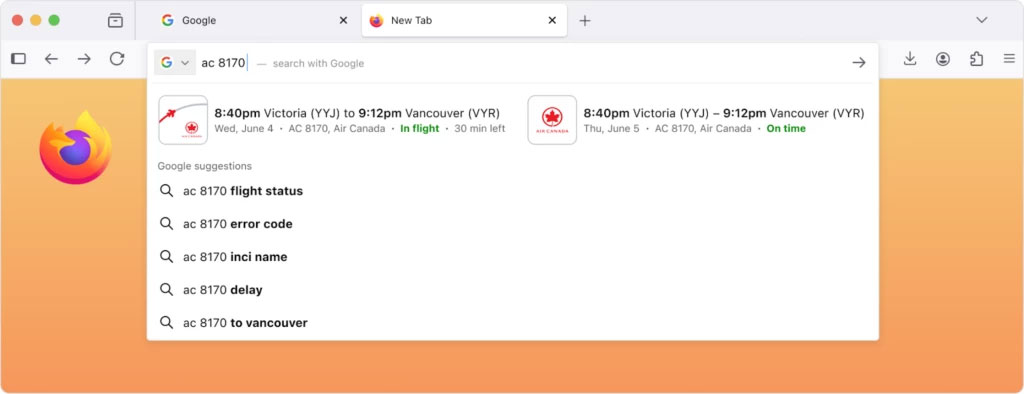
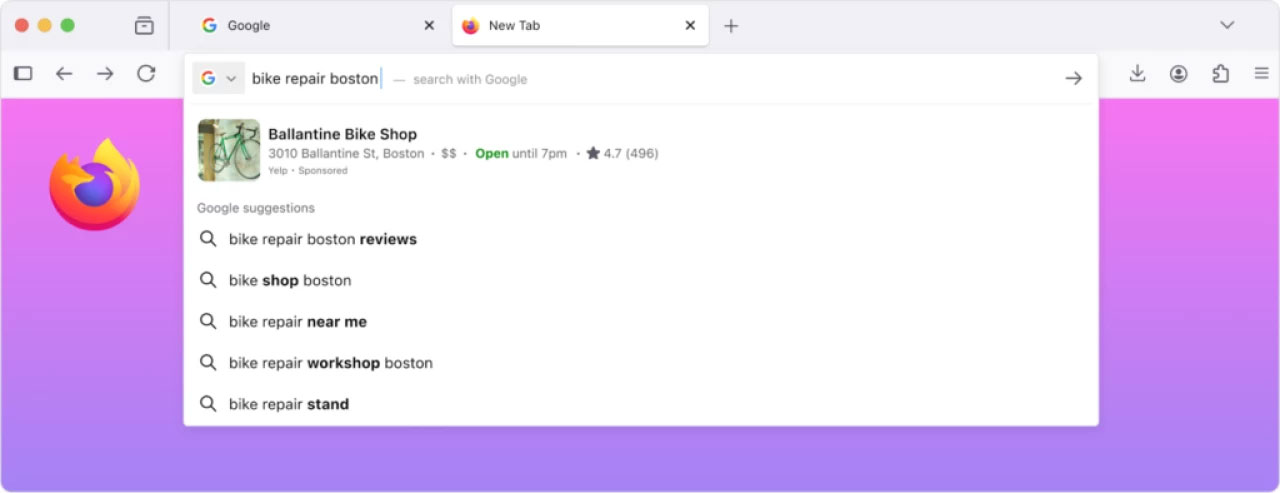
Mozilla says it now has a highly secure architecture that handles requests without revealing your IP address. First, the request is encrypted and sent through a relay operated by Fastly — which sees your IP but doesn't see the content of the request. Then, the relay forwards the request to Mozilla's servers, which can see the request but doesn't know your IP.
The feature is built on Merino — the 'privacy-protecting' web service behind Firefox Suggest today.
Ad-supported, yet private
Mozilla also says that users may see ads in suggestions, but thanks to the Oblivious HTTP (OHTTP) system, no one — not Mozilla or the sponsor — will know who you are.
Once the feature launches, You can turn it off at any time by going to Settings > Search , then unchecking 'Retrieve suggestions as you type '. Or go to About:config And set Browser.urlbar.quicksuggest.online.enabled = false .
FAQ
What is new about Firefox is about to get a smart feature that will make even Chrome users?
In practical terms, mozilla is bringing to Firefox a 'Smart Suggestions' feature that displays results, flights, stores, or websites directly in the address bar — both convenient and secure.
Why does this update matter?
The article highlights that 'Smart Suggestions' – Reply directly in the address bar In an upcoming update (for now only in the US), Firefox will roll out a 'smart suggestions' feature that lets you perform multiple actions right in the address bar.
Is the change available to everyone?
Availability may depend on the product version, region, account, or rollout stage described in the article.
Related Articles
 Chrome and Firefox Can 'Chat' with Each Other3 minutes read
 How to Speed up the Operation of Chrome and Firefox?: Google Chrome3 minutes read
 Goodbye Chrome, We Switch to Firefox13 minutes read
 Firefox Updates a Host of Exciting New Features to Entice Users3 minutes read
 How to Install the Chrome Utility for Firefox: Chrome Store Foxified5 minutes read
 Google Chrome and Firefox, Which Browser 'Consumes' More RAM?5 minutes read
Reader Comments 0
Sign in with email or Google to join the discussion.