Article on the subject of "network device"
-
The first country to issue an 'IoT labeling system' has been introduced to ensure the security of smart devices
finland has become the first country in the world to release a network security labeling system for iot devices.
-
Log in and configure the Router
since manufacturers often use the same default settings for all their products, this is a reminder that you need to change your ssid and reset your administrator password.
-
Expand home Wi-Fi network
typically, if a home wi-fi network has a narrow coverage, users buy new, more advanced wi-fi transmitters. however, you can save significant costs if you know how.
-
5 best Cisco network device monitoring tools
network monitoring is essential because it can help prevent attacks and solve problems before they cause financial loss to your organization.
-
How to determine the device IP address on the local network
before you begin to fix most network or internet connectivity problems, you need to know the ip address assigned to different hardware devices in your network.
-
What is Network TAP? How does it help secure the system?
a network tap is a hardware device that you place in a network, especially between two connected devices of a network (such as a switch, router, or firewall) to monitor network traffic.
-
QNAP provides an emergency warning about NAS device attack trends, showing how to secure NAS devices
nas (network attached storage), also known as a network hard drive, is a device that is installed to serve the needs of storing or accessing data.
-
Expand home Wi-Fi network
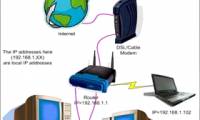
typically, if a home wi-fi network has a narrow coverage, users buy new, more advanced wi-fi transmitters. however, you can save significant costs if you know how.
-
Find all devices connected to your network on your phone easily
fing is a free application compatible for devices using ios and android operating systems. after installing and starting the application, it will scan your network. the amount of time it takes to scan each time will vary depending on the network speed and the number of devices connected.
-
Basic information about network equipment
in order to be able to use and connect networks to computers, we need dedicated network installation devices. including 5 basic names including repeater, hub, switch, router and gateway. each device has different characteristics as well as ability to work.
-
Working with Network Monitor (Part 1)
even though a computer network is quite reliable, sometimes problems arise. for example, a network may be slow compared to its capabilities or a device on this network may have trouble communicating.
-
Are 4G and 4G LTE networks the same?
the 4g network is now almost covered to all carriers, with activation programs and registration for 4g services. however, do you wonder why in your device there is a 4g lte network symbol, not 4g?
-
What is the hostname?
the hostname is the label assigned to the device (called the host) on the network and is used to distinguish this device from another device on a specific network or over the internet.
-
Instructions for fixing 'Network path was not found' error in Windows
when a computer, mobile device or printer tries to connect to a microsoft windows computer for example via a network, network path was not found error message - error 0x80070035 may appear. the computer cannot perform the network connection with the other device.
-
Select network device hardware (Part 2)
for businesses and families with computer enthusiasts, networking is a very common thing.
-
How is it called 'smart device'?
network connection does not mean 'smart'. smart devices really have to provide valuable, reliable and easy-to-use services.
-
Select network device hardware (Part 3)
small home or office networks make it easier to print and share files and internet phone calls.
-
How to sync files over a P2P network with Resilio Sync
resilio sync is a great solution for syncing files between almost any device you use every day. the only difference is that it creates a bitporrent-like p2p network between devices, so that the file stays on your device.
-
IP, Subnet mask, installation and configuration for 1 server
ip address is a unique number assigned to a device in a network - these devices can be a computer, a router, a network printer (network printer with a network card), etc. etc. this type of address is called a software address - it is different from the address address hardware address - or we know
-
Steps to fix Network Discovery not working in Windows 10
the network discovery feature allows you to discover other devices connected to the same network, as long as they also have the feature turned on. usually, it is used to share files or other devices such as printers.
-
Install laptop to prioritize wired network connection
have you ever been in a situation where, even though you connected your laptop to a wired network, the device still sees the previous wireless network as the default connection? the article will show you how to fix this problem quickly and easily.
-
Select network device hardware
small home or office networks make it easier to print and share files and internet phone calls.
-
How to fix the error IPv6 No Network Access
the ipv6 no network access error can occur on any mac, pc or mobile device, making it annoying when trying to connect to the network. in this guide, make tech easier with the instructions to get ipv6 connectivity working again.