Article on the subject of "cortana\'s features"
-

Use and configure Cortana on Windows 10
cortana is said to be a versatile personal assistant like siri on apple's ios device. here are the basics of installing cortana and using it for new windows 10 computers.
-
Is Google Assistant or Cortana a better virtual assistant?
among many existing virtual assistants, the two most famous siri alternatives are google assistant and cortana. both google and microsoft are 'fighting' with apple to win the top position in helping users complete all tasks.
-
Use and configure Cortana on Windows 10
cortana is said to be a versatile personal assistant like siri on apple's ios device. here are the basics of installing cortana and using it for new windows 10 computers.
-
The best setup guide for Cortana on Windows 10 (Part 1)
one of the new features integrated on windows 10 is cortana virtual assistant. cortana is displayed right on the taskbar and users can use this virtual assistant to ask questions or issue control commands, cortana will answer questions or follow your voice commands.
-
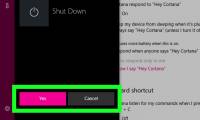
How to use Cortana to turn off or restart Windows 10?
cortana virtual assistant is one of the new features built into windows 10 and displayed right on the taskbar. users only need to speak into the device's microphone, ask questions or issue control commands, cortana will answer the question or follow the user's voice command.
-
18 tips and tricks to make the most of Cortana
microsoft's virtual assistant, cortana, is one of the best features introduced in windows 10 with many features to make computing more efficient and improve your productivity.
-
The best setup guide for Cortana on Windows 10 (The last part)
the feature to send notifications between devices is one of the completely new features integrated on the windows 10 anniversary update version. this feature allows users to synchronize notifications on mobile devices with computers.
-
First look at Cortana on Windows 10
as reported, microsoft will bring virtual assistant cortana to windows 10 operating system. and recently the image of cortana on windows 10 has appeared to give us a first look at some features.
-
How to change the language for Cortana in Windows 10
cortana is a cloud-based personal assistant that works on microsoft devices and many other services. cortana can provide a range of features, some of which are personalized.
-
How Cortana on Windows 10 works
slower than apple siri and google now, but cortana will surely be a heavyweight competitor in the currently bustling virtual assistant market. the presence of a virtual assistant from microsoft will be one of the most notable points about windows 10.
-
Is Google Assistant or Cortana a better virtual assistant?
among many existing virtual assistants, the two most famous siri alternatives are google assistant and cortana. both google and microsoft are 'fighting' with apple to win the top position in helping users complete all tasks.
-
What is Cortana? How to use Cortana on Windows 10
understand what cortana is, know how to activate, use and train cortana on windows 10 with simple steps.
-
Why is it disabled but Cortana still runs in the background?
although disabling cortana virtual assistant and on windows 10 computers users use local search to find everything. however, when opening task manager, some users find that cortana still runs in the background. so why is that? the answer will be in the following article of network administration.
-
How to use Cortana as a lookup dictionary on Windows 10
cortana virtual assistant is one of these extremely useful features, supporting users to search, perform shutdown operations, ... extremely quickly. in addition, the virtual assistant cortana on windows 10 is also used to make a dictionary, supporting users to quickly look up a word meaning quickly
-
Instructions to turn on Cortana and use this virtual assistant on Windows 10
cortana is microsoft's virtual assistant and if you want, 'she' is always ready to help you find anything on a windows 10 computer, providing weather forecasts and making sure not to miss any important tasks. important.
-
Completely disabling virtual assistant Cortana on Windows 10
cortana virtual assistant is one of the new features built into windows 10 and displayed right on the taskbar. just say the device's microphone, ask a question or issue a command, cortana will answer the question or follow your voice command.
-
Addresses an issue where Cortana is disabled on Windows 10
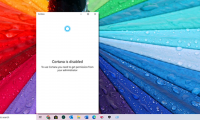
if you launch cortana and get the message 'cortana is disabled, to use cortana, you need to get permission your administrator' then you can resolve as follows.
-
Use Cortana to sync notifications between Android and Windows 10 computers
cortana virtual assistant is one of the new features built into windows 10. windows 10 users can use cortana to turn it off and restart their computer. in addition, if you want to display notifications from your android phone on your windows 10 computer, users can also use cortana virtual assistant
-
How to uninstall Cortana completely
the may 2020 update makes cortana a more productive app. if you're not in the habit of using this virtual assistant, you'll probably want to uninstall cortana.
-
Tips for finding files using Cortana on Windows 10
sometimes storing too many files on your computer makes it impossible to remember where the files you have saved. when you need to find an important file, you can't remember where the file is stored, even though you have rummaged through every corner of your computer. at times like that you just
-
How to Use Cortana
this wikihow teaches you how to set up and use cortana on your windows 10 computer, as well as your android and ios device. cortana is set up with your microsoft email address and language settings when you first install windows 10, and...
-
Instructions for fixing errors Start Menu and Cortana do not work on Windows 10
one of the new features integrated on windows 10 is cortana virtual assistant. users can use cortana to shutdown, restart, search smart, ... but however supdate windows, many users reflect that the start menu button and virtual assistant cortana are not working, or almost frozen . in the following
 Home
Home Tech info
 Technology
 Science
 Life
Life Application
 Electric
 Program
 Mobile
 System