Article on the subject of "computer upgrade"
-
How to extend the life of your laptop?
some laptops (laptops) can quickly degrade and soon 'leave'. but do not rush to believe it if you have not tried to optimize the life of the device, to continue using it for some time.
-
Which upgrade will improve your computer's performance the most?
do you feel your pc is running slowly? it's time to consider upgrading some of your hardware components.
-
How many reasons does Windows not receive enough RAM?
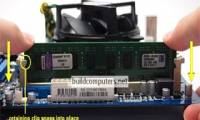
upgrading ram is one of the easiest jobs to upgrade. you just need to open two braces (fixed ram on both sides, usually white), put the ram bar into the slot (note the plug to plug in the right position) and clamp it to fix. that's it, you're excited to turn on the device and enjoy the results.
-
Dell upgraded a series of computers with Haswell chips
the newly upgraded products include xps 12 ultrabook, xps one all-in-one computer 27, xps 8500 desktop and alienware x51 gaming model.
-
These factors determine the speed of the computer
if you want to improve the speed of your computer system, the first thing you need to pay attention to is to arrange and select components that are reasonable so that they can interact with each other effectively. best.

-
Upgrade computer RAM at home simply and quickly
upgrading your computer's ram is the most effective solution to speed up your computer. after a period of use, your computer will need to upgrade its ram.
-
This is the #1 upgrade that makes your old computer look like new!
your secondary computer is old and it's getting slow when performing everyday tasks. instead of buying a whole new computer, upgrade it with a faster ssd.
-
Instructions on how to upgrade RAM on computers and Laptops
installing more ram is the most effective way to speed up your computer. even if your computer is a new computer, after only a few years of use you will have to install more ram to ensure better machine speed. besides new operating systems also require the use of more memory. when a computer does
-
When to upgrade RAM for computers and laptops?
are you looking to upgrade your computer's ram but don't know if you should? this article will guide you on how to upgrade ram as well as when to upgrade
-
A few notes when upgrading for computers
after a long time of use, the computer will become slow, sluggish and often malfunction. that is when we should consider the plan to buy new machines. however, if you do not have enough funds to buy yourself a new machine, you can use option 2 to upgrade the old machine.
-
How to choose and upgrade the right RAM for your computer
ram directly affects the processing speed of your computer. if you want to upgrade your ram but don't know which type to choose, tipsmake will help you learn how to choose the right ram and upgrade it properly for optimal performance.
-
DVD upgrade to Windows 8 costs 70 USD
users can also wait until the release date of october 26 to download a direct upgrade to a computer for $ 40 instead of buying a $ 70 upgrade dvd package. this is the price only applied until the end of january 2013.
-
How to upgrade RAM on a Mac
if your mac shows signs of slowness, upgrading ram is a great solution. this article will show you how to upgrade ram on your mac.
-
9 simple and cheap ways to upgrade your computer
the following ways will help your computer become younger and more energetic, especially giving users great comfort when sitting in front of a computer.
-
List of the best RAM for your computer should not be ignored
if you have more conditions and want to upgrade ram, it is a great suggestion for you when choosing a new ram bar to use.
-
How to update to the official iOS 10 version?
official ios 10 version has been released and users can upgrade on their device. we can choose to upgrade on the device or use itunes software on the computer.
-
If you don't hurry up, you can't upgrade to Windows 10 for free
if you still haven't switched to windows 10, whether by upgrading your current computer or buying a new computer, it's still not too late to do so for free.
-
How to Upgrade Computer RAM Quickly and Effectively
upgrading ram is necessary when your computer is slow, lags, has many tasks and lacks ram to run applications. how to upgrade more ram?
-
8 reasons for not upgrading the old computer
gamers or computer users for professional video editing always need to increase the configuration to improve performance. however, ordinary users can save money by being faithful to existing computers. here are the reasons why you don't need to hurry up and upgrade your old computer.
-
5 common problems when upgrading computers
during the upgrade process, you will surely encounter errors that are sometimes unforeseen. here are the five most common mistakes that even experienced people get.
-
When to upgrade RAM? Guide to upgrade laptop RAM
you can upgrade your computer's storage memory by following the instructions to upgrade laptop ram. but this needs to be thoroughly tested first.
-
Top 3 methods to improve computer boot time
upgrade to windows 8, upgrade the hard drive to ssd, perform system tweaks are the top 3 methods to help speed up computer boot.
-
Ways to upgrade desktop computers to optimize usage according to needs
join tipsmake to discover the simplest ways to quickly upgrade your old desktop computer at home.
-
How to upgrade computer RAM most effectively
ram is a hardware device that helps improve your computer speed. if your computer is slow or frozen, upgrading ram is also a way to make your computer better. but how effective is hiding at ram level? which ram is suitable to choose? join tipsmake in following the article on how to upgrade ram for
-
How to Upgrade Your Computer's Processor
this article shows you how to install a new processor on a windows computer. the microprocessor (cpu) plays an important role in the speed of the computer.