Article on the subject of "chrome blocks unsafe downloads"
-

Google Chrome will block unsafe downloads on HTTPS websites
this means that users will not be able to download executable or less secure compressed files distributed over an https connection.
-
Google wants to block unsafe, potentially risky download files on Chrome
security engineer of google chrome team emily clark recently proposed adding automatic features to prevent high-risk download operations, coming from sites that are not secured in future versions. of the world's most commonly used browser platform.
-
Google Chrome will block unsafe downloads on HTTPS websites
this means that users will not be able to download executable or less secure compressed files distributed over an https connection.
-
Google wants to block unsafe, potentially risky download files on Chrome
security engineer of google chrome team emily clark recently proposed adding automatic features to prevent high-risk download operations, coming from sites that are not secured in future versions. of the world's most commonly used browser platform.
-
How to turn off file download blocking mode on Chrome
sometimes chrome also mistakenly identifies a downloaded file as dangerous and blocks the download, affecting your work. in case you must download a file, you can disable blocking dangerous file downloads on chrome, according to the instructions below.
-
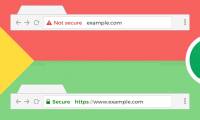
What to do if Google Chrome warns an unsafe website?
check the top left of the address bar, you will see the lock image. that means that site is safe to access. you often see these things on the internet.
-
What is Unsafe Rust?
unsafe rust gives you more control over memory. the article will give you everything you need to know about using unsafe rust and understand the risks of using it.
-
Chrome 68 will officially prioritize the SSL protocol
according to google's announcement, chrome browser version 68 will be released in july 2018. and starting from this version, google will officially mark websites that do not use ssl as unsafe.
-
Why is Google redesigning the user interface for Chrome downloads?
initially, google chrome shows active and completed downloads at the bottom of your screen.
-
Windows 11 suddenly blocks Google Chrome due to Microsoft security feature,
users report chrome automatically closing or freezing after launching, and not being able to reopen.
-
Chrome 71 automatically blocks any annoying ads
when chrome updates to version 71, all the most stubborn ads will be blocked.
-
Chrome will soon have an option to block insecure HTTP downloads.
https is becoming a mandatory standard that all websites need to meet, replacing http. in this context, google chrome is preparing to introduce an option to block insecure http downloads for users.
-
Instructions to enable safe file downloads on Google Chrome
in google chrome browser, you can use download restrictions feature to limit downloads, increasing browser security.
-
Chrome Flag Browser + exceeded 11 million downloads
the vietnamese chrome flag browser + has just reached 11 million downloads, and updated the new interface and launched an automatic spell check feature.
-
Google released Chrome 67 for Windows, Mac and Linux
google recently released chrome 67, the latest chrome stable with the ability to support generic sensor api, improve ar, vr and label it unsafe for hpkp (http-based public key pinning).
-
How to enable or disable automatic downloading of multiple files on Chrome
by default, google chrome requires confirmation when a website automatically downloads files continuously. however, if you want to block this action on all pages or blacklist specific sites, here's how.
-
Netflix on Android automatically downloads new episodes of your favorite shows
it's a very useful option to download content to your device using wi-fi, before you go somewhere without the internet or if you're using a limited data connection.
-
Operations with blocks in Excel
the following article shows you how to manipulate blocks in excel. frequently used operations in spreadsheets when working with blocks: 1. select blocks of contiguous cells. place the mouse cursor in the first cell position of the block - hold the left mouse button dragging
-
How to locate the Downloads folder, downloaded files on Windows
if you download any file from the internet through browsers like chrome, edge or firefox on windows, by default you can find it in a special folder called 'downloads'.
-
5 ways to identify safety extension before installation
currently, there are thousands, millions of extensions and a wide variety of genres in browsers. therefore, you need to know how to anticipate unsafe extensions, avoid false false settings, contain malicious code, malware, data collection, ...
-
How to Fix Microsoft Family Safety Blocking Google Chrome on Windows
this guide will show you the steps to stop microsoft family safety from blocking chrome on your device without any hassle.
-
Google Chrome blocks ads with tools available from February 15
pages displaying ads are annoying for users to prepare themselves.
 Home
Home Tech info
 Technology
 Science
 Life
Life Application
 Electric
 Program
 Mobile
 System