Table of Contents
This updated guide explores Microsoft may disable vbscript early in Windows 11 24h2/25h2 with practical details, clear explanations, and useful takeaways. Microsoft recently announced that it will be ending support for Bing Search APIs and another Edge feature in favor of more standardized and secure solutions.
Similarly, the removal of VBScript has been on Microsoft's radar for a long time. The company first expressed its intention in May 2023 and officially announced the end of support for this utility in October of the same year.
it is important to note, Still, that a deprecation notice does not mean the feature will disappear immediately. Instead, the feature is marked for removal and enters a "deprecation phase" — a period of time that allows organizations that depend on the feature to transition.
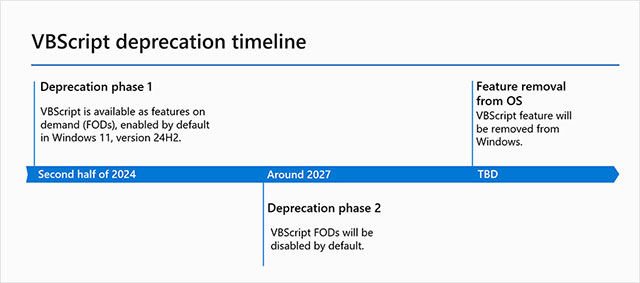
In its May 2024 roadmap, Microsoft divided the VBScript deprecation process into three phases. Currently, VBScript is still in the first phase as an optional feature (FOD) enabled by default.
The complication is that, while Microsoft previously mentioned that VBScript FOD would be disabled around 2027 (which coincides with the 2026-2027 Windows updates), the latest guidance post published recently suggests that the feature will be removed as early as 24H2 or 25H2.
Microsoft said:
At the current end of support stage, VBScript is still available as FOD and is enabled by default in Windows 11 version 24H2. Before it is disabled by default in these and future versions of the operating system, it is extremely important to determine where and how vbscript.dll is used in an enterprise environment.
This wording suggests that VBScript may soon be phased out as a default FOD, and explains why Microsoft is sharing new guidance to help businesses transition faster. Still, the tech giant insists that it is time to "proactively disable VBScript on Windows 11."
In the guidance, Microsoft highlights four mechanisms that help businesses detect the use of VBScript in their workflows and take the necessary steps to remove all VBScript-based dynamic link libraries (.dlls):
1. Use the official SysMon (System Monitor) utility to monitor and identify VBScript DLLs
2. Review VBScript dependencies such as Group Policy and PowerShell scripts related to:
- 1. Log in/log out
- 2 Start/Shutdown
- Scheduled Tasks
- VBScript Call
Microsoft also provides a PowerShell script to scan VBScript files across the system:
$pathsToScan = @("C:Users", "C:ProgramData", "C:Scripts") $logPath = "C:VBSScriptScanVbsFiles_$(hostname).csv" $results = foreach ($path in $pathsToScan) { if (Test-Path $path) { Get-ChildItem -Path $path -Filter *.vbs -Recurse -ErrorAction SilentlyContinue | Select-Object FullName, LastWriteTime, Length } } $pathsToScan = @("C:Users", "C:ProgramData", "C:Scripts") $logPath = "C:VBSScriptScanVbsFiles_$(hostname).csv" $results = foreach ($path in $pathsToScan) { if (Test-Path $path) { Get-ChildItem -Path $path -Filter *.vbs -Recurse -ErrorAction SilentlyContinue | Select-Object FullName, LastWriteTime, Length } }In particular, the company also provides another sample script to detect VBScript embedded in Microsoft Installer (MSI) packages:
Get-ChildItem -Path "C:MSIRepo" -Recurse -Filter *.msi | ForEach-Object { $msiPath = $_.FullName $sql = "SELECT * FROM CustomAction" $installer = New-Object -ComObject WindowsInstaller.Installer $database = $installer.GetType().InvokeMember("OpenDatabase", "InvokeMethod", $null, $installer, @($msiPath, 0)) $view = $database.OpenView($sql) $view.Execute() $record = $view.Fetch() while ($record -ne $null) { $actionName = $record.StringData(1) $actionType = [int]$record.StringData(2) if ($actionType -eq 6 -or $actionType -eq 38 -or $actionType -eq 50) { Write-Output "⚠ VBScript Custom Action: $actionName in $msiPath" } $record = $view.Fetch() }After detecting the use of VBScript, Microsoft guides businesses on how to proactively disable it using the DISM command:
Dism /Online /Remove-Capability /CapabilityName:VBSCRIPT~~~~ This command can be deployed in bulk via:
- Microsoft Intune
- GPO Startup Scripts
- Microsoft Configuration Manager
Microsoft warns that after executing the command, any process using VBScript will be blocked and may "error silently or report an explicit error." You can read the full post on Microsoft's official Tech Community page.
FAQ
What is the main takeaway about Microsoft May Disable VBScript Early in Windows 11 24H2/25H2?
The key is to understand the core idea, compare the available options, and apply the practical guidance that matches your situation.
What should beginners know about Microsoft May Disable VBScript Early in Windows 11 24H2/25H2?
Start with the essential steps and terminology. Avoid changing advanced settings until you understand how they affect performance, privacy, cost, or compatibility.
How can I use this information in practice?
Follow the relevant section in order, test one change at a time, and confirm the result before moving to the next step or recommendation.
Related Articles
 Microsoft Officially Killed Vbscript4 minutes read
 Microsoft Officially Removed the VBScript Language from Future Versions of5 minutes read
 How to Program with Vbscript8 minutes read
 Managing Windows Networks Using Scripts -- Part 3: Understanding15 minutes read
 Instructions to Disable Microsoft Consumer Experiences on Windows4 minutes read
 Disable Screenshots on Apple Watch: What You Need to Know4 minutes read
Reader Comments 0
Sign in with email or Google to join the discussion.