Table of Contents
This guide provides a clear, practical overview of evaluate the snapdragon 860 gaming performance on the POCO, with useful context, important details, and straightforward takeaways for everyday readers.

POCO X3 Pro (left) and POCO X3 NFC (right)
Instead of using the Snapdragon 732G processor like the NFC version, the POCO X3 Pro is equipped with Qualcomm's newly launched Snapdragon 860 chip. However, this is not a completely new chipset, but in fact just the "renamed" version of the Snapdragon 855 Plus, equipped on most high-end smartphones from 2019.
Snapdragon 860 is manufactured using 7nm process and has 8 cores in total - including 1 Cortex-A76 core clocked up to 2.96GHz, 3 Cortex-A76 cores with maximum clock speed of 2.42GHz and 4 Cortex-A55 1.8 cores. GHz. The chipset comes with Adreno 640 GPU, supports LPDDR4x RAM and UFS 3.0 standard memory.

POCO X3 Pro with Snapdragon 860 processor and Adreno 640 GPU
This guide will perform some tests to evaluate the gaming performance of the POCO X3 Pro. The first is the benchmark test using 3 of the most popular performance scoring software today - AnTuTu, Geekbench and 3DMark.
- AnTuTu: 546,169 points, including 142,511 CPU points, 190,731 GPU points, 93,809 points Memory and 119,118 UX points (User Experience - User Experience).

The POCO X3 Pro scored 546,169 points in the AnTuTu benchmark test.
- Geekbench: 776 points single-core and 2486 points multi-core (CPU), 2834 points OpenCL and 2690 points Vulkan (GPU).

For Geekbench, the handset scored 776 single-core and 2486 multi-core points.

The GPU that comes with the Snapdragon 860 is the Adreno 640, has an OpenCL score of 2834 and a Vulkan score of 2690.
- Benchmark GPU with 3DMark Wild Life (20 tests): Highest 3443 points, lowest 3378 points, average FPS of 20.5, stability is 98.1%.
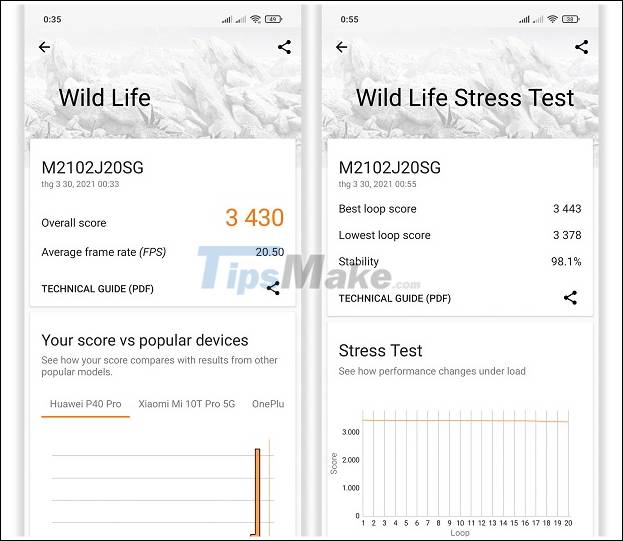
The POCO X3 Pro scored an overall score of 3430 on 3DMark's Wild Life test.
In the next part, we will try to play 4 hot games right now: League of Legends: Speed Chien, Lien Quan Mobile, Call of Duty: Mobile and PUBG Mobile. The number of frames per second (FPS) in the game will be displayed in the upper left corner of the screen.
League of Legends: Rapid War
The first test starts with League of Legends: Speed Chien, the popular mobile moba game from Riot Games, was officially released in Vietnam late last year. This is also one of the games that will probably be interested by a lot of young people, using it as criteria for choosing smartphones at the present time.

At the highest graphics level, the POCO X3 Pro can easily hit 60 FPS.

Even in teamfights, the frame rate remained stable at 59 - 60 FPS.

Parameter settings of League of Legends game: Speed War is used in the test.
Although POCO X3 Pro is equipped with a 120Hz screen, the game League of Legends: Speed War only allows users to set a maximum frame rate of 60 FPS, instead of 90 or 120 FPS. Meanwhile, the remaining parameters can be set to the highest level, including "Graphics Quality - Ultra" , "Effects Quality - High" , "Resolution - High" and "Post-Processing - On" .
With the aforementioned graphics settings, POCO X3 Pro can easily achieve 60 FPS when playing League of Legends: Rapid War. At the same time, the frame rate is always stable between 59 - 60 FPS (average ~ 59.6) even in combat.

FPS chart when playing League of Legends: Speed War at the highest graphics level on POCO X3 Pro.
Arena of valor
Launched at the end of 2016, Lien Quan Mobile still has an extremely large number of players and is one of the favorite games of many young people today.
Like League of Legends: Speed War, this game does not require much graphics or too high hardware configuration. Instead, players need a good, constant and stable network connection to avoid lagging, disconnection while playing games.

For Lien Quan Mobile, POCO X3 Pro easily achieves 60 FPS at the highest graphics level.
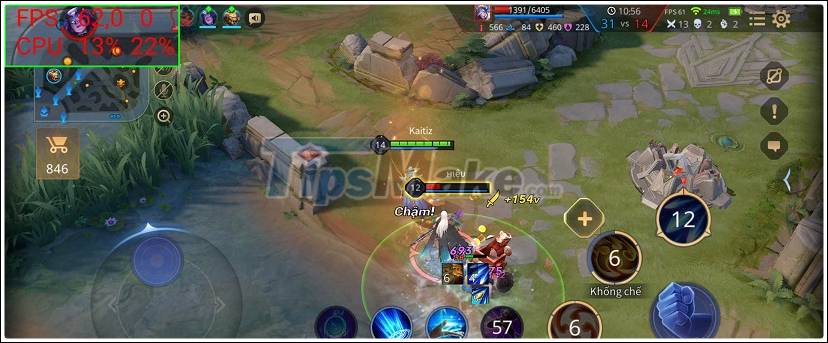
The frame rate was stable at 60 - 62 FPS throughout the match, not even dropping to 59 FPS.
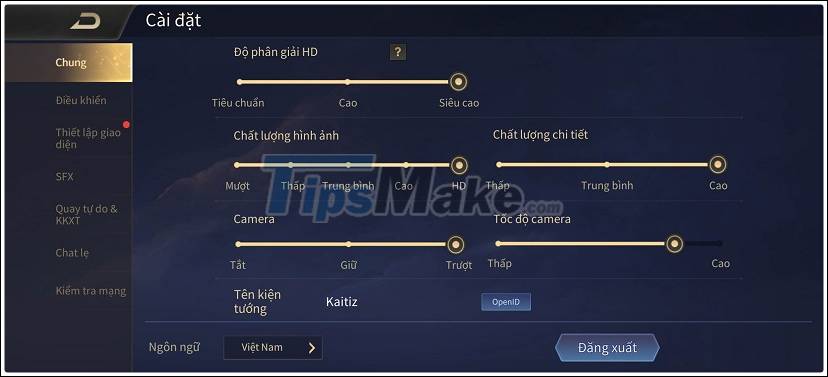
Parameter settings of the game Lien Quan Mobile are used in the test.
POCO X3 Pro users can set parameters in Lien Quan Mobile game at max setting (including "High FPS" , "HD Resolution - Super High" , "Image Quality - HD" and " Detail Quality - High " ).
During the process of playing Lien Quan Mobile, the machine for FPS was extremely stable. Statistics from PerfDog software show that the average frame rate that the POCO X3 Pro achieved when playing this game was 61.5 FPS.
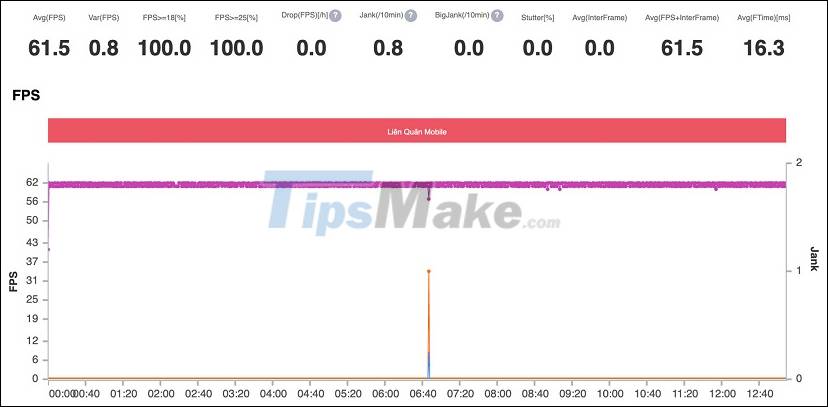
FPS chart when playing Lien Quan Mobile at the highest graphics level on POCO X3 Pro.
PUBG Mobile
The third test continues with PUBG Mobile, the mobile version of the popular PC game PlayerUnknown's Battlegrounds. Compared to League of Legends: Speed Chien and Lien Quan Mobile, it can be said that PUBG Mobile is "heavier" than a lot and requires quite high hardware configuration.
With Snapdragon 860 processor equipped on POCO X3 Pro, PUBG Mobile game allows players to set graphics at a maximum level of "Graphics - Ultra HD" and "Frame Rate - Ultra" (limited to 40 FPS). .
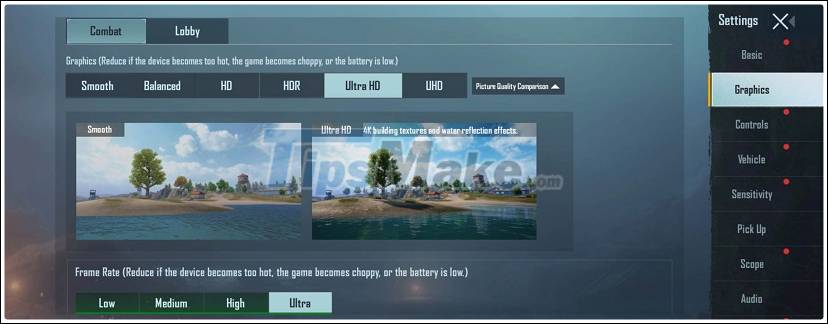
The highest level of PUBG Mobile graphics can be set on POCO X3 Pro.

When "Frame Rate" is set to "Ultra", the frame rate in the game is limited to 40 FPS.
Although the POCO X3 Pro is equipped with a 120Hz display, even when the Graphics is set to Smooth as low as Smooth , the Frame Rate is still limited to 60 FPS (Extreme). .
To get the highest FPS with the best graphics, we'll set Graphics at the highest possible HDR and Frame Rate to Extreme .

PUBG Mobile game settings are used in the test.

When moving by vehicle and teamfight, the frame rate of the game sometimes drops to around 57 FPS.

However, the average frame rate is still in the 57 - 61 FPS range.
POCO X3 Pro performed extremely impressively with PUBG Mobile, giving a stable frame rate of 57-60 FPS and no lag during the match.
Statistics from PerfDog software show that the average frame rate of this phone achieved when playing PUBG Mobile at "Graphics - HDR" and "Frame Rate - Extreme" is 59.7 FPS.

FPS graph when playing PUBG Mobile at HDR - Extreme graphics level on POCO X3 Pro.
Genshin Impact
The final test is Genshin Impact, an open-world action-adventure RPG developed by miHoYo, released late last year. Due to owning a high-quality graphics platform, this game requires the device to have relatively good performance and is quite demanding - if not the "hardware killer" for smartphones.

Graphics settings are set to max setting - Highest and 60 FPS.
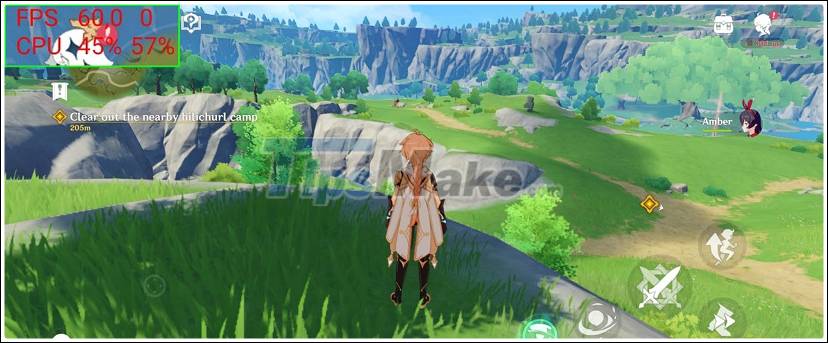
Once the map has loaded, the POCO X3 Pro starts at 60 frames per second.

The frame rate in the game changes continuously, averaging about 30 - 60 FPS.
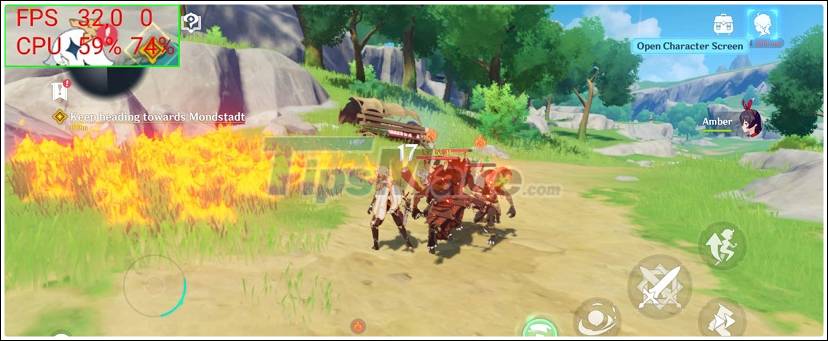
With some scenes with many effects, the machine even dropped to 10-20 FPS.
Compared to the previous 3 games, POCO X3 Pro is much hotter when playing Genshin Impact. At the highest graphics level, the phone is not really impressive and often happens to drop fps, giving an average frame rate of ~ 45.2 FPS during 11 minutes of movement and continuous combat. listed from PerfDog software).
Obviously, for a smoother experience with Genshin Impact, POCO X3 Pro users should lower the graphics of this game to a lower level (for example, Medium), instead of setting it to High or Highest.

FPS chart when playing Genshin Impact at the max graphics settings on POCO X3 Pro.
Conclusion
With the Snapdragon 860 processor, POCO X3 Pro can completely "max setting" the popular games today, from the average level such as League of Legends: Toc Chien and Lien Quan Mobile, to games that require configuration. as high as PUBG Mobile and Genshin Impact.
However, the POCO X3 Pro has not been able to "take advantage" of the 120Hz screen because the Snapdragon 860 has not been fully optimized - limited to 60 FPS for some games that support frequency monitors. scan high.

FPS parameters when playing games on POCO X3 Pro.
POCO X3 Pro is currently sold genuine in Vietnam with a starting price of 6.99 million VND for 6GB RAM + 128GB ROM. Obviously, it can be said that this is one of the best performing smartphones at the current price, even when compared to "portable".
In addition to the powerful performance from the Snapdragon 860 processor, POCO X3 Pro also has a 120Hz refresh rate screen, dual speakers, a 5260mAh battery and supports 33W fast charging. The phone is extremely suitable for those who do not care too much about camera quality, display, but focus mainly on gaming.
Key Takeaways
Use the information above as a practical reference for evaluate the snapdragon 860 gaming performance on the POCO. Review each step carefully, confirm any requirements, and choose the option that best fits your situation.
FAQ
What does this guide explain about Evaluate the Snapdragon 860 Gaming Performance on the POCO?
It explains the main concepts, practical considerations, and useful steps related to evaluate the snapdragon 860 gaming performance on the POCO without requiring advanced knowledge.
Who can benefit from learning about Evaluate the Snapdragon 860 Gaming Performance on the POCO?
This information is useful for readers who want a clear overview, practical guidance, and reliable steps related to evaluate the snapdragon 860 gaming performance on the POCO.
What should I check before applying this information?
Review the requirements, confirm that your device, software, or situation matches the instructions, and back up important data before making major changes.
Related Articles
 Evaluate the Snapdragon 870 Gaming Performance on Redmi K4011 minutes read
 Poco F2 Pro Will Be One of the Cheapest High-end Smartphones3 minutes read
 Xiaomi Mi 11 Gaming Performance Review: Is Snapdragon 888 as15 minutes read
 Xiaomi Poco F2 Officially Launched on May 122 minutes read
 Snapdragon Control Panel: Complete Guide4 minutes read
 Does More RAM Make a Difference in Gaming Performance?13 minutes read
Reader Comments 0
Sign in with email or Google to join the discussion.