Table of Contents
Instructions for Installing Kali Linux on Windows 10 Are Easier is easier to understand when the core ideas are paired with practical examples. The sections below explain the topic clearly, highlight useful steps, and point out details that can prevent common errors.
You can download and install Kali Linux directly from the Microsoft App Store on Windows 10 as easily as installing any other application. This is a guide to installing Kali Linux on Windows 10, without USB boot, virtualization software at all.
- How to install and use Kali Linux on VmWare virtual machine
- Basic Linux commands everyone needs to know
- Certain deadly commands never run on Linux
It sounds incredible, but this is the truth.
Kali Linux is a Linux-based, open-source, free operating system and is widely used in hackers, penetration testing. It is now possible to run Kali Linux as an application on Windows 10 without dual booting or virtualization.
Kali Linux is the latest Linux distribution provided on the Windows App Store, after Ubuntu, OpenSUSE and SUSE Enterprise Linux.
- Download Ubuntu right in Windows Store only brothers
In Windows 10, Microsoft has provided a feature called Windows Subsystem for Linux (WSL), which allows users to run Linux applications directly on Windows.
"In the past few weeks, we have been working with Microsoft WSL to bring Kali Linux to the Microsoft App Store as an official WSL distribution and today Kali Linux has officially appeared on Microsoft App Store," the Kali Linux team said. know.
- Instructions on how to install Ubuntu on VirtualBox virtual machine
- Instructions for installing Ubuntu on VMware Workstation - Part 1
Run Kali Linux on Windows 10
If this is your first time using Windows Subsystem for Linux (WSL), you need to enable this option before downloading Kali Linux.
Follow these steps to enable WSL:
Open Control Panel> Apps and features (or Programs )> Programs and Features > Select T urn Windows features on or off

Select Windows Subsystem for Linux and save it> Restart the computer.

Alternatively, open PowerShell under Admin and run the following command:
Enable-WindowsOptionalFeature -Online -FeatureName Microsoft-Windows-Subsystem-Linux
You open Kali Linux page on Microsoft App Store, click Get to download.
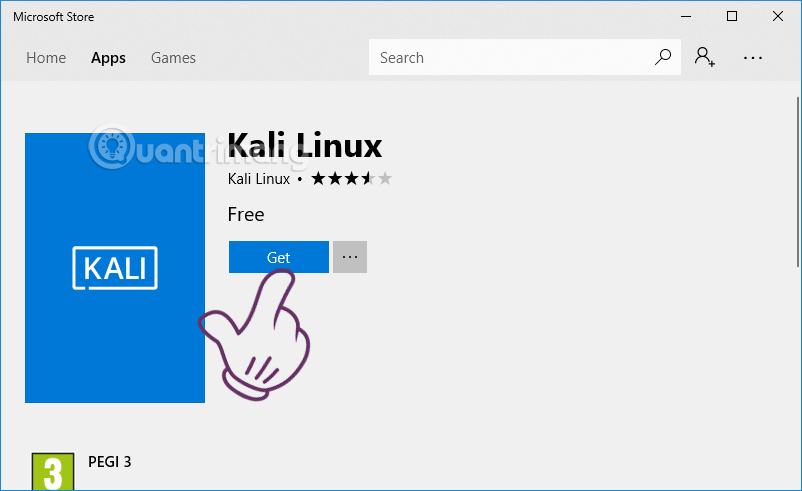
Click Launch to install Potassium automatically and open the control panel window.

Kali Linux will automatically install on Windows 10, takes about 10 to 15 minutes.
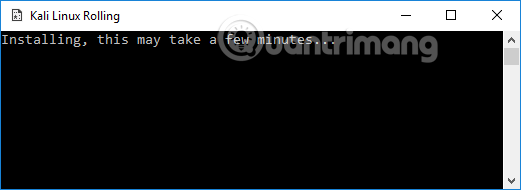
Request to create user account when installing:
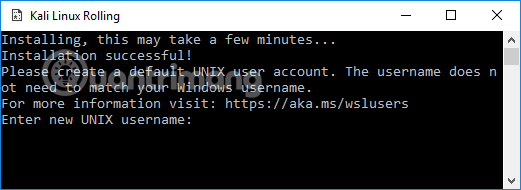
You enter the username, enter the password and re-enter the password again to confirm.
If you want to enable the GUI for Kali Linux, enter the command:
 login to tty1
 apt-get update
 apt-get upgrade -y
 apt-get install -f gdm3
If Kali Linux requires root access, add sudo first, remember the password set in the previous step because adding sudo will require you to enter the password.
 sudo login to tty1
 sudo apt-get update
 sudo apt-get upgrade -y
 sudo apt-get install -f gdm3
If you are interested in activating Kali's desktop environment, here are video tutorials for installing xfce4 and xrdp to connect Kali Linux via Remote Desktop.
To install an penetration testing tool, such as metasploit, you use the same command as on the normal Kali version:
 apt-get update
 apt-get install metasploit-framework
If root is required, just add sudo before the commands.
This Kali Linux distribution is good news for security experts and penetration testers with limited toolset.
Kali Linux on Windows doesn't have any built-in hack or penetration testing tools, but you can easily install it later.
If the antivirus application or Windows Defender tells Kali Linux to be dangerous, you can enable false alerts or turn off the antivirus application temporarily to use. Although some users report this, when I try to install it, Windows Defender doesn't notice anything.
- How to scan websites for potential security vulnerabilities with Vega on Kali Linux
- How to install VmWare Tools on Kali Linux
- How to install Kali Linux on Android using Linux Deploy
FAQ
What should you know about run Kali Linux on Windows 10?
If this is your first time using Windows Subsystem for Linux (WSL), you need to enable this option before downloading Kali Linux.
What is Instructions for Installing Kali Linux on Windows 10 Are Easier?
You can download and install Kali Linux directly from the Microsoft App Store on Windows 10 as easily as installing any other application.
Why is Instructions for Installing Kali Linux on Windows 10 Are Easier important?
A clear understanding of Instructions for Installing Kali Linux on Windows 10 Are Easier helps you make informed decisions, avoid common mistakes, and use the relevant tools or techniques more effectively.
Related Articles
 How to Install Kali Linux Dual Boot Windows5 minutes read
 How to Install and Use Kali Linux on Vmware Virtual Machine10 minutes read
 Kali Linux 2022.3: Comes with White Hat Hacker Tool Upgrades25 minutes read
 How to Create USB Boot Live Kali Linux11 minutes read
 How to Encrypt LVM Partitions When Installing Kali Linux6 minutes read
 4 Reasons Why White Hat Hackers Love to Use Kali Linux7 minutes read
Reader Comments 0
Sign in with email or Google to join the discussion.