Table of Contents
MiDesktop is a fork of the classic KDE 1 desktop adapted for modern Linux systems. It aims to preserve the older desktop's interface and working style rather than simply applying a retro theme to today's KDE Plasma. It is an active development project, so test it separately before relying on it for daily work.
What is being revived?
The desktop uses Osiris, a C++ graphical toolkit derived from Qt 2.3.2. Libranext's Osiris project page identifies MiDesktop as a main use for the toolkit. Modern KDE Plasma uses a different software stack, so MiDesktop is not an official downgrade option within Plasma.
The attraction is a classic panel, menus and desktop organization on a supported Linux base. That is different from installing an obsolete distribution simply to see its old interface. Modern applications can run alongside a retro desktop, but window management and integration still need testing.
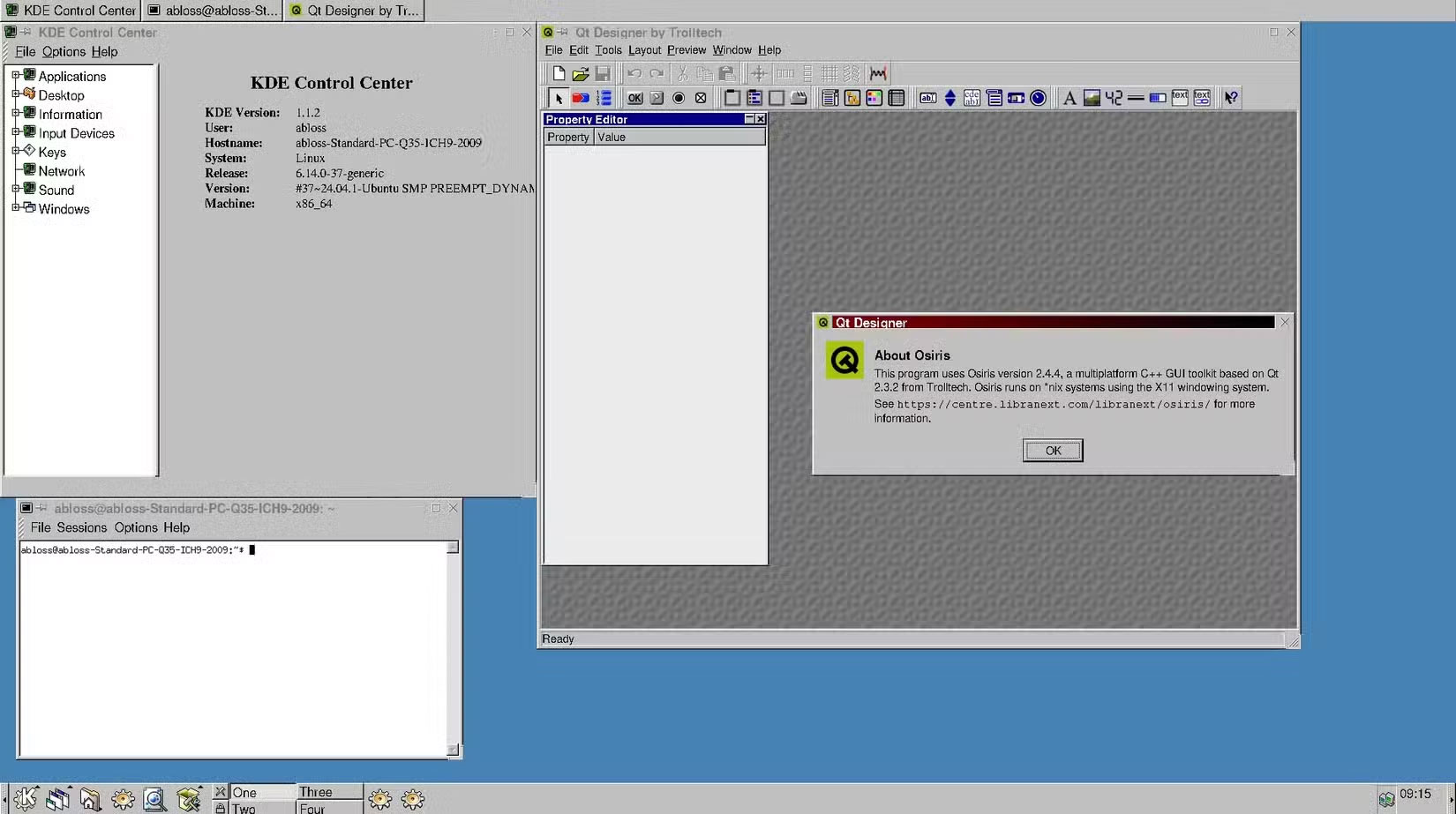
The classic desktop interface shown here may differ from later MiDesktop releases.
Current development changes the limitations
The developer's MiDesktop 1.2.0 beta announcement reports fixes for disappearing panel menus and Firefox or GTK windows resizing beyond the screen. It also lists improvements to scrolling and font rendering, a new MiPanel, and additional ported applications including KCalc and Ark.
Those changes mean early preview bug lists should not be treated as a description of every later release. The announcement still identifies limited multi-monitor handling: windows do not consistently treat each display as a separate screen. The developer also notes limited testing across different systems.
Check the release notes for the exact build you intend to use. A developer's successful daily use is useful feedback, but it does not guarantee stability on another computer.
Where installation packages come from
The project provides instructions for prebuilt Debian and Ubuntu packages. These are project-maintained packages and repositories, not evidence that MiDesktop is included in the default official Debian or Ubuntu repositories. Follow the linked project installation documentation for supported releases, architectures and repository channels.
Users upgrading from the first development preview should read the migration instructions: the developer reports changed package names and a repository move. Do not reuse old repository commands without checking them.
Knowing how Debian packages are installed is useful, but it does not replace the project's dependency and upgrade instructions.
How to try it without disrupting your main desktop
Use a spare installation or virtual machine, keep a working desktop session available, and test application launching, resizing, keyboard input and display behavior. Verify the required display session; early MiDesktop builds target X11, and a possible future Wayland port should not be assumed to be available.
If you want a maintained contemporary desktop instead of a historical interface, compare KDE Plasma and GNOME. MiDesktop's main appeal is experiencing and developing the classic KDE workflow on a current Linux base.
Related Articles
 How to install the legendary Alliance on Linux
 4 classic Linux tools that have better modern alternatives
 Winamp, the once-legendary music player will come back next year
 Latest Legendary Dragon God Giftcode
 How to Fix League of Legends Patching and Update Errors
 How to back up and restore Linux Terminal history
Reader Comments 0
Sign in with email or Google to join the discussion.