Table of Contents
With the Spear in Minecraft, you can launch quick stabs and charge attacks, suitable for both melee combat on the ground and mounted combat.
The Spear is a brand new weapon coming to Minecraft, acting as a 'bridge' between the Sword and the Trident. You can launch quick stabs and charge attacks, suitable for both melee and mounted combat.
If you are preparing to face off against aggressive mobs or PvP with other players, mastering the Spear will give you a huge advantage. This article will provide you with a complete guide on how to craft and use this new weapon.
Synthesis of materials for making Teaching
Although not yet in the stable version, Mojang has released the Spear crafting recipe.
You should prepare including:
2 wooden sticks
1 material depending on level:
- Wood Plank
- Stone
- Copper Ingot
- Iron (Iron Ingot)
- Gold Ingot
- Diamond Ingot
- Netherite
How it works:
- Use wood → Wooden spear
- Use Iron Ingot → Iron Spear
- Use Netherite → Netherite Spear
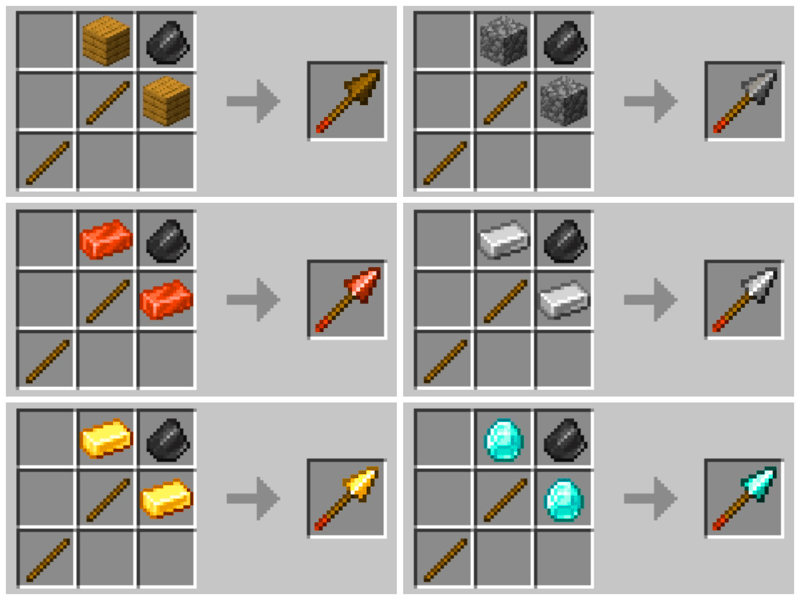
Higher material level → greater damage, different cooldown speed.
How to Craft a Spear in Minecraft
Once you have all the ingredients:
- Step 1: Right click on the Crafting Table to open the interface.
- Step 2: Place 1 stick in the bottom left corner box.
- Step 3: Place the second stick in the middle box.
- Step 4: Place the material (wood/stone/bar…) in the top right corner box.
- Step 5: Spear will appear in the results box, now you just need to drag it into the inventory.
You can now use the Spear to fight enemy mobs in the Minecraft world.
How to Use Spears in Minecraft
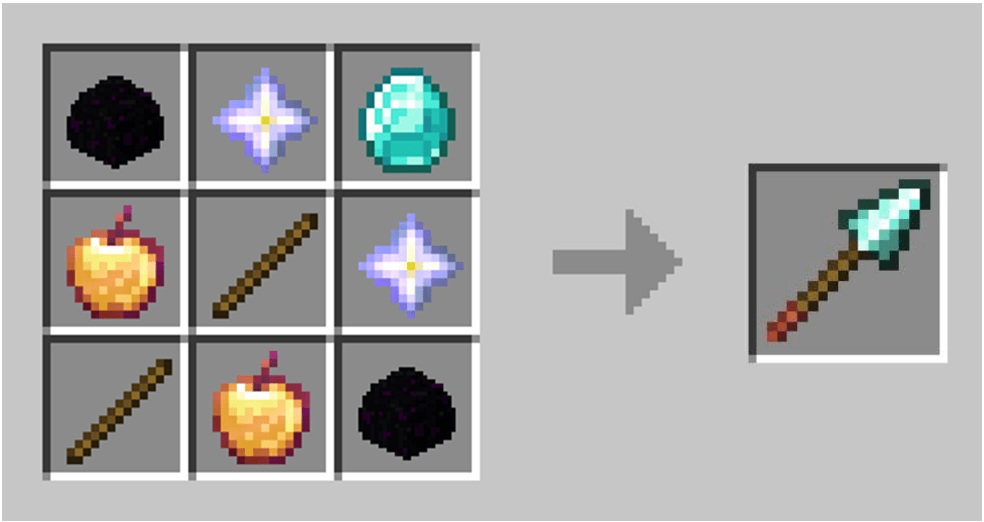
The spear has two attack modes, each suited to different fighting styles:
1. Stab
This is a basic and quick attack similar to other weapons or items, ideal when you are in close range.
- Holding a spear in hand
- Left click once when mob is in range
- Deals melee damage with longer range than most other melee weapons
Note:
- After each Jab, the Spear has a short cooldown, like an Ender Pearl or Chorus Fruit.
- Extremely effective when wanting to keep your distance from mobs.
- Can be enhanced with Spear-specific Enchantments, especially Lunge, to increase Jab power.
2. Charge Attack
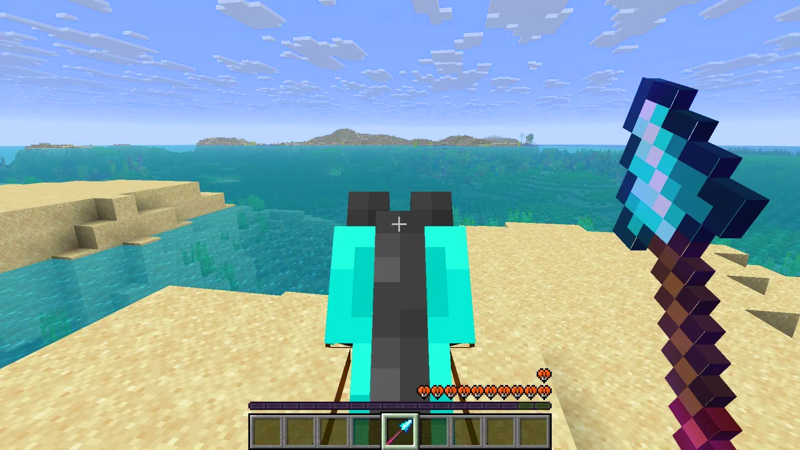
This is a decisive attack, dealing damage based on the player's movement speed.
- Similar to Mace, but instead of calculating fall height → calculates movement speed
- Extremely powerful when fighting while riding a beast
How to do:
- Ride a horse, Nautilus, or any mountable creature.
- Move at high speed.
- Grab your Spear and charge straight at your enemy.
When hitting the target:
- Deals massive damage
- Causes knockback
- Can knock enemies off mounts
Charge Attack special mechanism:
-
If you hold the Spear for too long, the spear tip will shake slightly:
-
Loss of ability to throw off mount
-
-
If held any longer:
-
Knockback effect is gone → only base damage remains
-
-
Wait a moment for the Priest to return to 'optimal' state and then charge again.
About the Teaching level:
-
Netherite & Diamond
-
High damage, strong active state, but long cooldown
-
-
Wood & Stone
-
Fast cooldown, lower damage
-
Other tips when using the Teaching
- You can Charge up while flying with Wings.
- Can Charge up when riding a Minecart, riding an ice boat — where speed is extremely high.
- Use multiple enchants other than the Book of Stab Support to maximize damage output.
Spears in general are a very interesting new weapon in Minecraft, combining speed, long range and the ability to generate force while moving. Knowing how to use your Stab and Charge attacks will give you a huge advantage in both PvE and PvP.
Have you come up with any unique uses for Spears in the Minecraft world? Share them below in the comments.
FAQ
How do you craft and use a spear in Minecraft: step-by-step guide?
In practical terms, with the Spear in Minecraft, you can launch quick stabs and charge attacks, suitable for both melee combat on the ground and mounted combat.
What should you check before getting started?
Review the requirements, compatible device or software version, and any warnings described in the guide before making changes.
What should you do if the steps do not work?
Repeat the steps in order, confirm that your app or system is up to date, and review the troubleshooting details provided above.
Related Articles
 How to Craft Chains in Minecraft 1.204 minutes read
 How to Craft and Use a Name Tag in Minecraft 26.19 minutes read
 How to Craft a Bag in Minecraft 1.20 Is Extremely Simple5 minutes read
 When Will the Mounts of Mayhem Minecraft Version Be Updated7 minutes read
 How to Craft a Beacon in Minecraft: Practical Guide9 minutes read
 What Is Spear Phishing?7 minutes read
Reader Comments 0
Sign in with email or Google to join the discussion.