Table of Contents
A metered connection tells Windows that a network has a limited or costly data allowance. Windows may reduce background transfers on that connection, but it does not completely block internet access or guarantee a hard data cap.
When a metered connection helps
Use the setting for a phone hotspot, mobile broadband plan, travel connection, or any network with a strict allowance. On a metered network, Windows and some Microsoft apps may postpone nonessential downloads, synchronization, Store updates, and some live content. Important security or reliability updates can still download, and third-party programs may ignore the setting.
Set a Wi-Fi network as metered
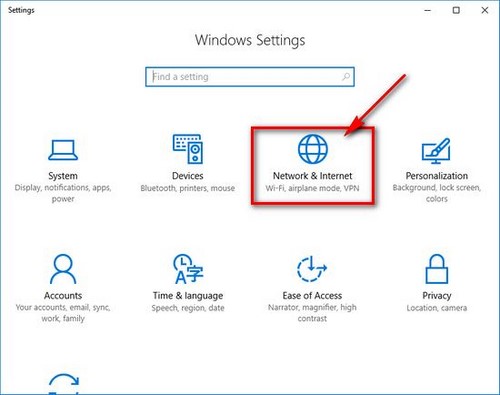
- Press Windows + I and open Network & Internet.
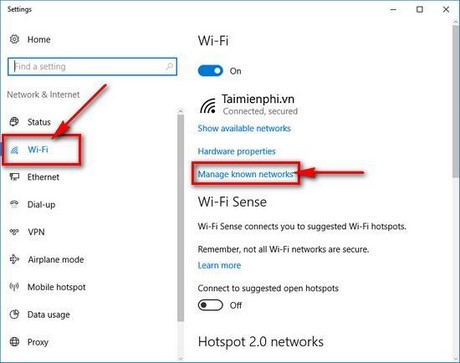
- Select Wi-Fi. On current Windows 10 versions, click the connected network's name or Properties. Older builds may require Manage known networks.
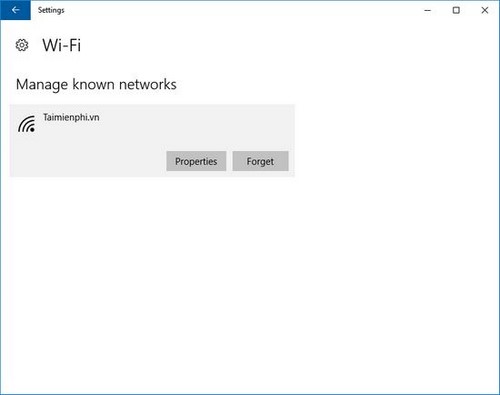
- If you opened Manage known networks, select the saved network and choose Properties.
- Turn on Set as metered connection.
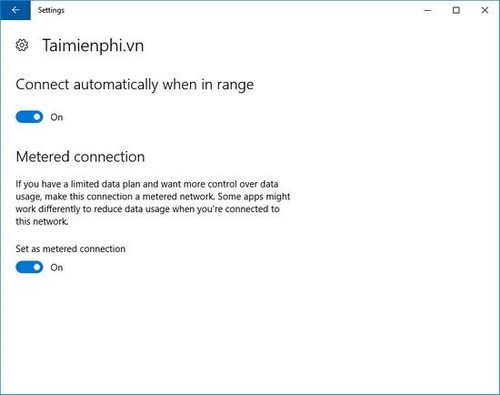
The choice is stored for that Wi-Fi profile. Other networks remain unchanged, so repeat the process for each limited connection.
Set an Ethernet connection as metered
Open Settings > Network & Internet > Ethernet, select the active network, and turn on Set as metered connection. Older Windows 10 releases did not expose this switch for Ethernet; install supported Windows updates if the option is missing.
Add a data limit
Metered mode is a signal to Windows, not an automatic cutoff. To track an allowance, open Settings > Network & Internet > Status > Data usage (the exact location varies by Windows 10 release), select the connection, and choose Enter limit. Set a monthly, one-time, or unlimited reporting period and enter the allowance supplied by the provider.
The counter is useful for estimates, but the mobile carrier or ISP remains the authoritative source for billable usage. Review per-app consumption under Data usage; Windows includes several less-obvious network and system tools described in this guide to built-in Windows utilities.
Turn metered mode off
Return to the same network's Properties page and turn the switch off. Do this temporarily if a trusted application refuses to synchronize or a large update is intentionally required. Re-enable it before returning to mobile data.
If the setting resets
Forgetting the Wi-Fi network, using Network reset, or recreating the adapter can remove the saved preference. Reconnect, reopen the network properties, and set it again. If you are working through a connection problem rather than a data allowance, use the separate Windows Wi-Fi troubleshooting guide instead of treating metered mode as a repair tool.
Related Articles
 How to Fix Bluetooth Metered Connection Error on Windows 106 minutes read
 How to Enable // Disable Ethernet Connection Measurement Feature6 minutes read
 How to Enable/disable Smart App Control Windows 11: Step-by-Step Guide5 minutes read
 7 Extremely Interesting Wi-Fi Features on Windows 10 Not Everyone8 minutes read
 How to Enable Switch Control on iPhone2 minutes read
 How to Use Remote Desktop on Windows 7: Clear Instructions9 minutes read
Reader Comments 0
Sign in with email or Google to join the discussion.