Article on the subject of "delete windows.old folder"
-

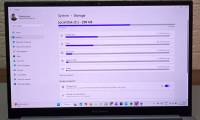
How to delete the Windows.old folder in Windows 11
windows will automatically delete windows.old 30 days after its creation. but if you need that storage right now, you can try any of these methods to remove the folder from your pc.
-
How to delete Windows.old folder on Windows 10 to free up hard drive space
when you upgrade the operating system to windows 10, the old version of windows is not deleted but instead changes into the windows.old folder so you can return to the old version of windows if needed.
-
What is the Windows.old folder and how do you delete it?
when upgrading to the new version from the old windows, you will have the windows.old folder on your computer, and it takes up a large amount of space. you can delete this folder but the way to delete will be different from the normal folder.
-
How to delete the Windows.old folder in Windows 11
windows will automatically delete windows.old 30 days after its creation. but if you need that storage right now, you can try any of these methods to remove the folder from your pc.
-
4 ways to delete Windows.old folder on Windows 10 computer
instructions on how to delete the windows.old folder on windows 10 with ccleaner, disk cleanup, command prompt, easy and fast storage feature. click view now!
-
Instructions to delete Windows.old folder on Windows 7/8 / 8.1?
usually after you reinstall windows without deleting the old partition, windows 7/8 / 8.1 will appear a new folder in drive c with the name windows.old. what is that? that is the folder containing all the system files of the old windows version, when not deleted, the system will automatically
-
Instructions on how to delete the Windows Installer folder on Windows
the windows installer folder contains a significant amount of installation files. we can delete the hidden installation folder within windows installer to free up computer space.
-
How to delete Windows.old folder on Windows 10 to free up hard drive space
when you upgrade the operating system to windows 10, the old version of windows is not deleted but instead changes into the windows.old folder so you can return to the old version of windows if needed.
-
How to delete Windows.old folder on Windows 10?
these windows.old folders account for nearly 15 gb on the hard drive, the occupancy rate is quite significant. however, you can delete this windows.old folder without any problems.
-
Microsoft confirmed the error could not delete the Windows.old folder on Windows 10
an annoying bug is back on windows 10 and prevents users from deleting the 'windows.old' folder that takes up a lot of memory on the computer.
-
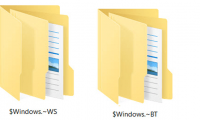
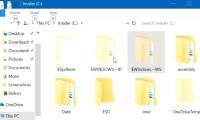
How to delete the $ Windows. ~ WS folder on a Windows 10 computer
the following article will guide how to delete the $ windows. ~ ws folder on a windows 10 computer. stay tuned!
-
What is the Windows.old folder? How to delete the Windows.old folder
the article provides information about the windows.old folder, how to downgrade to the old version of windows, and how to delete the windows.old folder extremely simply and in detail. let's see it now!
-
What is the directory $ WINDOWS. ~ BT, can delete $ WINDOWS. ~ BT or not?
folders such as $ windows. ~ bt and $ windows. ~ ws are directories related to the windows 10 upgrade process. these folders may appear on windows 7, 8 and 10 and more. , these folders are hidden folders, so to see these directories you have to perform some additional operations to display the
-
What is the $WINDOWS.~BT directory? Is it possible to delete this folder?
what is the $windows~bt directory? is it possible to delete this folder? is a question that many people are interested in when they see the $windows.~bt folder on the computer. all will be answered in the article below.
-
Delete these temporary Windows folders to reclaim precious storage space
windows creates temporary files in the background to keep things running smoothly. but over time, these hidden files silently accumulate in system folders, slowly taking up all the space you have.
-
How to assign permissions to delete any folder or file on Windows?
in some cases when you delete a folder or file on a windows computer but cannot delete it and on the screen that displays an error message you need permission to perform this action. in order to be able to delete folders and files, you must assign permission permissions to delete them.
-
How to delete the Ansel folder on the computer
how to delete the ansel folder. the ansel folder only appears on computers with discrete nvidia cards with the main purpose of saving high-quality screenshots and hdr images while playing games. what's special is when you delete this folder and it can reappear
-
Is it safe to delete files from the WindowsInstaller folder in Windows 10?
if you're reading this article, most likely, you want to delete the huge windowsinstaller folder, but aren't sure if it's safe to delete it.
-
How to delete the $ Windows. ~ WS folder in Windows 10
what is the $ windows ~ bt directory? is it possible to delete this directory? is the question that many people are interested in when the $ windows. ~ bt folder appears on the computer. all will be answered in the article below.
-
Instructions for fixing errors 'Cannot delete folder: The directory is not empty'
'cannot delete / access denied' hay 'không thể xóa thư mục: những thư mục không phải trống' is one of the most common errors in windows xp, windows vista, windows 7 and windows 8. this error occurs while you try delete a folder on the system.
-
Use CMD to create an 'undeleted' folder on Windows
have you ever thought that you could create an inviolable folder, no one can delete that folder or not? don't think not because of this you can completely do it. just use cmd without the support of any 3rd party software or applications.
-
5 Ways to Delete Windows.Old Folder on Windows 10, 8
hoang ha pc has compiled 5 simple and popular ways to delete the windows.old folder on windows 10, 8. let's take a look!
 Home
Home Tech info
 Technology
 Science
 Life
Life Application
 Electric
 Program
 Mobile
 System