Article on the subject of "computer memory"
-
How to determine if computer memory has a problem?
a bad memory can cause a lot of different problems on the computer. here are just a few of the many problems you may encounter.
-
Learn computer components and decode signals for basic errors
every component inside a computer plays an important part in the overall operation of the system, just like the human body. no parts are redundant. some components are also crucial to computer speed and performance.
-
How to choose laptop CPU that meets the needs (part 1)
cpu is known as the laptop's brain, this is the control center of the computer, so how to choose a suitable cpu for the computer
-
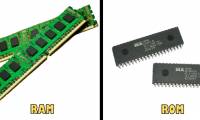
RAM and ROM are two concepts that are easily confused
if you have used a computer, then more or less you have heard of two familiar terms: ram and rom and know they are related to computer memory. however, not everyone knows how different rom and ram are?
-
Which company CPU should I choose: Intel or AMD?
the choice of components and the assembly of a pc has never been a simple task. even if you have removed hundreds of machines, the selection of components for compatibility and stable operation has never been an easy task. not only that, factors like cost, performance and demand also need to be
-
How does CEO Intel try to reassure investors about security flaws?
intel ceo brian krzanich presented a recent review of spectre and meltdown security deficiencies recently discovered in most intel processors.
-
How to determine if computer memory has a problem?
a bad memory can cause a lot of different problems on the computer. here are just a few of the many problems you may encounter.
-
How to handle a computer error message Your computer is low on memory on Windows
you are using the computer, the screen suddenly appears your computer is low on memory error message, along with the applications that you are opening will be closed. even if you reboot the machine, it still can't be fixed, because this is a memory error.
-
RAM and ROM are two concepts that are easily confused
if you have used a computer, then more or less you have heard of two familiar terms: ram and rom and know they are related to computer memory. however, not everyone knows how different rom and ram are?
-
Choosing memory for your computer
instructions on how to choose the right ram for your computer for your needs
-
What is the function of memory card? How to choose the best memory card
what is a memory card and what does a memory card do? how to choose a memory card that suits your needs is a difficult question. let's learn about the effects of memory cards, external memory cards for laptops
-
How to Format a Memory Card Using a Windows Computer
tipsmake today will teach you how to erase and reformat the memory card. memory cards are commonly used as memory on cameras and tablets; to use a memory card on a specific operating system, you need to format it first.
-
How to Repair a Corrupted Memory Card
this wikihow teaches you how to recover the photos and other data from a malfunctioning memory card. it will also teach you how to reformat the memory card for continued use if the memory card is repairable. stop using the card immediately...
-
Check computer memory (RAM) on Windows, Macbook
ram is an important component of computers and laptops. you should regularly check your computer memory to detect and fix errors promptly.
-
How many GB of RAM does your computer need?
ram is also called random access memory, or simply called memory, is one of the most important parts on your computer. but how much ram is enough?
-
How does ROM memory work?
rom read-only memory (read-only memory) is an integrated circuit programmed with specific data from the time of production. rom is used not only in computers, but in most electronic devices, other information technology, and this memory is sometimes considered as a firmware.
-
Instructions on how to clear Copilot memory on your computer.
windows copilot can remember some information from your interactions. while this feature can be useful, you may want to clear copilot memory for privacy reasons.
-
How to free up computer memory Windows 7, 8 / 8.1 and Windows 10
freeing memory, increasing the amount of storage on windows is necessary, especially when your computer memory has a limit and what you want to save is too much. see the ways to increase computer memory below.
-
Here's how to increase virtual memory capacity on Windows
virtual memory (virtual memory) is an indispensable component of the windows operating system. when the amount of ram on your computer is not enough to run the program, the operating system will switch to using virtual memory.
-
How to use Memory Cleaner to release RAM
memory cleaner is a software that frees up ram, optimizes the computer system to speed up operations on computers.
-
'Remember your face and forget your name', remedy and method for practicing super memory
anyone can have super memory if they know how to practice.
-
How to fix laptop not recognizing SD memory card?
memory card is a data storage tool. if the laptop does not recognize the memory card or cannot read the data, what should be done? how to fix the computer not recognizing the memory card or the memory card error not being recognized?
-
How to view applications that take up a lot of memory on your computer is extremely easy
are you looking to see which applications take up a lot of memory on your computer? tipsmake has instructions on how to do it extremely simply, quickly and accurately. apply immediately!
-
How to Disable BIOS Memory Options
this wikihow teaches you how to turn off memory options like ram or caching from within your windows computer's bios menu. keep in mind that the bios menu will be different for each computer, meaning that your computer will not have some...
-
What is virtual memory? How to set Virtual memory for Windows computers
virtual ram helps the computer operate more smoothly, using heavy software without jerking and lag. do you know what virtual ram is and how to create virtual ram?
-
How to test iPhone 6/6 Plus using MLC or TLC memory
currently, the iphone 6 duo is being used by apple using two different memory chips, mlc and tlc. however, according to the reflection of many users, the model using tlc memory chips often hangs unexpectedly and automatically reboots.