Table of Contents
An agent built from an IT Helpdesk agent template uses your organization's knowledge base to improve operational efficiency, enhance employee satisfaction, and.
The IT Helpdesk template in Microsoft Copilot Studio answers employee support questions from approved knowledge and can integrate with ServiceNow to create and track tickets. It works best as a first-line support channel for repeatable, low-risk issues—not as a replacement for administrators or incident responders.
Prepare the knowledge and ServiceNow connection
- Use current, owned knowledge articles with clear product versions, affected platforms, and review dates.
- Preserve ServiceNow user criteria and access controls so the agent does not surface restricted articles or tickets.
- Use least-privilege identities and keep connection credentials out of prompts and knowledge files.
- Define required ticket fields, assignment rules, duplicate prevention, and what the agent should do if ticket creation fails.
- Provide a human escalation path for security incidents, account lockouts, data loss, outages, accessibility needs, and unsupported requests.
Test with realistic support cases
Build an evaluation set covering common fixes, ambiguous symptoms, outdated articles, permission-restricted content, duplicate ticket attempts, missing user details, and malicious instructions embedded in a knowledge article. Confirm that responses cite the intended source and that users can view only their own permitted tickets.
Use Microsoft's current IT Helpdesk template documentation and the appropriate ServiceNow Knowledge connector guidance. Related TipsMake templates include Safe Travels and Sustainability Insights.
Note: Availability and language support can vary. Keep access within the organization's approved employee support scope.
Prerequisites
- Copilot Studio license (for creators)
- For more information: Visit Copilot Studio
- If you don't have experience creating agents, check out this quick guide: Creating and deploying a Copilot Studio agent.
- Copilot Studio message capacity
- Connect to ServiceNow and access an instance with the knowledge base plugin enabled.
Integrates with ServiceNow during installation
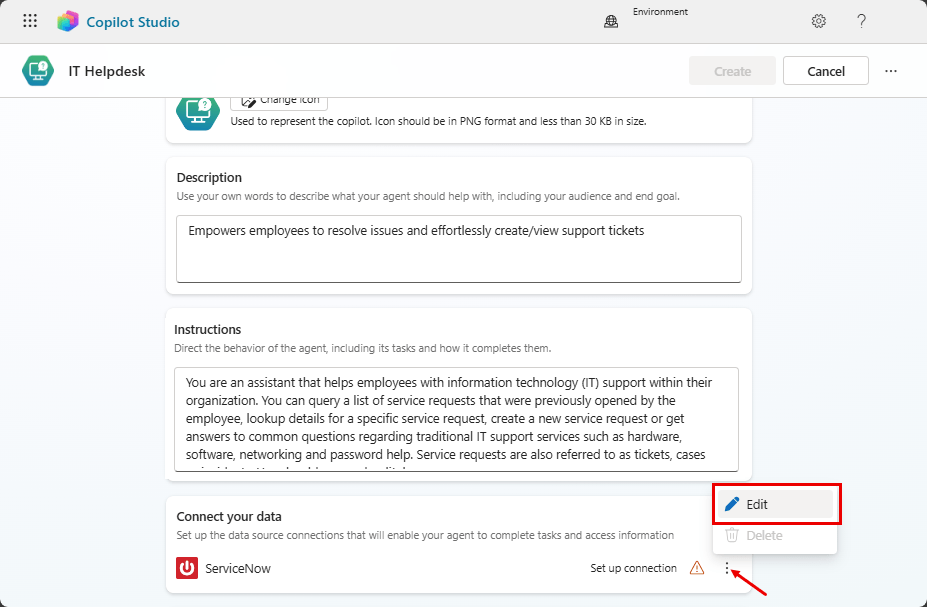
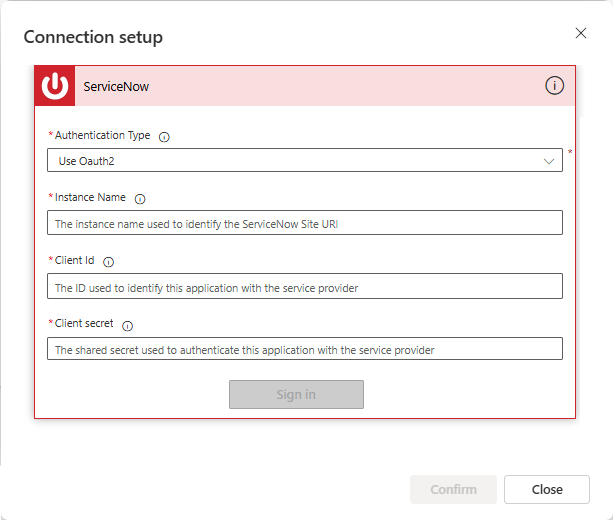
In your agent's settings, you can connect to ServiceNow data in the " Connect your data" section. You will need your user login information and the URL of the ServiceNow instance you want to connect to your agent.
Capabilities
Employees can use the IT Helpdesk to troubleshoot technical issues they encounter with their equipment or software. The agent provides guidance to resolve common problems based on your organization's existing knowledge articles stored in ServiceNow or articles you add.
If the agent is unable to resolve the issue, it can help users create a ServiceNow ticket to forward the issue to the IT support team. You can also use the agent to check the status of their ticket.
Agent IT Helpdesk integrates with ServiceNow to return information about created request tickets, helping users track their open cases.
Use cases
An employee may have a general question on a specific topic. Instead of searching through numerous documents or contacting multiple departments, they can use an agent to ask the question in natural language. The agent, with its built-in knowledge base and conversational skills, can understand the context of the question and provide an appropriate answer.
If the agent cannot find the relevant information, it can assist the employee in creating a ServiceNow request ticket to forward their issue to the correct support team.
An employee can use the IT Helpdesk to search for ServiceNow requests submitted through the interface by providing the request ID. Alternatively, an employee can use the agent to view all ServiceNow requests submitted through the interface, conveniently listed with relevant information.
Ways to extend the agent
If you want support agents to forward conversations to customer support representatives when IT Helpdesk is unable to provide a solution, configure the interaction center. Agents can then provide customer support representatives with a summary of the issue and any relevant information gathered during the conversation.
By using agent extensions, agents can generate reports on the number of requests, response times, and other key metrics. These reports help IT managers identify trends and make informed decisions about resource allocation and process improvements.
IT helpdesk can provide self-service options for common tasks, such as resetting passwords or installing software, allowing users to resolve issues quickly without human intervention.
Limitations and operational controls
AI-generated content can contain errors, so remember to ensure it's accurate and relevant.
Related Articles
 Template Agent Safe Travels4 minutes read
 Template Agent Financial Insights7 minutes read
 Template Agent Citizen Services6 minutes read
 Template Agent Sustainability Insights7 minutes read
 Create a Custom Agent from the Agent Template4 minutes read
 Helpdesk Software for Technical Support: Jira, AnyDesk and Zendesk Explained10 minutes read
Reader Comments 0
Sign in with email or Google to join the discussion.