Table of Contents
An agent built from the Citizen Services agent platform allows public sector organizations to quickly build agents using their publicly available information to help citizens navigate government services and information through a question-and-answer-like experience.
The Citizen Services template is a starting point for an internal public-sector information agent. It demonstrates how an agent can answer questions from public web content, surface road-closure information, and guide users toward services. It is not a ready-to-publish citizen portal: replace the demonstration sources, permissions, branding, and actions with resources your organization controls.
Implementation checklist
- Create the agent from the template in a non-production Power Platform environment.
- Inventory every sample knowledge source, connector, topic, and action before replacing it.
- Add only authoritative, maintained pages and approved APIs. Define who owns each source and how stale content will be corrected.
- Write clear fallback and escalation behavior for questions the agent cannot answer.
- Test common requests, ambiguous questions, inaccessible services, emergency wording, and out-of-scope prompts with subject-matter experts.
- Review privacy, accessibility, records-retention, security, analytics, and publishing requirements before expanding access.
Microsoft's current Citizen Services template documentation states that the template is English-only and should be limited to internal organizational use. Treat those restrictions and the City of Redmond demonstration disclaimer in the source template as deployment constraints, not optional copy.
For related implementations, see TipsMake's IT Helpdesk agent template and Safe Travels agent template.
Note
- The template agents are currently only available in English and should only be used internally within your organization.
- DISCLAIMER: For illustrative purposes only, this agent uses the City of Redmond's public website as a knowledge source and API for traffic alerts. Commercial use of text, city logos, images, and other graphics is prohibited without the express written permission of the City of Redmond.
Prerequisites and access
You will need:
- A Copilot Studio account: Follow the Power Platform instructions on how to create and manage environments in Copilot Studio and understand the administrative and security controls.
- At least one public knowledge source or website containing information about public services.
What the template demonstrates
A public sector organization can choose this agent as a starting point and easily configure and customize it to suit their needs. The application comes pre-configured with the following capabilities:
- Citizens can ask questions through a natural language interface and expect to receive quick answers along with links to information resources, based on pre-configured knowledge bases.
- You can ask about events, such as road closures.
- You can submit requests to the organization, such as asking for assistance.
To illustrate, the application is pre-configured with public websites as knowledge sources and APIs. Now you can customize the application's topics and knowledge to suit your needs.
Update knowledge resources
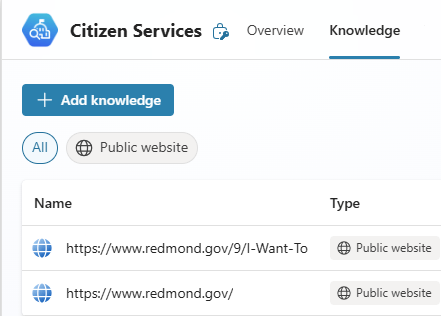
You can customize the app's list of knowledge sources to suit your needs by including public websites and other knowledge sources.
1. Open Citizen Service Agent in Copilot Studio and select Knowledge at the top of the page.
2. Replace unwanted sources of information by deleting them and adding desired websites and sources, or by editing the unwanted sources.
Configure the road-closure action
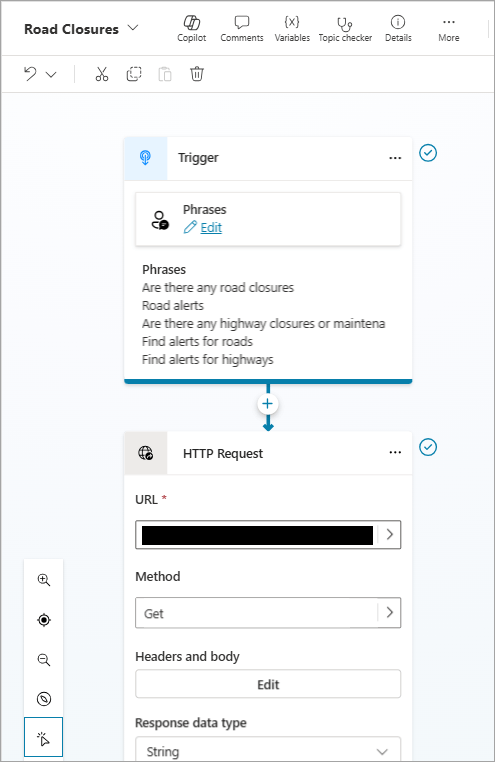
In this example, the application demonstrates connecting road closure data via an API, configured in the Configure the road-closure action theme. The API response is displayed through an Adaptive card, including a map component and a description of the closure.
To highlight the situation, integrate it with content about your road closure.
Create the agent from the template
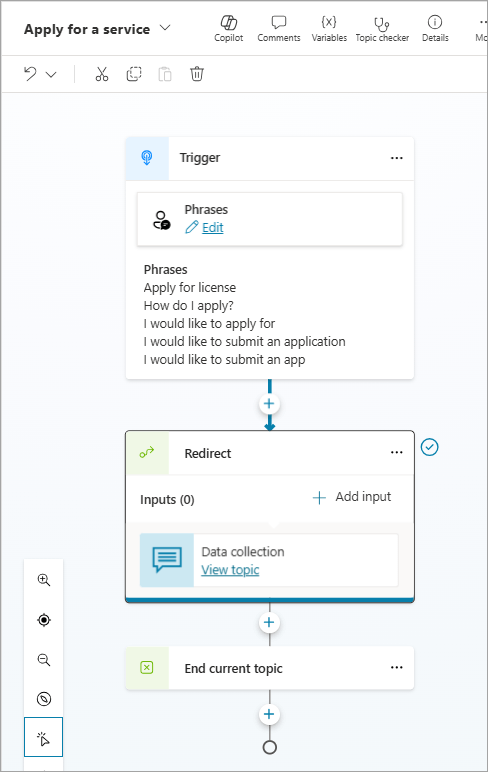
In this example, the agent displays a form to register for support or a service. This form is configured in Apply for a service, triggering the Data collection topic and using an Adaptive card to enter information. The configured Adaptive card displays the use of regular expressions for validation.
This capability is a placeholder that you can fully configure and connect to your system.
Suitable internal use cases
The specific use cases and questions that the Citizen Services agent can address depend on the knowledge base used. However, the agent is designed to:
- Providing citizens with answers to questions from a government organization's public website.
Example prompt: Summarize city development plans
- Provide people with direct information, such as which roads are closed.
Example prompt: Show all prohibited routes
- Provide people with a way to register for assistance.
Example prompt: I want to register for support
Ways to extend the template
You can configure this agent with more knowledge sources to answer relevant questions, and you can integrate it with profile systems using connectors. Some examples of expansion opportunities are:
- Expanding knowledge with diverse sources allows people to find a wider variety of information.
- Integrate the agent with support programs, such as information about existing social services like food assistance, housing assistance, and healthcare.
- Integrate agents with step-by-step instructions on how to register for support.
- Integrate the agent with forms to allow citizens to report issues in their community, such as waste disposal or potholes on the road.
Important limitations and governance checks
AI-generated content can contain errors, so remember to ensure it's accurate and relevant.





Reader Comments 0
Sign in with email or Google to join the discussion.