Table of Contents
An agent built from the Safe Travels agent template is a business-to-employee (B2E) agent designed to provide travel support for a company's employees.
The Safe Travels template in Microsoft Copilot Studio is a business-to-employee agent for answering work-travel questions from an approved knowledge base. The default source focuses on U.S. destinations, so organizations should replace or supplement it with their own travel policy, booking rules, emergency contacts, insurance guidance, and authoritative destination advisories.
Travel information can be time-sensitive and safety-critical. Configure the agent to show its source and date, distinguish company policy from public guidance, avoid guessing when coverage is missing, and direct urgent health, security, immigration, or legal questions to the appropriate official service or human team.
Test before publishing
- Ask about destinations inside and outside the knowledge-base coverage.
- Test conflicting, expired, and undated advisories.
- Confirm that employees see only information permitted by their identity and role.
- Check emergency escalation, after-hours contacts, and unsupported-language behavior.
- Run a repeatable evaluation set after every source or instruction change.
Use Microsoft's Safe Travels template documentation and template setup guidance as the current references. Related TipsMake examples include the IT Helpdesk template and Sustainability Insights template.
Note: Feature and language availability can vary. Verify the current template settings and keep employee-facing access within your organization's approved scope.
Prerequisites
The organization's knowledge base contains travel advisory information similar to the default website https://travel.state.gov/ provided in the agent.
Set up the agent
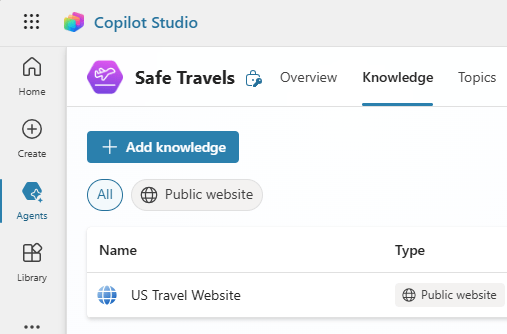
When using this agent, you are provided with several default migration websites. If you want to add other data, you can do so from the agent's Knowledge page.
Open the agent in Copilot Studio and select Knowledge at the top of the page.
Use cases
- Staff planning international trips can use a project manager to review specific travel documents required, such as passports or visas, ensuring they have everything necessary before departure.
- Staff can use the project manager to access health and safety guidelines—including information on vaccinations, local health risks, and consulate contact details—before traveling to a new destination.
- In the event of an emergency while on business travel, employees can quickly access emergency support information for their destination, including contact information for local emergency services and the nearest consulate.
Ways to extend the agent
- Integrating the company's travel data into the project manager will provide easy access to bookings directly through the project manager interface.
- Expanding the project manager with information on local emergency services and company resources will allow employees to quickly connect with emergency support while traveling.
- Integrating the project manager with the company's travel booking systems and experiences will simplify the approval process for employee business travel. This integration allows employees to easily submit business travel requests and receive approval through an agent interface.
- Employees can use the agent to view any available language support from the company's knowledge base before the trip, helping them prepare for potential language barriers.
- Employees can access local recommendations for restaurants, attractions, and activities at their destination by using recommendations directly from the company's knowledge base.
- Before traveling for business, employees can research the cultural norms and customs of their destination, ensuring they respect them and are better informed throughout their trip.
Limitations and safety controls
AI-generated content can contain errors, so remember to ensure it's accurate and relevant.
Related Articles
 Template Agent IT Helpdesk5 minutes read
 Template Agent Financial Insights7 minutes read
 Template Agent Citizen Services6 minutes read
 Template Agent Sustainability Insights7 minutes read
 Create a Custom Agent from the Agent Template4 minutes read
 Download Safedns Agent for Safe Browsing Software for $ 9.95, Free4 minutes read
Reader Comments 0
Sign in with email or Google to join the discussion.