Table of Contents
You can upload documents directly to a Microsoft Copilot Studio agent and use them as knowledge for generative answers. Open the agent, select Add knowledge , upload a supported file, give it a clear name and detailed description, and select Add to agent . Copilot Studio stores and indexes the upload in Dataverse.
Before uploading, decide whether a static agent-wide copy is appropriate. Direct uploads do not automatically synchronize when the original file changes, and their access model differs from connected SharePoint or OneDrive sources.
Direct upload vs SharePoint, OneDrive, file groups, and node-level files
Copilot Studio supports several ways to ground an agent in documents. They are not interchangeable.
| Method | Best for | Key behavior |
|---|---|---|
| Direct file upload | A controlled, relatively static set of documents | Creates an agent-level copy stored and indexed in Dataverse; manual replacement is required after source changes |
| SharePoint or OneDrive | Files or folders that change and should use source permissions | Connected content can synchronize and the user's credentials are checked before answers are returned |
| File group | Many uploads divided by predictable attributes | Combines files into one group with instructions for selecting the appropriate member |
| Generative answers node upload | A document that should be used only in a specific topic or flow | Offers more control over which generative answers node uses the uploaded content |
Direct agent-level uploads are available across the agent. If a document should not influence every generative route, use a targeted node configuration or explicitly exclude the knowledge where the product supports it.
Important distinction: 'Allow file input from users' is a different feature. It lets a user attach a file during a conversation; it does not permanently add that file to the maker-defined agent knowledge base.
Requirements and current limits
Dataverse search must be enabled
Uploaded-file knowledge requires Dataverse search. If the file option is unavailable or Dataverse files cannot be added, ask the environment administrator to confirm that Dataverse search is enabled and that the maker has the required permissions.
Storage and file limits
- Maximum file size: 512 MB per file .
- Maximum uploaded-file knowledge: 500 files per agent .
- Total uploads are also limited by the available Dataverse file storage in the environment.
- Encrypted, password-protected, or sensitivity-labeled files that cannot be indexed are unsupported for direct upload.
- Standalone image, video, executable, and audio files cannot be used as uploaded documents.
These are product ceilings, not content-quality targets. Hundreds of overlapping or poorly named files can reduce retrieval precision even when the upload is technically allowed.
How to upload files as a Copilot Studio knowledge source
- Open the agent in Microsoft Copilot Studio.
- Select Add knowledge from the Overview or Knowledge page. You can also start from the properties of a generative answers node when building node-scoped behavior.
- Drag and drop a file into the upload area, or browse to its location.
- Enter a clear name . Copilot Studio uses the filename by default, but a human-readable name is usually better.
- Add a detailed description that explains the document's subject, audience, scope, region, version, and effective date.
- Select Add to agent .
- Open the Knowledge page and wait for the source status to become ready before testing it.
Indexing time varies with the document type, file size, number of sources, and environment state. Do not publish based only on a successful upload; verify that the source is ready and retrieves the correct passages.
How to name and describe an uploaded document
The description helps generative orchestration determine when a knowledge source is relevant. 'Policy PDF' provides almost no routing information. A useful description states what the file contains and when it should or should not be used.
| Field | Weak example | Improved example |
|---|---|---|
| Name | handbook-final-v7.pdf | US Employee Leave Handbook — 2026 |
| Description | Employee information | Official 2026 leave eligibility, accrual, approval, and return-to-work rules for US employees. Do not use for contractors or employees outside the United States. |
Description checklist
- Subject: what questions the document can answer.
- Audience: which users, customers, employees, or products it covers.
- Jurisdiction: country, state, business unit, or market.
- Time: effective date, version, and expiration date.
- Exclusions: situations in which another source should be used.
- Authority: whether it is policy, guidance, a draft, or historical reference.
Descriptions do not repair contradictory content. Remove obsolete duplicates or define a clear precedence rule in the agent's instructions when multiple valid sources overlap.
Supported document types
| Category | Extensions |
|---|---|
| Microsoft Word | .doc, .docx |
| Microsoft Excel | .xls, .xlsx |
| Microsoft PowerPoint | .ppt, .pptx |
.pdf |
|
| Plain text and markup | .txt, .md, .log, .html, .htm |
| Structured text | .csv, .xml, .json, .yml, .yaml |
| OpenDocument | .odt, .ods, .odp |
| Publishing and rich text | .epub, .rtf, .tex |
| Apple iWork | .pages, .key, .numbers |
Format support means the file can be accepted and processed; it does not guarantee equally good retrieval from every layout. Complex spreadsheets, multi-column PDFs, scanned pages, speaker notes, and deeply nested JSON should be tested with realistic questions.
Prepare documents for better retrieval
- Use descriptive headings and a logical section hierarchy.
- Keep one authoritative topic per document where practical.
- Put important context in text, not only in decorative graphics.
- Use explicit labels for table columns and units.
- Remove repeated headers, navigation, boilerplate, and obsolete appendices.
- For scanned PDFs, apply accurate OCR before upload.
- Include version and effective-date information inside the document.
Use annotated images embedded in PDF files
Standalone image files are not supported as direct knowledge uploads. Copilot Studio can, however, use information from an image embedded in a PDF when that image has a meaningful annotation or alt text.
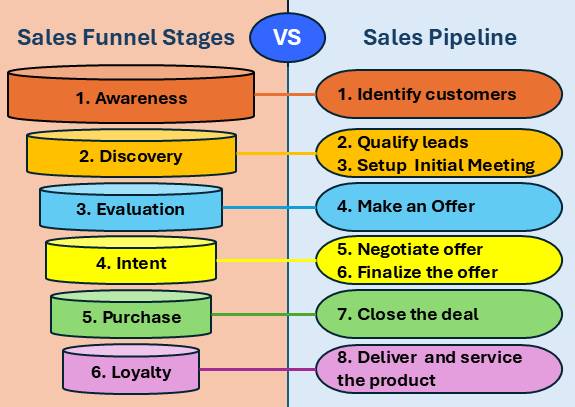
Describe the information, not merely the appearance. For example:
Sales funnel with five sequential stages: Awareness, Interest, Consideration, Evaluation, and Purchase. Lead volume narrows at each stage; the sales team begins direct qualification at Consideration.
'Blue funnel graphic' does not provide enough knowledge to answer a question about stages. Embedded images are supported in all languages, but icons are not supported as knowledge-bearing images.
Security and access-control considerations
Microsoft states that direct uploads are stored securely in Dataverse. Storage security does not by itself define who should be allowed to receive an answer based on the file.
- Direct uploads are agent knowledge: anyone who can use the agent under its configured access model might receive grounded content. Do not assume the original file's repository permissions follow the copied upload.
- Connected sources check user access: Microsoft documents credential checks for OneDrive and SharePoint knowledge before returning responses.
- Authentication matters: define the agent audience and sign-in requirements before adding confidential files.
- Data minimization matters: upload only the content necessary for the agent's purpose.
- Sensitivity protection can block indexing: encrypted, password-protected, or sensitivity-labeled documents are not supported by this direct-upload method.
Use a connected source when permissions differ by user. Copying confidential documents into agent-wide uploaded knowledge can flatten the original access boundary.
Test the knowledge source before publishing
- Wait until the file shows a ready status.
- Ask direct questions whose answers appear clearly in the document.
- Ask paraphrased and ambiguous versions of the same questions.
- Ask an out-of-scope question and confirm that the agent does not invent an answer from the file.
- Test conflicts with another knowledge source and verify the intended precedence.
- Inspect citations or source references and compare them with the exact passage.
- Test with the roles and authentication states that real users will have.
- Repeat the tests after replacing, adding, grouping, or removing files.
Maintain static uploads
Direct uploads are static. When the authoritative source changes, the copied knowledge does not automatically update. Establish an owner, review interval, effective date, and replacement procedure. Remove obsolete versions after validating the replacement so the agent does not retrieve conflicting rules.
If documents change frequently, a synchronized OneDrive or SharePoint source is usually easier to govern than a recurring manual upload process.
Troubleshooting uploaded-file knowledge
| Problem | Likely cause | What to check |
|---|---|---|
| Upload option is unavailable | Dataverse search, environment, or maker permission issue | Ask an administrator to confirm Dataverse search and access |
| File is rejected | Unsupported type, file over 512 MB, encryption, password, or sensitivity protection | Use a supported, unencrypted document within the limit |
| Source remains processing | Large file, complex content, storage issue, or initial environment setup | Wait, check environment capacity, review status, and retry only after confirming failure |
| Agent ignores the file | Vague description, source not ready, or answer is hard to extract | Improve the description, simplify document structure, and test exact passages |
| Agent gives an outdated answer | Static upload was not replaced | Upload the current version and remove the obsolete source after testing |
| Wrong users can receive content | Agent access does not match document sensitivity | Remove the file, restrict the agent, and use an access-aware connected source |
| Image content is not used | Standalone image, missing alt text, or unsupported icon | Embed the image in a PDF and provide detailed, informational alt text |
Frequently asked questions
Where are uploaded Copilot Studio files stored?
Microsoft documents that uploaded files are stored and indexed in Dataverse and consume the environment's available file storage.
How many files can an agent use as uploaded knowledge?
An agent can include up to 500 files as knowledge, with a maximum of 512 MB for each file. Dataverse storage capacity also applies.
Do uploaded files update automatically?
No. Direct uploads are static copies. Replace them manually after the authoritative source changes, or use a synchronized OneDrive or SharePoint source.
Can I upload a folder?
Direct upload selects individual files. OneDrive and SharePoint knowledge options can support files and folders, subject to their own limits and configuration.
Can Copilot Studio read images?
For this upload method, standalone images are not supported. An annotated image embedded in a PDF can be used when its alt text describes the information it contains.
Should I use one file or a file group?
Use individual sources for a small number of distinct documents. Use a file group when many uploaded files belong to one collection and the agent can select the right file by attributes such as region, role, product, tier, or effective date.
Related Articles
 Use unstructured data as a knowledge source for agents10 minutes read
 Create and Deploy Agents in Microsoft Copilot Studio9 minutes read
 Copilot Studio Knowledge Sources: Complete Guide10 minutes read
 How to Create File Groups in Microsoft Copilot Studio13 minutes read
 Overview of AI-Based Agent Creation7 minutes read
 Add Copilot Connectors to Copilot Studio Agents8 minutes read
Reader Comments 0
Sign in with email or Google to join the discussion.