What is GoogleBook? An overview of Google's new AI laptop for the Gemini era.
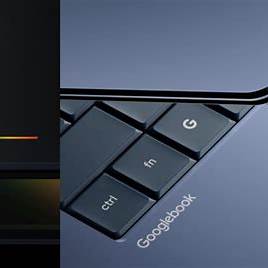
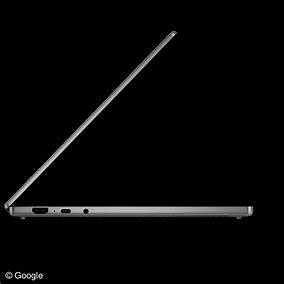
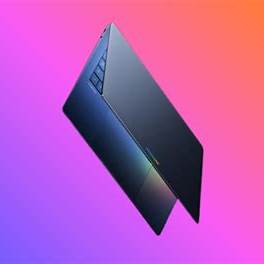
GoogleBook is Google's new line of AI laptops, built around Gemini Intelligence, Magic Pointer, Google Play, Android, and a premium Glowbar design.
- What is GoogleBook?
- Why is GoogleBook gaining attention?
- Is GoogleBook the new Chromebook?
- Key features of Google Books
- Which company will manufacture the Google Book?
- Who is GoogleBook suitable for?
- Can Google Books compete with MacBooks and Windows laptops?
- Should you buy a Google Book when it launches?
- Frequently Asked Questions about GoogleBook
- Conclude
What is GoogleBook?
Googlebook is a new line of AI laptops introduced by Google, designed around Gemini Intelligence and the Android ecosystem. Unlike the old understanding of 'Google Books' as a book search platform, Googlebook, in the context of today's new technology, is a new category of laptops from Google, aiming for a smarter, more connected, and AI-centric personal computing experience. Google included Googlebook in the compilation of new updates at Android Show I/O Edition 2026, along with Gemini Intelligence and other Android upgrades.
GoogleBook is more than just a laptop with a few added AI features. It represents Google's new direction in the personal computing market, where AI isn't just a standalone application but is integrated into the everyday user experience. According to WIRED, GoogleBook is a new laptop platform built on Android technology, deeply integrated with AI, and not an immediate replacement for Chromebooks.

Why is GoogleBook gaining attention?
The Googlebook garnered attention because it appeared at the right time, as the laptop market was entering the AI PC race. Previously, users typically chose laptops based on specifications, battery life, screen, keyboard, durability, and operating system. But with the Googlebook, Google is trying to change the question: laptops not only need to be powerful, but also need to understand context, offer proactive support, and connect well with personal devices.
GoogleBook is built to put Gemini Intelligence at the heart of the experience. This means that tasks such as searching for information, processing images, creating calendars, accessing files from your phone, opening Android apps, or creating personalized widgets can feel more natural. MacRumors reports that GoogleBook will have features like Magic Pointer, Create My Widget, Quick Access, Android phone connectivity, and a Glowbar design on the lid.
Notably, Googlebook doesn't appear as a single laptop model. It seems to be a category of devices, involving several major manufacturers such as Acer, ASUS, Dell, HP, and Lenovo. This suggests Google wants to create a broader AI laptop ecosystem, rather than releasing just one limited device.
Is GoogleBook the new Chromebook?
Googlebook is related to Chromebooks but isn't exactly the same. Chromebooks are known for their web-first philosophy: lightweight, fast, secure, affordable, and heavily reliant on the Chrome browser and web applications. Googlebook, on the other hand, takes an AI-first and Android-centered approach, meaning the experience is built more deeply around Gemini, Android apps, and the ability to sync with Android phones.
WIRED argues that the Googlebook won't replace Chromebooks, but it's a new step that will help Google establish a clearer position in the high-end laptop segment. Google hasn't yet announced the official name of the Googlebook's operating system, although there have been previous internal reports referring to it as Aluminium OS.
In other words, if Chromebooks once represented the era of web-based and cloud-based laptops, then GoogleBooks represents the era of AI-powered laptops, where the operating system, applications, and intelligent assistants work together to support users in every task.
Key features of Google Books
- Gemini Intelligence is the center.
At the core of the Googlebook is Gemini Intelligence. This is the AI layer that Google has incorporated into many of its devices and services, with the Googlebook being one of its most important products. With Gemini Intelligence, the Googlebook not only responds when users type commands, but can also offer suggestions based on the content currently displayed on the screen.
For example, when you're viewing an email with a meeting date, AI can suggest creating an event in your calendar. When you're working with images, AI can assist with comparison, matching, or contextual processing. This is a major difference between a laptop 'with chatbots' and a laptop designed from the ground up for AI.

- Magic Pointer – the smart mouse pointer
One of GoogleBook's most notable features is the Magic Pointer. Instead of just a regular mouse cursor, the Magic Pointer is designed to trigger contextual AI suggestions. Users can move or 'shake' the cursor to bring up Gemini and receive suggestions based on the content it's pointing to.
According to MacRumors, Magic Pointer can suggest creating a meeting when a user points to a date in an email, or support processing two selected images at the same time. This is how Google turns a very familiar laptop behavior into a natural AI trigger.
In terms of user experience, Magic Pointer can help reduce the number of steps involved. Users don't need to copy content, open a separate AI application, paste data, and then enter requests. Instead, the AI can appear right where the user is working.
- Create My Widget – create widgets using AI
GoogleBooks is also mentioned for its Create My Widget feature, which allows users to create custom widgets using natural language. Instead of having to install an application or design a dashboard themselves, users can describe their needs and let Gemini create a suitable widget.
For example, you can request a widget to track your class schedule, flights, exchange rates, weather, important emails, or daily work plans. According to MacRumors, this feature can connect to the internet and Google apps like Gmail and Calendar to create personalized dashboards.
This feature is ideal for users who frequently multitask. Instead of opening multiple tabs and applications, GoogleBook can turn the home screen into a personal information center.
- Deep synchronization with Android phones
One of the biggest advantages of the Google Book is its ability to connect with Android phones. The Google Book is designed so that Android users can more easily continue working between their phone and laptop.
According to WIRED, GoogleBook allows users to open applications from their Android phones on their laptops, continue working, and even search for or open documents and images from their phones directly within the Files app on GoogleBook.
This makes GoogleBook an attractive option for users already familiar with the Google ecosystem: Gmail, Google Drive, Google Photos, Google Calendar, Android phone, and Google Play. If implemented smoothly, GoogleBook could become a significant competitor to how MacBooks connect with iPhones within the Apple ecosystem.

- Apps from Google Play and the Android experience on your laptop.
The Google Book is described as a device that combines the power of Android, Google Play, and Chrome. This suggests Google wants to leverage the vast Android app store to serve laptop users. However, the major challenge lies in optimizing Android applications for the large screen, keyboard, touchpad, and desktop-style multitasking.
WIRED reports that GoogleBook aims for a better Android app experience that adapts well to larger screens, rather than simply scaling the phone interface onto a laptop. This is crucial because if GoogleBook wants to compete with Windows laptops or MacBooks, the app experience must be good enough for real work, not just for testing.
For the average user, Google Play can offer significant advantages: note-taking, learning, photo editing, task management, entertainment, social media, banking, e-commerce, and many other familiar tools are all accessible from a laptop.
- Premium Glowbar design
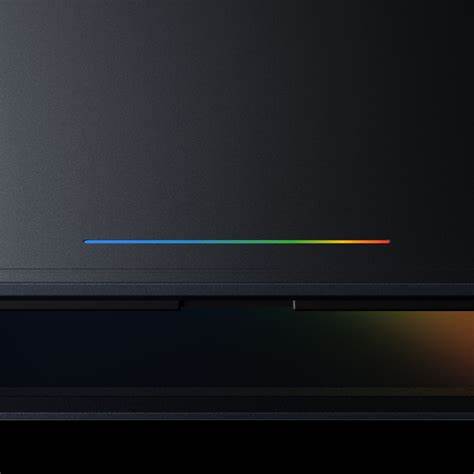
The Googlebook also stands out thanks to a design detail called the Glowbar. This is a light strip on the lid, featuring Google's signature colors, and can serve as a distinguishing feature between the Googlebook line and other laptops.
According to WIRED, Glowbar gives Googlebooks a unified brand identity, creating a premium feel and reminiscent of the lightbar on the previous Chromebook Pixel. The Guardian also notes that Googlebooks will launch in the fall and will have models from multiple manufacturers, while details on specifications and pricing will be announced later.
The Glowbar design could become a crucial branding element. In the laptop market, where many devices have very similar appearances, a distinct identifying detail will help the Googlebook become more memorable.

Which company will manufacture the Google Book?
Googlebooks are not manufactured by a single company. Tech sources indicate that the first manufacturers to join include Acer, ASUS, Dell, HP, and Lenovo.
This means the market could see many different Googlebook models: a slim and light version for students, a high-end version for professionals, a large-screen version for creators, or a battery-optimized version for frequent travelers. However, full specifications, pricing, and specific model lists are not yet available, so users should wait for official information before making a purchase decision.
Who is GoogleBook suitable for?
GoogleBooks may be suitable for the following user groups:
Android users
If you're using an Android phone, the Google Book is a very noteworthy product. The ability to open phone apps on your laptop, find files from your phone, and switch between the two devices can make your daily experience more seamless.
Students
Students need laptops for online learning, assignments, note-taking, research, deadline management, and group meetings. GoogleBooks, with its Gemini Intelligence, personalized widgets, and Google Calendar synchronization, can support more effective learning.
Office workers
Office workers often handle emails, meeting schedules, documents, spreadsheets, phone calls, and many other repetitive tasks. Magic Pointer and Gemini can help streamline operations such as creating schedules, searching for information, summarizing content, or processing basic data.
Content creator
Content creators, marketers, bloggers, and social media managers can benefit from the ability to process images, create dashboards, find ideas, manage files, and connect with Google applications. With deep AI integration, GoogleBook can become a device that supports faster content creation.
People who like new technology
If you're interested in AI PCs, Android laptops, or devices within the Google ecosystem, the Google Book is a product to watch in 2026.
Can Google Books compete with MacBooks and Windows laptops?
GoogleBook has the potential to compete, but it still needs time to prove itself. MacBooks have advantages in performance, battery life, the Apple ecosystem, and professional applications. Windows laptops have advantages in software, gaming, business, and hardware diversity. For GoogleBook to break into this market, it needs to do three things well: its AI must be truly useful, its Android applications on laptops must be powerful enough, and its hardware must be worthy of its premium positioning.
Ars Technica identifies Googlebooks as an upcoming line of Android-powered laptops, designed from the ground up with Gemini Intelligence, but also notes that the practical effectiveness of the AI features needs to be tested once the product reaches consumers.
Therefore, GoogleBook may not immediately replace MacBooks or Windows laptops, but it opens up a different path: AI-first laptops for Android users and the Google ecosystem.
Should you buy a Google Book when it launches?
At the moment, it's impossible to say for sure whether or not to buy a Google Book, as Google hasn't yet released the full specifications, price, battery life, screen, processor, and real-world performance of each model. However, the Google Book is worth waiting for if you need a modern laptop that's well-integrated with Android and want to experience AI deeply integrated into the operating system.
You should consider a Google Book if you use an Android phone, work extensively with Google apps, want a lightweight and smart laptop, or prefer devices with contextual AI support. Conversely, if you need specialized Windows software, heavy engineering software, PC gaming, or professional workflows on macOS, you should wait for real-world reviews before buying.
Frequently Asked Questions about GoogleBook
What is GoogleBook?
GoogleBook is Google's new line of AI laptops, designed around Gemini Intelligence, Android, Google Play, Chrome, and deep synchronization with Android phones.
Is Googlebook the same as Google Books?
No. In this article, Googlebook refers to Google's new line of laptops. Google Books, on the other hand, is Google's online platform for searching and previewing books.
Can Google Books replace Chromebooks?
There are currently no signs that Googlebook will immediately replace Chromebooks. WIRED states that Googlebook is not replacing Chromebooks, but rather a new, more advanced laptop platform focused on AI.
What operating system does Google Books use?
Google has not yet announced the official name of the operating system. Some sources suggest that the operating system is related to the Android platform and was previously referred to internally as Aluminium OS.
How much does a Google Book cost?
There is currently no official pricing. Information regarding pricing, specifications, and specific models is expected to be released closer to the device's launch date.
When will the Google Book be available for sale?
Multiple sources indicate that the Googlebook will appear in the fall of 2026, with participation from manufacturers such as Acer, ASUS, Dell, HP, and Lenovo.
Conclude
GoogleBook is a significant step for Google in the AI laptop market. Instead of continuing to rely solely on traditional Chromebooks and ChromeOS, Google is opening up a new laptop category where Gemini Intelligence, Android apps, Magic Pointer, Create My Widget, Quick Access, and Glowbar become key identifying features.
The most appealing aspect of the Googlebook lies in how Google places AI at the heart of the PC experience. If features like Magic Pointer, Android phone synchronization, and AI widgets work seamlessly in practice, the Googlebook could become a very attractive option for Android users, students, office workers, and anyone looking for a more modern laptop for the AI age.
However, the Googlebook still leaves many unanswered questions: its price, specifications, battery life, whether Android applications on the laptop are powerful enough, and whether Gemini Intelligence truly helps save time in daily work. Therefore, the Googlebook is a product worth considering, but users should wait for more official information and real-world reviews before deciding to buy.
You've just finished reading the article "What is GoogleBook? An overview of Google's new AI laptop for the Gemini era." edited by the TipsMake team. You can save what-is-googlebook-new-ai-laptop-of-google.pdf to your computer here to read later or print it out. We hope this article has provided you with many useful tech tips and tricks. You can search for similar articles on tips and guides. Thank you for reading and for following us regularly.
- How to turn off Google's AI features to avoid being bothered.
- Instructions for getting started with Gemini Embedding 2
- How to turn Gemini into a powerful productivity tool.
- How to Convert Document Files to Speech with Gemini
- 4 Google apps that work better with Gemini.
- Instructions for using the Gemini utility