Table of Contents
Gemini can help students study when it is used to explain, question, and give feedback—not simply to produce an answer for submission. The most useful prompts make the student attempt the work, reveal the next step gradually, and end with a way to check understanding.
Features vary by age, account type, school settings, region, and rollout. If a named tool is not visible in the mobile app, check the web version and the current Gemini help pages.
1. Use Guided Learning instead of asking for the answer
For a difficult concept, ask Gemini to teach in stages. Guided Learning is designed to ask questions and provide explanations, but you can request the same behavior explicitly:
Help me understand conservation of momentum. Start by asking what I already know.
Use one simple example, then give me a problem to solve. Do not reveal the next
step until I attempt it. If I make a mistake, identify the specific misconception
and give a hint rather than the final answer.
This method is more effective than requesting a complete solution immediately because it exposes where your understanding breaks down. After the lesson, close the chat and explain the concept from memory on paper.
The official Gemini learning-tools guide explains how to select Guided Learning and add supporting files.
Ask for different representations
If an explanation does not work, change the representation rather than asking for the same answer again:
- “Explain this with a diagram and label every variable.”
- “Give me a physical analogy, then explain where that analogy stops being accurate.”
- “Show the symbolic method first and a numerical example second.”
- “Compare this idea with the concept I learned in the previous chapter.”
Check definitions, formulas, and technical claims against your course materials. A confident explanation can still be wrong.
2. Turn notes into practice that tests recall
Gemini can create flashcards, quizzes, study guides, and practice tests from notes or an uploaded file. Ask for questions that require recall and application rather than a summary you only reread.
Use only the attached lecture notes. Create:
- 8 short-answer questions that cover different sections;
- 4 application questions using new examples;
- 3 plausible-mistake questions that test common misconceptions.

Ask one question at a time. Wait for my answer, grade it against the notes, explain
the missing point, and return missed topics later in the session. Do not introduce
facts that are not in the file.
For a standardized exam, verify that the format, timing, calculator rules, and scoring match the official testing organization. A generated “SAT-style” or “JEE-style” question is not automatically representative of the current exam.
Gemini’s study-material help page covers built-in quizzes, flashcards, study guides, and practice tools where available.
Keep an error log
After each session, record:
- the question or topic;
- your incorrect answer;
- the reason it was wrong;
- the correct rule or method;
- a date to retry a similar question.
This turns an AI quiz into a study plan. Do not rely on Gemini’s score alone; compare ambiguous or high-stakes answers with an answer key, textbook, or instructor.
3. Use Canvas for revision, not ghostwriting
Canvas provides a workspace for developing text or code with Gemini. It is useful for outlining, reorganizing a draft, identifying unclear reasoning, or generating test cases.
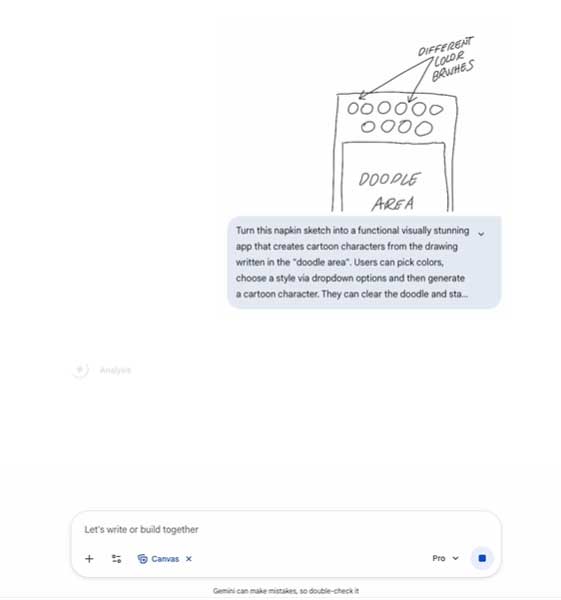
For an essay, write a first version before asking for help:
Act as an editor, not a ghostwriter. Read my draft and:
1. restate my thesis in one sentence;
2. identify paragraphs that do not support it;
3. flag claims that need evidence;
4. point out two possible counterarguments;
5. ask me three revision questions.

Do not rewrite the essay. Quote only the sentence you are commenting on.
For code:
Review this program as a tutor. First ask me to predict its output. Then identify
one bug at a time and give a small test that exposes it. Do not provide the final
corrected program unless I ask after attempting the fix.
Follow the instructor’s AI policy. If AI assistance must be disclosed or cited, record what you uploaded, the prompts you used, and how the final work changed.
4. Study from your own sources
You can upload class notes, slides, readings, images, and supported documents. Give Gemini a source boundary so it does not mix the course material with general web knowledge:
Use only the attached chapter and lecture notes. Build a study guide organized
by the instructor’s three learning objectives. For every definition, include the
page or slide where it appears. Mark any question the supplied files cannot answer.
Useful follow-ups include:
- “Compare these two definitions and explain why they are not interchangeable.”
- “Create a concept map linking the six terms in this lecture.”
- “Which section contains the evidence for your third claim?”
- “Give me a blank version of the diagram to label from memory.”
An Audio Overview can help you revisit themes while away from the screen. Listen after active study, not instead of it. Return to the written source for equations, citations, dates, and exact wording.
Protect private material
Do not upload unpublished research, personal records, exam questions, licensed course packs, or another student’s work without permission. School-managed accounts may have different controls from personal accounts; follow institutional rules.
5. Prepare for applications and interviews
Gemini can help analyze a job description, improve the structure of a résumé, and simulate an interview. It should not invent experience, skills, certifications, or results.
Compare my résumé with this internship description. Create a table with:
- requirement from the posting;
- evidence already present in my résumé;
- missing or weak evidence;
- a question I should answer before revising.

Do not add qualifications or achievements that I did not provide.
For interview practice:
Run a five-question mock interview for this role. Ask one question at a time.
After each answer, rate clarity, relevance, evidence, and concision. Ask a follow-up
when my example is vague. At the end, list repeated weaknesses and give me one
different question to practice without AI.
Research the employer through its official site and credible independent sources. Treat generated company facts, salary ranges, and job requirements as leads until verified.
A study workflow that keeps you in control
| Stage | Student action | Gemini’s role |
|---|---|---|
| Attempt | Try the problem or draft first | Wait or ask diagnostic questions |
| Feedback | Explain your reasoning | Identify a specific gap and give a hint |
| Correction | Revise in your own words | Check the revision against supplied material |
| Retrieval | Answer a new question without notes | Vary the example and delay missed topics |
| Verification | Consult the textbook, key, or instructor | Point to sources and mark uncertainty |
Before submitting any work
- Can you explain every claim, calculation, and line of code yourself?
- Did you verify facts and citations in the original sources?
- Did Gemini invent a quotation, page number, reference, or achievement?
- Does your course allow this kind of AI assistance?
- Did you preserve your own voice and reasoning?
- Have you disclosed the assistance if required?
Gemini is most valuable as a practice partner: it can ask another question, reframe an explanation, and give immediate feedback. Learning still happens when you retrieve, apply, correct, and explain the material yourself.





Reader Comments 0
Sign in with email or Google to join the discussion.