Table of Contents
Gemini Deep Research is useful when a question requires information from many sources, comparison across several criteria, and a report that explains how the pieces fit together. It is less useful for a simple fact that can be checked on one authoritative page.
The quality of a research report still depends on the scope, source selection, and verification. These six practices make the result easier to trust and act on.
1. Start with the decision, not just the topic
“Research electric cars” leaves too many choices to the tool. State what you need to decide, who the report is for, the location, the time frame, and the constraints.
A stronger prompt looks like this:
I need to shortlist three electric cars for a family of four in the UK.
Compare models currently available to order using:
- total purchase price before optional extras;
- official range and charging information;
- boot space and child-seat practicality;
- warranty;
- independent safety rating;
- expected delivery information.

Use manufacturer pages for specifications and the relevant independent safety body
for crash ratings. Show the date checked for price and availability. Separate facts
from your recommendations and flag any missing or conflicting information.
This prompt tells Deep Research what evidence matters and prevents a broad industry overview from replacing the actual decision.
2. Review and edit the research plan
Deep Research can propose a plan before it begins. Read that plan as if it were an outline from a researcher. Look for missing criteria, an inappropriate region, weak source types, or a comparison that cannot answer your question.
Useful plan revisions include:
- “Use primary sources for eligibility rules, specifications, and prices.”
- “Do not use affiliate roundups as evidence for product claims.”
- “Include one section for costs that are not shown in the headline price.”
- “Compare like-for-like time periods and currencies.”
- “List disagreements between credible sources instead of averaging them.”
Do not make the plan so rigid that it excludes an important finding. Specify evidence standards and decision criteria, while allowing the research to identify genuine gaps.
3. Inspect sources while the report is created
Use the source or sites-browsed view when it is available. A long source list is not automatically a strong one. Check whether key claims come from:
- government agencies, regulators, standards bodies, or official documentation;
- the organization responsible for a current policy, schedule, or product specification;
- original research rather than a summary of that research;
- independent reporting when the topic needs scrutiny rather than a company’s own description.
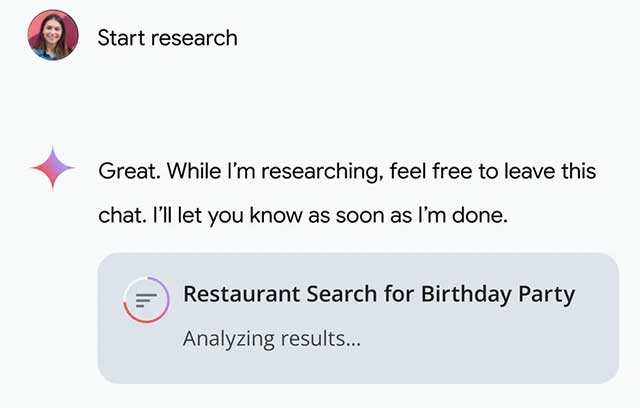
Watch for repeated articles that all trace back to the same press release, pages from the wrong country, undated material, and search snippets used without opening the page. If an essential source is missing, stop and edit the plan or request a targeted follow-up.
4. Ask focused follow-up questions
After the first report, do not ask only for “more detail.” Identify a gap or a claim that needs stronger evidence. For example:
- “Which three conclusions rely only on secondary sources?”
- “Open the official terms and verify the cancellation conditions directly.”
- “Add a table showing the date and source for every price.”
- “What evidence would change this recommendation?”
- “Find credible sources that disagree with the report’s main conclusion.”
- “Remove any claim that cannot be traced to a source you accessed.”
A follow-up can use the material already gathered or trigger additional research. Reopen the cited page when the distinction matters; a revised AI answer is not itself verification.
5. Treat local and high-stakes research carefully
Deep Research can help compare local services, events, schools, camps, contractors, or travel options, but this information changes quickly. A business directory may show a company that has moved, a registration page may list an old date, and a price may exclude fees.
For local research, require:
- the exact geographic boundary;
- an “information checked” date;
- a direct link to the provider or responsible authority;
- a distinction between confirmed availability and a directory listing;
- phone or email verification before booking, paying, or traveling.
For medical, legal, financial, or safety questions, use the report to organize authoritative information—not to replace a qualified professional. Confirm current rules and personal eligibility with the responsible authority.
6. Export only after verifying the report
Gemini can export a Deep Research report to Google Docs and, where available, create an Audio Overview. These formats are useful for editing, sharing, or listening, but they preserve the report’s weaknesses as well as its strengths.
Before exporting:
- open every source supporting a key decision;
- check quoted wording, dates, numbers, and units;
- remove unsupported recommendations;
- label uncertainty and unresolved conflicts;
- confirm that the report contains no private or confidential data that should not be shared.
After export, keep source links beside the claims they support. A separate reference list is helpful, but readers should not have to guess which source supports which statement.
Using Audio Overview well
An Audio Overview is best for revisiting the main themes after you have checked the written report. It is not a substitute for tables, citations, legal wording, or exact prices. Listen for orientation, then return to the text before making a decision.
According to the current Gemini Deep Research help page, export and Audio Overview controls are available from the report or Canvas interface, subject to account and feature availability.
A reusable Deep Research prompt
Research question:
[State the decision or question.]

Audience and purpose:
[Who will use the report and what will they do with it?]

Scope:
- Location:
- Time period:
- Included:
- Excluded:

Comparison criteria:
1.
2.
3.

Source requirements:
- Prefer primary and authoritative sources for factual claims.
- Use independent sources where evaluation or criticism is needed.
- Include the publication or update date when available.
- Identify claims that rely on one source.
- Flag inaccessible, conflicting, or missing evidence.

Output:
- Short answer first
- Comparison table
- Evidence by criterion
- Uncertainties and disagreements
- Recommended next checks
- Sources linked beside the claims they support
Final verification checklist
- Does the report answer the original decision rather than merely describe the topic?
- Are current claims supported by current sources?
- Are specifications and rules taken from the responsible organization?
- Did you open the most important citations?
- Are facts separated from interpretation?
- Does the report disclose missing or conflicting evidence?
- Have time-sensitive details been confirmed before action?
Deep Research saves time by gathering and organizing material. It does not transfer responsibility for the conclusion. The most useful workflow combines a clear decision brief, a reviewed research plan, targeted follow-ups, and direct checks of the evidence.
Related Articles
 How Gemini Get Data from Gmail, Drive Works?3 minutes read
 Google Announces Gemini 2.5 Pro Deep Think, Beats OpenAI's O3 and O4 Models4 minutes read
 What Is Gemini 3 Deep Think?8 minutes read
 What Is ChatGPT Deep Research?6 minutes read
 8 Ways to Use ChatGPT's Deep Research Tool8 minutes read
 Google Launches Gemini 3: Surpasses GPT-5.1 on Many Important AI: Key Details4 minutes read
Reader Comments 0
Sign in with email or Google to join the discussion.