Table of Contents
When AI chatbots first emerged, and everyone was racing to release their own good-sounding AI chatbot versions, comparisons between apps like Gemini and ChatGPT were easy. But as Google and OpenAI continued to add new chatbot features, models, and ways to access them, the differences became less apparent.
Currently, both apps offer most of the functionality you'd expect from any top-tier AI chatbot: answering questions, web searching, multilingual translation, audio understanding, and image creation. So what are the differences, and which one should you use?
Comparing Gemini and ChatGPT: An Overview
The gap between Gemini and ChatGPT is narrowing, but they still differ in a few key areas. Here's a quick summary of the comparison between the two platforms:
|
ChatGPT |
Gemini |
|
|---|---|---|
|
Developer |
OpenAI |
|
|
Model |
GPT-4o mini (available free of charge); GPT-4o, o3, and o4-mini |
Gemini 2.5 Flash (available for free); Gemini 2.5 Pro (limited free quantity) |
|
Context window |
128,000 tokens |
Maximum 1 million tokens |
|
Supported languages |
Over 50 |
Over 40 |
|
Real-time web search |
Yes (powered by Bing) |
Yes (supported by Google) |
|
Create video |
Yes (Sora) |
Yes (Veo) |
|
Create images |
Yes (GPT-4o) |
Yes (Imagen 4) |
|
Memory |
Automatic memory; saves preferences from conversations. |
Manual memory |
|
Voice mode |
Yes (multi-platform) |
Yes (mobile only) |
|
Custom chatbot |
Yes, it's available for paid users; it can integrate image creation and code execution. |
Yes, it's for all users; seamlessly integrates with Google apps; no image creation required. |
|
Foundation |
Web, mobile, and desktop |
Web and mobile |
|
Price |
Free; ChatGPT Plus costs $20/month; ChatGPT Pro offers more features for $200/month. |
Free; Gemini AI Pro costs $19.99/month; Google AI Ultra offers expanded access for $249.99/month; Google Workspace users get Gemini for free. |
Differences between Gemini and ChatGPT
Both are powered by modern AI models, but each has its own strengths.
ChatGPT and Gemini are powered by modern, multimodal AI models capable of doing almost anything. ChatGPT is supported by two model groups: GPT-4o and o3/o4; Google Gemini, the chatbot, is powered by Google Gemini. Each model contributes to the unique strengths of ChatGPT and Gemini.
- Context window . ChatGPT's context window is significantly smaller than Gemini's: 128,000 tokens compared to one million tokens. Some users won't notice the difference, but if you're working with large documents or analyzing code, you'll likely encounter ChatGPT's limitations.
- Image creation . Both apps allow you to create images using AI. ChatGPT uses GPT-40, while Gemini uses the newer text-to-speech image creator, Imagen 4. If image creation is important to you, ChatGPT limits the number of images you can create with a free account, while Gemini doesn't impose any such limits.
- Video . ChatGPT Plus users can create videos through Sora, and paid Gemini users can create videos with Veo. The difference is that Veo 3 now offers higher output quality and includes audio. You can also create videos directly from the Gemini app, while ChatGPT users need separate access to Sora.
- Memory . Both apps have memory, but they work differently. ChatGPT's memory function is enabled by default for all ChatGPT Plus accounts and automatically records details and preferences shared in your chat to tailor responses. With Google Gemini, you need to manually add memos in the settings, making it more like ChatGPT's custom instructions.
- File conversion . ChatGPT can convert files from one format to another – for example, you can convert an article into a presentation (and vice versa). Gemini does not currently offer this functionality.
There are many such small differences between the two apps, but you won't really know which one is important to you until you start using them. This is also why some people use both.
Gemini is deeply integrated into the Google ecosystem, while ChatGPT offers broader integration capabilities.
As you can imagine, Gemini is deeply integrated into the Google ecosystem. Without leaving the conversation, you can ask Gemini to retrieve real-time information from other Google apps, including Gmail, Drive, Maps, Flights, Hotels, and YouTube. Simply type @[name of the app you want to search] and then enter your question.
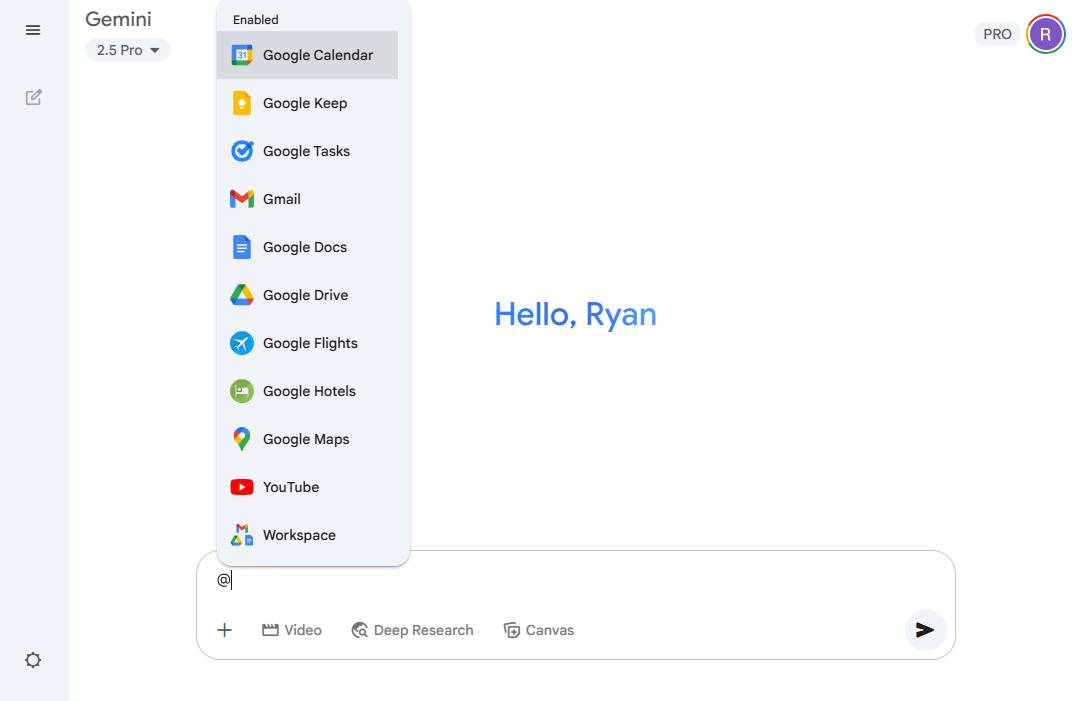
In fact, this means you can do things like:
- The request is for Gemini to retrieve details from an email thread in Gmail.
- Share a link to a file stored in Google Drive or export the contents of that file directly in your chat.
- Export Gemini responses to Google Docs, Gmail, or Google Keep.
- Plan your trip – including flights, driving routes, and accommodations – for your upcoming journey.
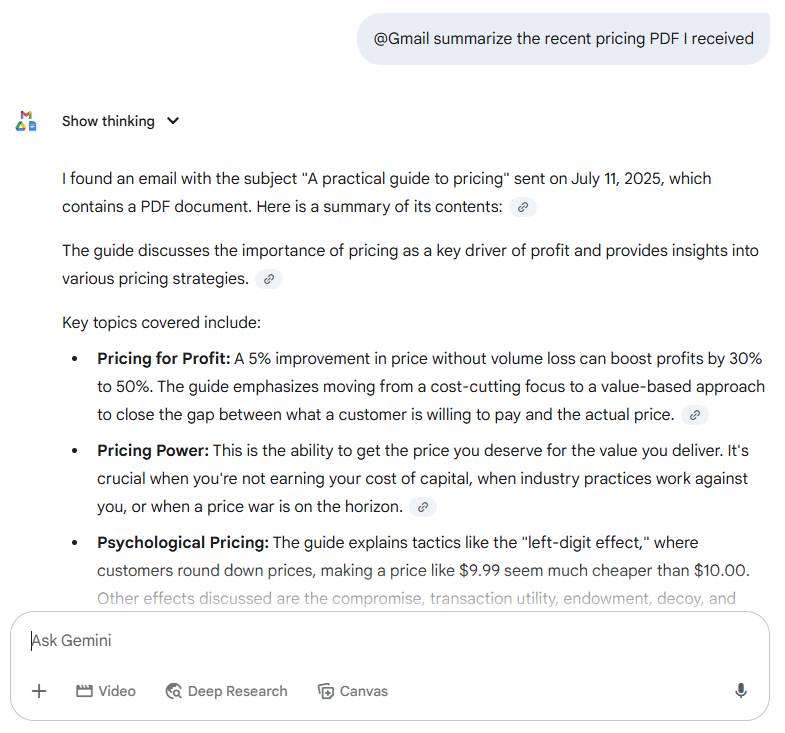
For example, if you ask Gemini to reference Gmail or Drive, it will not only retrieve details from the referenced email or file but also clickable links if you want to delve deeper.
ChatGPT integrates with Google Drive , so it can read documents like Docs, Sheets, etc. But first you have to connect your Google account and tell it exactly which files to view - and it still can't access your email.
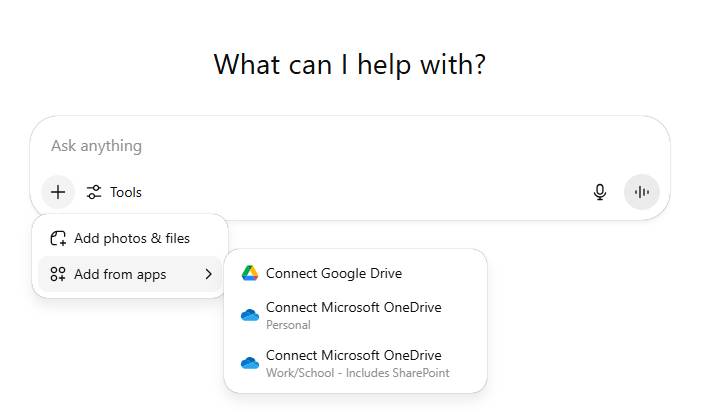
Instead, ChatGPT lets you pull pre-made or custom chatbots (called GPTs) into your ChatGPT chat by typing @[GPT name] followed by your prompt in the message bar. It's a different kind of integration than Gemini and Google, but you can easily switch between chatbots and get the right kind of AI-based support for each situation. For more direct integration with other apps, ChatGPT's free plan integrates with Google Drive and Microsoft OneDrive, and ChatGPT Plus connects with about a dozen popular apps like Dropbox, Canva, Box, GitHub, Hubspot, and Teams.
Both apps allow you to build custom chatbots, but ChatGPT offers more advanced features.
If you're a Plus or Enterprise user, OpenAI lets you build custom chatbots (GPTs) – and there's no limit to the number of GPTs you can build. All you need to do is tell the GPT builder, in simple English, what you want to create, and the builder will proceed from there.
Custom GPTs can browse the web, generate images, and run code. You can also upload knowledge files—for example, writing style guides or help documents—directly to your GPT generator to provide information for GPT responses.
This is an example of a GPT created by simply instructing the GPT builder to create a chatbot that only shares interesting facts about otters.
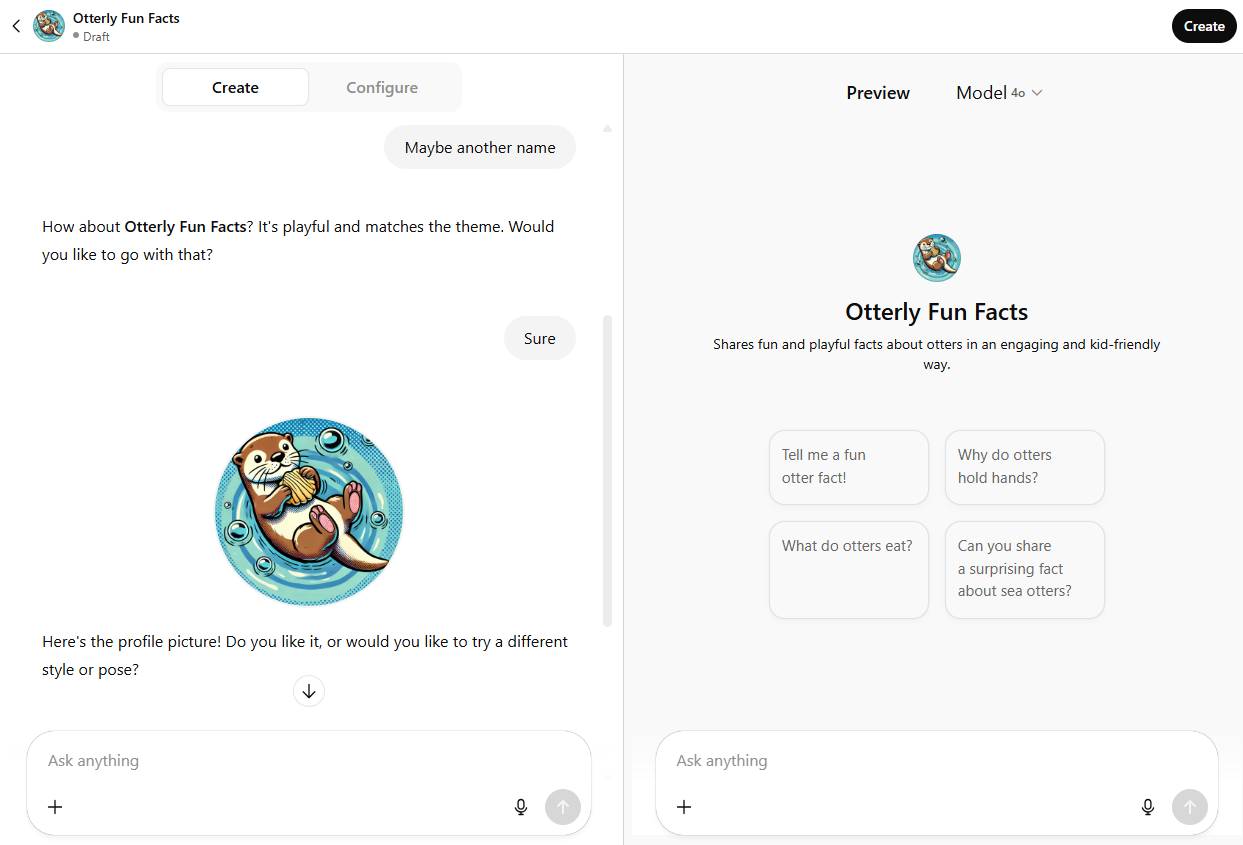
Google has a similar feature called Gemini Gems, and it's available to all Gemini users—even if you're using the free plan. It's not as fully automated as ChatGPT, as you need to write the instructions and name your Gem yourself instead of letting the bot handle it.
However, the process remains the same: Write down what you want to build, and Gemini will take care of the rest. With just a few sentences, you can create a Gem that connects to Google Maps to show which zoos are closest to your location.
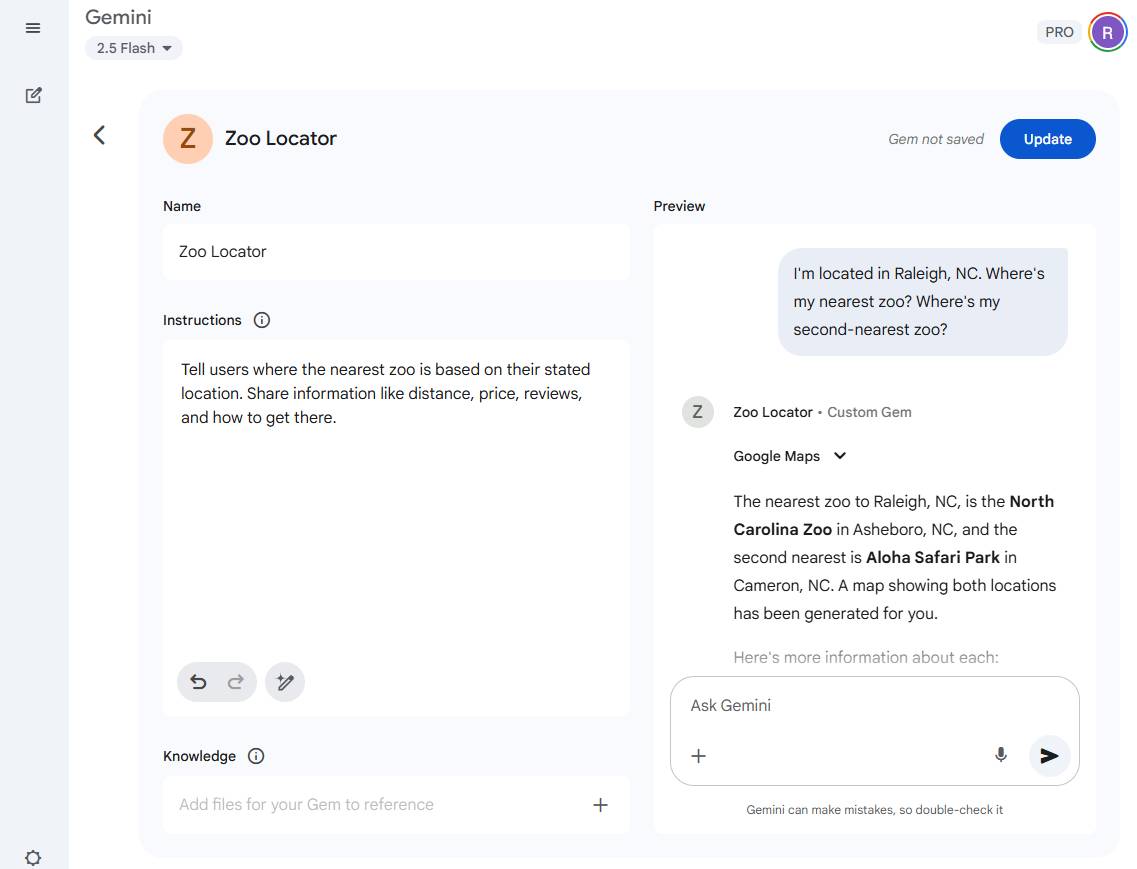
Unlike GPT, you cannot use Gem to create AI images or interact with Gem using Gemini Live (voice mode). If those features are important to you in a custom chatbot, stick with ChatGPT.
Both apps are similarly priced, but Gemini offers more free features.
OpenAI charges $20/month for ChatGPT Plus, and Google charges $19.99/month for Gemini AI Pro. With only a small difference between the paid versions of each service, you might think there's not much to discuss. But with multiple tiers—free, paid, group, and premium—the speed of analytics is well worth it.
ChatGPT is relatively simple: In addition to the $20/month Plus plan, there's a $200/month Pro plan that offers unlimited access to multiple models, expanded access to in-depth research and Sora video creation, as well as access to research previews of newer features like Operator. If you want your team to be able to work together on ChatGPT, you can purchase the Team plan for $30/month/user.
Google offers two ways to access Gemini's paid features. If you're using a personal Google account, you can upgrade to Google AI Pro for $19.99/month, or—if you want to ensure you'll almost never encounter usage limits—you can subscribe to Google AI Ultra for $249.99/month. If you have a Google Workspace account, Gemini is included, although the Standard and Plus plans give you more access than the lower-tier Starter plan.
You can't go wrong using any app as a free user, but it's worth noting that Gemini is generally more generous in adding features to its free plan than ChatGPT. Gemini's free plan includes Gems (custom GPT), unlimited voice calls, and access to the latest models—all features you would normally pay for with ChatGPT.
Gemini vs. ChatGPT: Which is better?
If you're still wondering about the difference between Gemini and ChatGPT, the truth is there isn't much of a contrast. But that answer probably won't help much if you're still undecided about which one to use.
The advice is: If you use Google a lot, use Gemini. Otherwise, ChatGPT is still the best option for most people.
Of course, there are some exceptions. If you work with large documents and rely on large context windows, Gemini might be a better fit; Gemini is also better for video enthusiasts thanks to its Veo integration.
Related Articles
 minutes read
 5 Reasons Why Gemini Advanced Is Far Superior to ChatGPT Plus7 minutes read
 Compare ChatGPT and Gemini Learning Modes7 minutes read
 ChatGPT vs Claude vs Gemini: Which AI Should You Use?12 minutes read
 Which Is Better Gemini Advanced or ChatGPT Plus: What to Know13 minutes read
 Why Is Claude Superior to Gemini and ChatGPT?7 minutes read
Reader Comments 0
Sign in with email or Google to join the discussion.