Table of Contents
Copilot Studio includes security and governance controls for agent creation, data access, publishing, monitoring, and administration. A secure deployment still requires deliberate configuration: administrators must decide who can build agents, which data and connectors they can use, where agents can be published, and how activity is audited.
Copilot Studio security controls at a glance
| Control | What it helps administrators manage |
|---|---|
| Runtime protection status | Highlights an agent's security status on the Agents page so makers can address warnings before publishing. |
| Power Platform data policies | Allow or block capabilities such as unauthenticated use, knowledge sources, connectors, skills, HTTP requests, channels, triggers, and Application Insights. |
| Authentication and credentials | Controls how users sign in and whether a tool runs with the user's own credentials. Manual Microsoft Entra ID authentication can also use certificates where supported. |
| Audit and monitoring | Provides agent activity records through Microsoft Purview and monitoring or alerting options through Microsoft Sentinel. |
| Environment routing | Directs makers to approved Power Platform environments instead of allowing unmanaged development in arbitrary locations. |
| Publishing and sharing controls | Restricts channels and audiences, helping prevent an agent from being exposed more broadly than intended. |
| Customer-managed keys | Lets eligible organizations manage encryption keys for a Copilot Studio environment. |
| Customer Lockbox | Adds an approval workflow for certain Microsoft support access to customer data, subject to documented coverage limits. |
Start with identity, environments, and least privilege
Give maker and administrator access through managed Microsoft Entra ID groups where practical, and assign only the roles each person needs. Separate development, test, and production environments so experimental agents do not share the same controls or data connections as production agents.
Environment routing can place new makers in an approved workspace. For higher-risk agents, review authentication, audience restrictions, connection ownership, service accounts, and the permissions of every knowledge source before publishing.
Use data policies to reduce exposure
Power Platform data policies are one of the main administrative safeguards for Copilot Studio. Apply them at the tenant, environment group, or environment level according to the deployment model. Block connectors, channels, knowledge sources, HTTP access, and other features that the agent does not require.
A policy is not a substitute for testing. Confirm that blocked combinations behave as expected in a test environment, and repeat the check after adding a connector, tool, trigger, or channel. The practical controls to verify should also be part of a broader Copilot Studio compliance review.
Monitor agents and investigate changes
Audit records can help administrators understand who changed or invoked an agent and which protected actions occurred. Microsoft Purview supplies audit capabilities, while Microsoft Sentinel can support centralized monitoring and alerts. Availability, event detail, retention, and licensing vary, so validate the records your organization actually receives before relying on them for incident response.
Before release, use a repeatable Copilot Studio agent testing process. Test both expected conversations and security boundaries, including unauthorized users, restricted data, failed connectors, and unsafe tool requests.
Understand contractual and service boundaries
Copilot Studio follows Microsoft's Security Development Lifecycle, but customer obligations are also defined by the applicable Product Terms, Data Protection Addendum, licenses, and service documentation. Use Microsoft's current compliance resources to confirm certifications, geographic availability, data residency, and feature-specific limitations; do not assume that enabling one control makes the entire agent compliant.
Customer Lockbox can govern certain support access to customer data, but its coverage is not universal. Microsoft documents exclusions for outbound data and audit-logging pipelines. Review the current Copilot Studio security and governance documentation before treating Lockbox as a complete boundary.
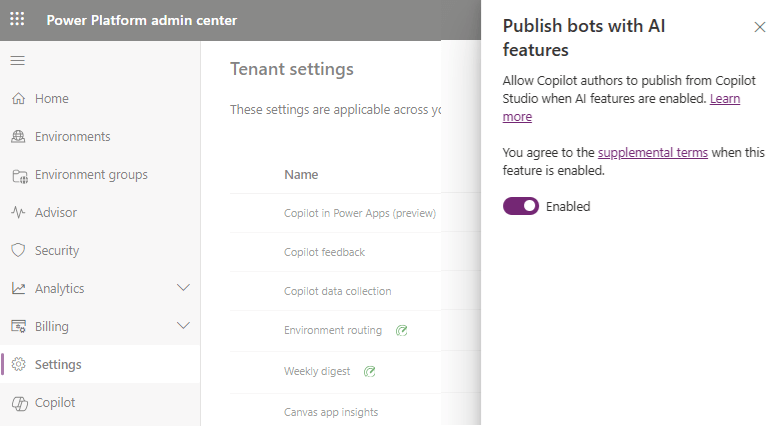
Pre-publish security checklist
- Confirm maker, administrator, and end-user access.
- Apply restrictive data policies and document approved exceptions.
- Review every connector, knowledge source, tool, trigger, and channel.
- Test authentication, permissions, and failure behavior.
- Verify audit events and alert routing in the production design.
- Document data location, retention, encryption, and support-access requirements.
- Reassess the agent after configuration, model, or data-source changes.
Security is an operating process rather than a one-time publishing setting. Keep ownership clear, monitor deployed agents, and periodically remove permissions and integrations that are no longer needed.
Related Articles
 Overview of Copilot Studio11 minutes read
 Frequently Asked Questions About Copilot Studio Security8 minutes read
 Create and Deploy Agents in Microsoft Copilot Studio9 minutes read
 Ensure Compliance with Copilot Studio's Regulations11 minutes read
 Storing Geographic Data in Copilot Studio6 minutes read
 Add Copilot Connectors to Copilot Studio Agents8 minutes read
Reader Comments 0
Sign in with email or Google to join the discussion.