Table of Contents
This guide provides a practical overview of Microsoft uses images as passwords for Windows 8 with clear explanations and useful details. It focuses on the information users are most likely to need.
This feature is designed for touch screens, especially for tablets. According to Microsoft, this is an optional function next to the standard password with regular characters.
How Microsoft Uses Images as Passwords for Windows 8 Works
This security application works based on users's three-finger movement done on the photo. Users can draw lines, create dots or draw curves instead of entering security characters to unlock.
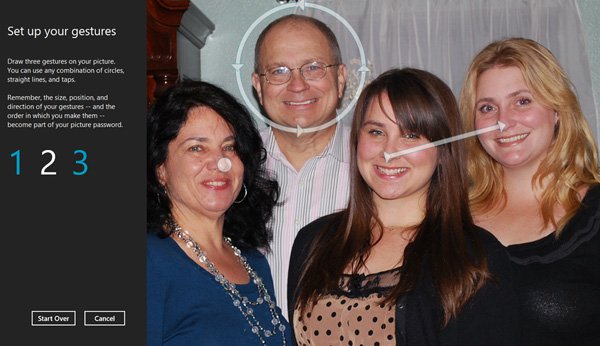 Users can create passwords with dots, circles or lines on images for computers running Windows 8. Photo: Microsoft.
Explaining on his blog, Microsoft advises users to choose a photo with many easily recognizable points such as a human face. This allows users to easily create lines to create passwords as well as convenient to remember passwords with this image.
Microsoft also identified with an image with 10 points of recognition, users can create 10 dots, 40 circles, 90 lines. Gathering all these options will create about 2.7 million passwords to protect computers.
FAQ
What is the main benefit of Microsoft uses images as passwords for Windows 8?
The main benefit is a clearer understanding of the topic and a practical way to apply the information covered in this guide.
What should I check before using Microsoft uses images as passwords for Windows 8?
Confirm compatibility, review the required settings, protect important data, and use the latest supported version whenever possible.
What should I do if the result is different?
Repeat the steps carefully, verify permissions and version differences, and consult the product's official support documentation for changes not shown in the article.
Related Articles
 Microsoft Warns of the Dangerous Usage Habits of Millions of3 minutes read
 Microsoft Authenticator No Longer Saves Your Passwords: Export Them Now!5 minutes read
 Use Images Instead of Passwords - Should I Use Them?5 minutes read
 How to Retrieve VPN Passwords Saved on Windows 103 minutes read
 How to Recover or Reset a Lost Windows 10 User Account Password6 minutes read
 Americans Are Banned from Using Password 1234 to Ensure Safety3 minutes read
Reader Comments 0
Sign in with email or Google to join the discussion.