Table of Contents
File fragmentation occurs when parts of one file are stored in noncontiguous locations on a volume. A mechanical hard drive must move its read/write heads between those locations, so heavy fragmentation can make some workloads slower. It is normal file-system behavior—not the same as bad sectors or physical disk damage.
How fragmentation happens
As files are created, expanded, deleted, and replaced, free space becomes split into smaller gaps. A new or growing file may then be written into several gaps instead of one continuous area. Large downloads, virtual-machine disks, archives, and frequently changing files can become fragmented over time.
Fragmentation does not mean data is “out of order” or invalid. The file system records where every piece belongs, so the file can still be read normally.
Does fragmentation slow every drive?
- HDD: scattered file pieces can increase mechanical seek time. Consolidating them may improve some access patterns.
- SSD: there is no moving read head, so traditional defragmentation offers little benefit and creates unnecessary data movement. SSDs use operations such as TRIM and other storage-aware optimization.
Slow performance alone does not prove fragmentation. Low free space, background activity, insufficient memory, malware, a damaged file system, or a failing drive can cause similar symptoms.
Use Windows Optimize Drives
- Open Start and search for Defragment and Optimize Drives.
- Check the Media type column.
- Select a volume and choose Analyze for an HDD when available.
- Choose Optimize. Windows selects an operation suited to the detected media.
- Use Change settings to review the automatic schedule.
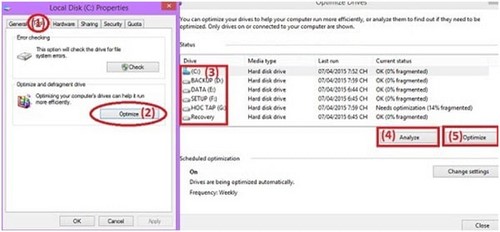
Windows' scheduled optimization is enough for most PCs. Do not schedule several third-party defragmenters to work on the same volume.
What about Defraggler and similar tools?
Third-party utilities can provide detailed maps, file-level controls, or alternative schedules. In an older Defraggler interface, the basic HDD workflow was to select a volume, analyze it, and then choose a defragmentation action.
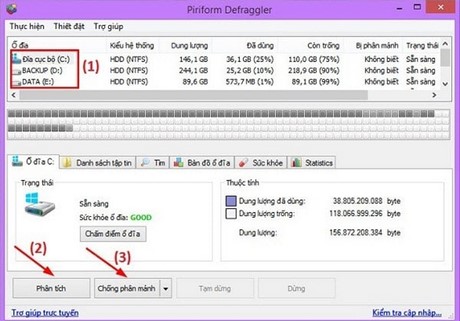
If you use a third-party tool, get it from the publisher, verify current Windows support, and make sure it distinguishes HDDs from SSDs. Back up important data before any intensive optimization.
You do not need to “prevent” fragmentation completely
Trying to keep an HDD at zero fragmentation wastes time and causes extra disk activity. Leave adequate free space, keep automatic optimization enabled, and run a manual analysis only when there is a specific reason.
Defragmentation cannot fix clicking, unreadable sectors, SMART warnings, or disappearing drives. For those symptoms, see signs of bad sectors and drive-health checks. For tool options, review TipsMake's defragmentation software overview.
Related Articles
 These Quality Hard Drive Defragmentation Software7 minutes read
 Defragment Your Hard Drive Using UltraDefrag3 minutes read
 What Is a Fragmented Hard Drive? the Cause and How to Fix It7 minutes read
 5 Effective Ways to Defragment Hard Drives on Computers in 20247 minutes read
 5 Ways to Check Hard Drive Effectively to Help Periodically Check11 minutes read
 How to Install and Use Iobit Smart Defrag to Defragment Your Hard Drive4 minutes read
Reader Comments 0
Sign in with email or Google to join the discussion.