Table of Contents
Bad sectors are disk locations that cannot reliably store or return data. They are different from file fragmentation: fragmented files are split across otherwise usable areas, while a physical bad sector can indicate damaged media or a failing drive. Defragmentation does not repair bad sectors.

Warning signs to take seriously
- Recurring read or write errors: Windows or an application reports an I/O error, cyclic redundancy check (CRC) failure, or an unreadable file.
- Files become corrupt or disappear: documents fail to open, archives no longer verify, or applications repeatedly reinstall damaged files.
- Folders or partitions become inaccessible: the same area fails repeatedly even after a restart.
- SMART or diagnostic warnings: the drive reports reallocated, pending, or uncorrectable sectors, or fails the manufacturer's test.
- Unusual delays: the PC freezes while accessing specific files, the drive repeatedly retries, or transfers drop to zero for long periods.
- Mechanical symptoms: clicking, repeated spin-up attempts, disconnects, or a drive that vanishes from Windows or firmware setup.
Any one symptom can have another cause, such as a damaged cable, power problem, controller fault, or file-system corruption. Repeated symptoms together make hardware failure more likely.
What a surface-scan result means
A disk test may display slow blocks and unreadable blocks with different colors. In the older HD Tune example below, red blocks indicate read errors reported during that scan.
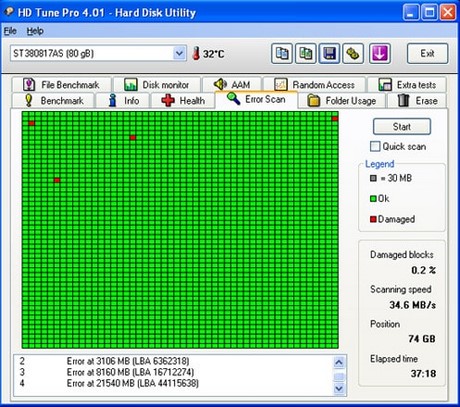
A clean scan is only a snapshot; it does not rule out an intermittent problem. Likewise, one slow block is not enough to diagnose a drive without checking SMART data, cables, logs, and the manufacturer's diagnostic.
Back up before running repairs
If the drive contains important data, copy it to another physical device before running a long surface scan, chkdsk /r, a format, or any write test. Intensive reads and writes can stress a failing disk. For irreplaceable data or a clicking drive, stop using it and consult a professional recovery service.
How to confirm the problem
- Check the cable, connector, power supply, and USB enclosure when applicable.
- Read SMART information with the drive manufacturer's utility or a trusted monitor.
- Run the manufacturer's short diagnostic after the data is safe.
- Review Windows Event Viewer for recurring Disk, NTFS, or storage-controller errors.
- Use a non-destructive surface read test only when needed and when you understand its load on the drive.
TipsMake explains how to check drive health in Windows and how to run a surface test with HDDScan.
Repair or replace?
File-system repair can correct logical metadata errors, and drive firmware may remap a sector during a write. Neither process heals physically damaged media. Replace the drive if warnings recur, bad-sector counts increase, data remains unreadable, or the manufacturer's diagnostic fails.
Restore files from a verified backup to the replacement drive. Do not keep the suspect disk as the only copy of important data, even if a format temporarily makes it appear normal.
Related Articles
 Hard Drive Bad Sectors - Signs and Solutions3 minutes read
 Know About Bad Sectors on Your Hard Drive8 minutes read
 Check and Detect Bad Sectors on Your Hard Drive Using Hddscan3 minutes read
 How to Clean Up Bad Sectors on a Hard Drive Using MHDD in Hiren's Boot CD5 minutes read
 3 Best Software to Check the Hard Drive for the Best Bad3 minutes read
 Dti Surface Scanner: Quickly Detect Bad Sectors for Hard Drives3 minutes read
Reader Comments 0
Sign in with email or Google to join the discussion.