Table of Contents
IObit Smart Defrag can analyze and consolidate fragmented files on a mechanical hard drive. Windows already includes scheduled drive optimization, so a third-party utility is optional. Back up important data first, identify each drive's media type, and do not expect defragmentation to repair bad sectors or a failing disk.

Install Smart Defrag carefully
- Download Smart Defrag from the official IObit page. Avoid third-party download mirrors.
- Verify the publisher shown by Windows before allowing the installer to run.
- Read each setup screen. Choose a custom installation when available and decline unrelated software, browser changes, subscriptions, or shortcuts you do not want.
- Review the license and privacy terms, complete installation, and open the application.
The installation screenshots in the original article show an old version with toolbar offers. Current screens, options, and licensing may differ, so do not follow the old buttons mechanically.
Check the drive type before optimizing
Search Windows for Defragment and Optimize Drives and check the Media type column. Traditional defragmentation is intended for HDDs. SSDs use storage-aware operations such as TRIM; do not apply an HDD-specific full defrag mode to an SSD.
Also check the drive's health and keep adequate free space. If it clicks, disconnects, reports SMART warnings, or contains unreadable files, back up and diagnose it instead of defragmenting.
Analyze and defragment an HDD
- Open Smart Defrag and select only the intended HDD volume.
- Choose Analyze to view the reported fragmentation level.
- If the HDD is meaningfully fragmented, choose the standard defragmentation mode first. More aggressive “optimize” modes move more data and take longer.
- Keep the PC connected to reliable power and avoid large file transfers while the task runs.
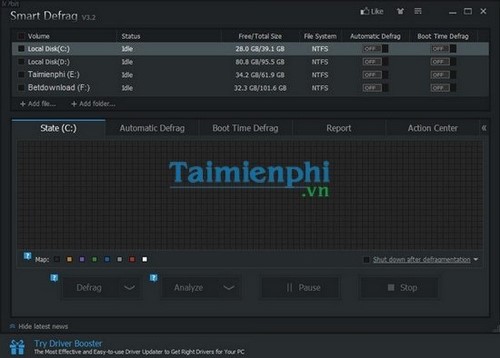
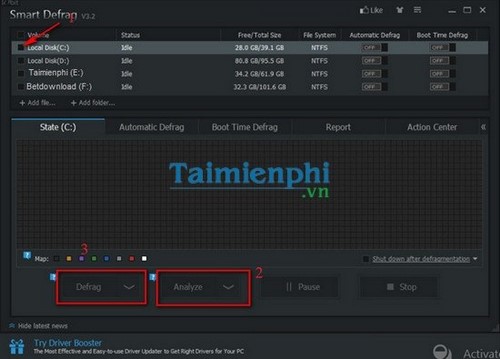
These screenshots show a legacy interface, but the basic workflow—select, analyze, then choose an action—remains useful. Confirm the current documentation before using boot-time, game, or priority-file modes.
Configure automation conservatively
Do not schedule Smart Defrag and Windows Optimize Drives to perform overlapping jobs. If you enable automatic optimization, use one scheduler, limit it to HDDs, and choose a time when the PC is normally powered on but not busy.
Review options that launch at startup, run in the background, or display notifications. Disable any you do not need. Uninstall the utility through Windows Settings if you prefer to return to the built-in optimizer.
What the result does—and does not—mean
A lower fragmentation percentage indicates that files were consolidated. It does not guarantee a faster PC, prove the disk is healthy, or make data “absolutely safe.” Performance also depends on storage health, free space, memory, CPU load, and startup software.
For alternatives, see TipsMake's comparison of hard-drive defragmentation tools. If the PC freezes or storage errors appear, use drive-health checks before running another optimization pass.
Related Articles
 How to Use Smart Defrag to Defragment Hard Drives Effectively6 minutes read
 Install and Use Free Registry Defrag to Defragment Your Hard Drive4 minutes read
 How to Use Auslogics Disk Defrag to Defragment Your Hard Drive6 minutes read
 These Quality Hard Drive Defragmentation Software7 minutes read
 How to Defrag a Computer5 minutes read
 How to Defrag a Hard Drive with the Disk Defragmenter3 minutes read
Reader Comments 0
Sign in with email or Google to join the discussion.