Table of Contents
Instructions to Hide or Delete Recycle Bin Icon on Desktop is easier to understand when the core ideas are paired with practical examples. The sections below explain the topic clearly, highlight useful steps, and point out details that can prevent common errors.
1. Delete the Recycle Bin icon on Windows 10
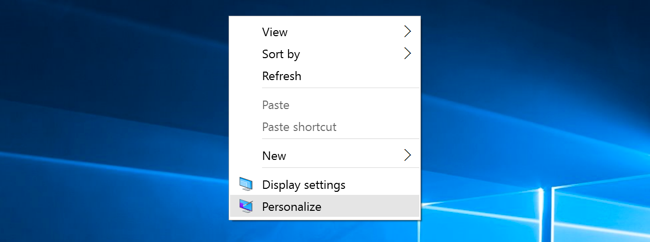
To delete the Windows 10 Recycle Bin icon, first right-click on the Desktop and select Personalize.
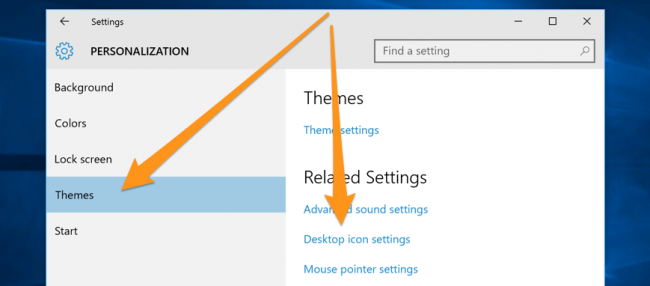
A new window will appear, select Themes in the left menu, then select Desktop icon setting under the Related Settings option.
On the Desktop icon setting window, uncheck the Recycle Bin section and click Apply .
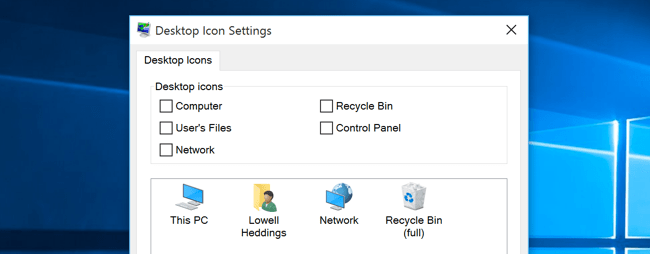
So the Recycle Bin icon has been hidden on your Desktop.
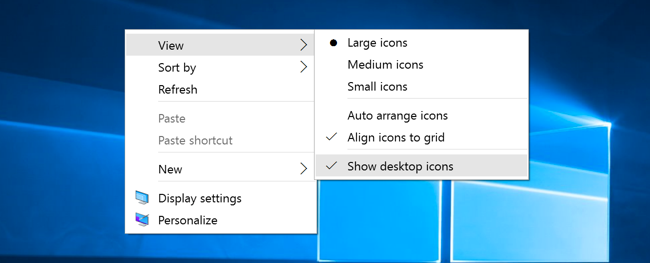
You can also hide all icons on the Desktop by right-clicking on the Desktop then clicking View and selecting Show desktop icons .
2. Delete the Recycle Bin icon on Windows 7 or Windows 8
Right-click on the Desktop, select Personalize and select Change Desktop Icons .
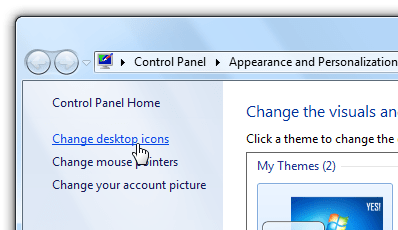
Uncheck the Recycle item.
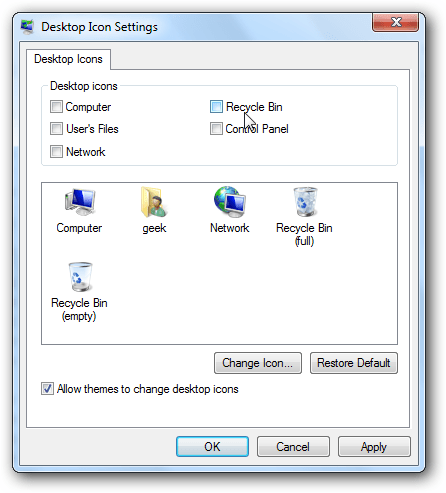
Note: You can set hide or delete the Recycle Bin icon in the Desktop Icon Settings Personalization option.
3. Delete the Recycle Bin icon on Windows Vista

To delete the Recycle Bin icon on Windows Vista, simply right-click the icon and then select Delete .
You can refer to some of the following articles:
-
How does Windows 7, 8 not automatically upgrade to Windows 10?
-
Instructions for enabling / disabling Hibernate mode on Windows 10
-
Tricks to hide files or folders on Windows, Mac OS X and Linux
Good luck!
FAQ
What should you know about 1. Delete the Recycle Bin icon on Windows 10?
To delete the Windows 10 Recycle Bin icon, first right-click on the Desktop and select Personalize.
What should you know about 2. Delete the Recycle Bin icon on Windows 7 or Windows 8?
Right-click on the Desktop, select Personalize and select Change Desktop Icons.
What is Instructions to Hide or Delete Recycle Bin Icon on Desktop?
1. Delete the Recycle Bin icon on Windows 10 To delete the Windows 10 Recycle Bin icon, first right-click on the Desktop and select Personalize.
Related Articles
 Tips for Using Recycle Bin More Effectively9 minutes read
 How to Restore the Recycle Bin Icon Lost in Windows 105 minutes read
 How to Hide Icons on Windows 11 Desktop?4 minutes read
 How to Change the Windows 11 Recycle Bin Icon3 minutes read
 How to Hide and Show the Recycle Bin on Windows 114 minutes read
 How to Hide/show System Icons on Windows 11 Desktop3 minutes read
Reader Comments 0
Sign in with email or Google to join the discussion.