Table of Contents
This article provides a clear overview of Instagram Adds a New Comment Management Feature, with the main facts, useful context, and practical details organized for easy reading.
This feature has been updated early on the Instagram version for iOS. To delete Instagram comments, simply select the comment you may need to delete and then click the dot icon at the top right. Next, click the 'manage comments' option and you can enter up to 25 spam comments to delete at the same time, or 'more options' to choose other options like blocking or restricting spam accounts. For Instagram on Android, you just need to touch and hold to select multiple comments and delete at once. Alternatively you can still click the dot icon to choose to block or restrict accounts as usual.
Besides the mass delete feature for negative comments, Instagram also did not forget to add another interesting feature, which is to highlight positive comments, in which 'Pinned Comments' will be a non-functional function. integral, allowing you to select the comment that you like best to display fixed at the top of each topic.
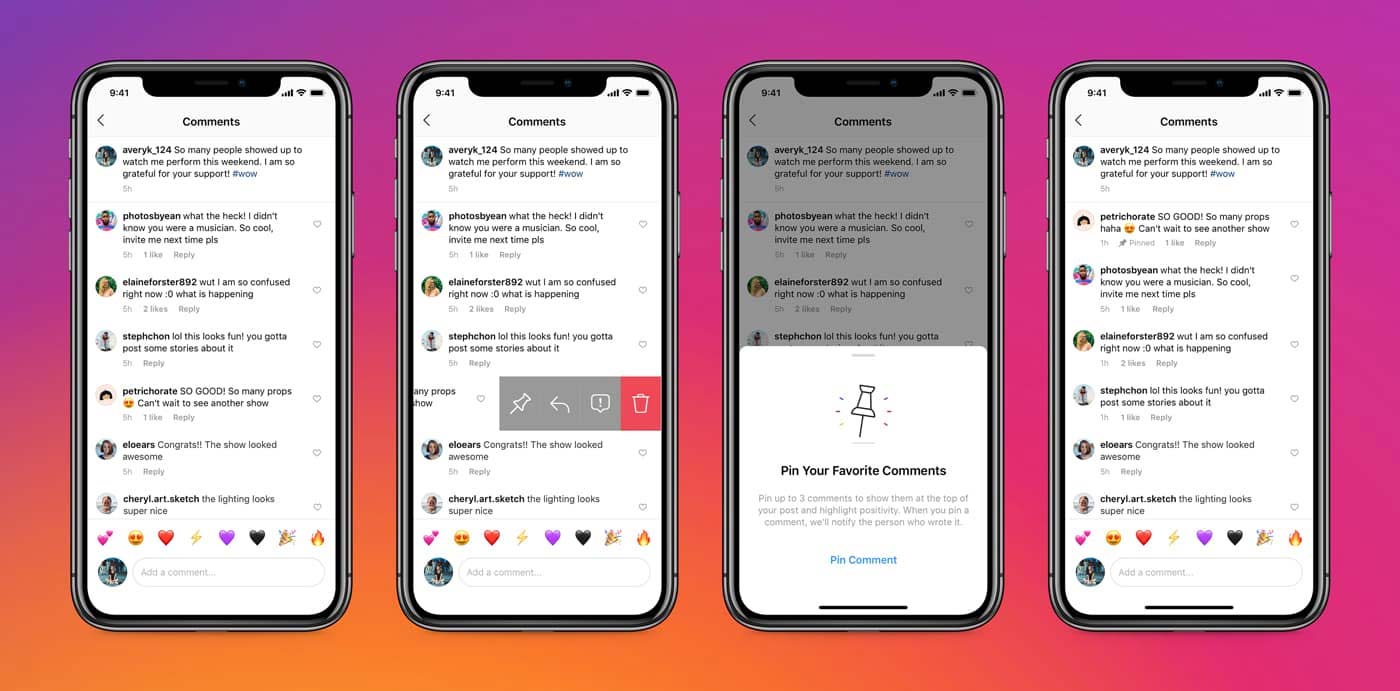 Some new features added on Instagram
Another notable addition is the ability to specify which objects are allowed to tag (mention) and mention (mention) to you. You can choose to allow everyone, or just the people you follow, or no one can tag or mention yourself in comments, comments or story posts on Instagram. These optional features will be found in the privacy section of the Settings menu.
In related news, according to the hacker 'reverse technology' discovery, Jane Manchun Wong, Instagram is quietly testing a feature called Remembering, so people can remember the accounts of the deceased. like on Facebook.
FAQ
What is the main focus of Instagram Adds a New Comment Management Feature?
The article explains the most important facts, context, and practical details related to Instagram Adds a New Comment Management Feature.
Who may find this information useful?
It is useful for readers who want a clear overview, practical context, and a better understanding of the subject.
What should readers verify before taking action?
Check current product versions, official requirements, regional availability, and any details that may have changed since the original publication.
Related Articles
 How to Comment with a Gif on Instagram3 minutes read
 Instagram Reel Video Gif Comment Guide2 minutes read
 Instagram Adds a Feature to Send Text Messages2 minutes read
 How to Comment Using GIF Animation on Facebook3 minutes read
 How to Login to Multiple Instagram Accounts3 minutes read
 YouTube Upgrades the New Comment Management System2 minutes read
Reader Comments 0
Sign in with email or Google to join the discussion.