Table of Contents
This article examines How to use VLC Media Player and explains the main developments, practical implications, and context readers should understand.
- Advanced tricks use VLC Media Player
- Instructions for rotating videos are inverted and inclined by VLC Media Player
- How to record webcam videos on VLC Media Player
Instructions for Playing Jigsaw on VLC Media Player
Step 1:
First you open the video you want to play puzzle or open later. Then click on Tools and then select Effects and Filters.

Step 2:
Switch to Adjustments and Effects interface, click on the Video Effect tab and then click on the Geometry tab. Then in the content below select the Puzzle Game to activate the puzzle game on VLC. Next enter the number of puzzle pieces into horizontal and vertical columns. Up to 16 users will be allowed to enter. Finally click Close to save.

Going back to the interface we will see the video screen converted to a puzzle game. Now you can try to figure out how to merge on VLC Media Player interface. If you don't want to play the puzzle and put the video back to the default screen, just skip the Puzzle game.
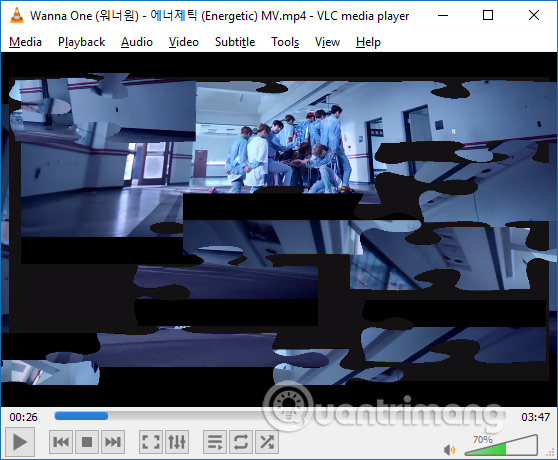
An interesting feature on VLC Media Player software that few people know about. So not only watch videos, or audio on VLC, but you can also entertain with an intellectual jigsaw puzzle, with collages taken from the scene in the video itself.
- Trick to watch YouTube videos on VLC Media Player
- How to watch movies and videos with subtitles on Windows Media Player
- Convert video frame to image using VLC Media Player
I wish you all success!
FAQ
How does How to use VLC Media Player work?
This article examines How to use VLC Media Player and explains the main developments, practical implications, and context readers should understand.
What should you prepare before using this method?
Advanced tricks use VLC Media Player Instructions for rotating videos are inverted and inclined by VLC Media Player How to record webcam videos on VLC Media Player Instructions for Playing Jigsaw on VLC Media Player Step 1: First you open the video you want to.
What should you do if the process does not work as expected?
Then click on Tools and then select Effects and Filters.
Related Articles
 Valentine SMS, Beautiful Love Puzzle Messages4 minutes read
 How to Use Jigsaw Faceart with Celebrities4 minutes read
 This Hidden Setting in Windows Will Make Videos Play Smoother!4 minutes read
 How to Turn on and Off the Auto Play Feature on Zalo5 minutes read
 YouTube Play 4x Video: YouTube Tests 'Crazy' 4x Video Playback Speed3 minutes read
 How to Turn Off Auto-play Videos on Viber3 minutes read
Reader Comments 0
Sign in with email or Google to join the discussion.