Table of Contents
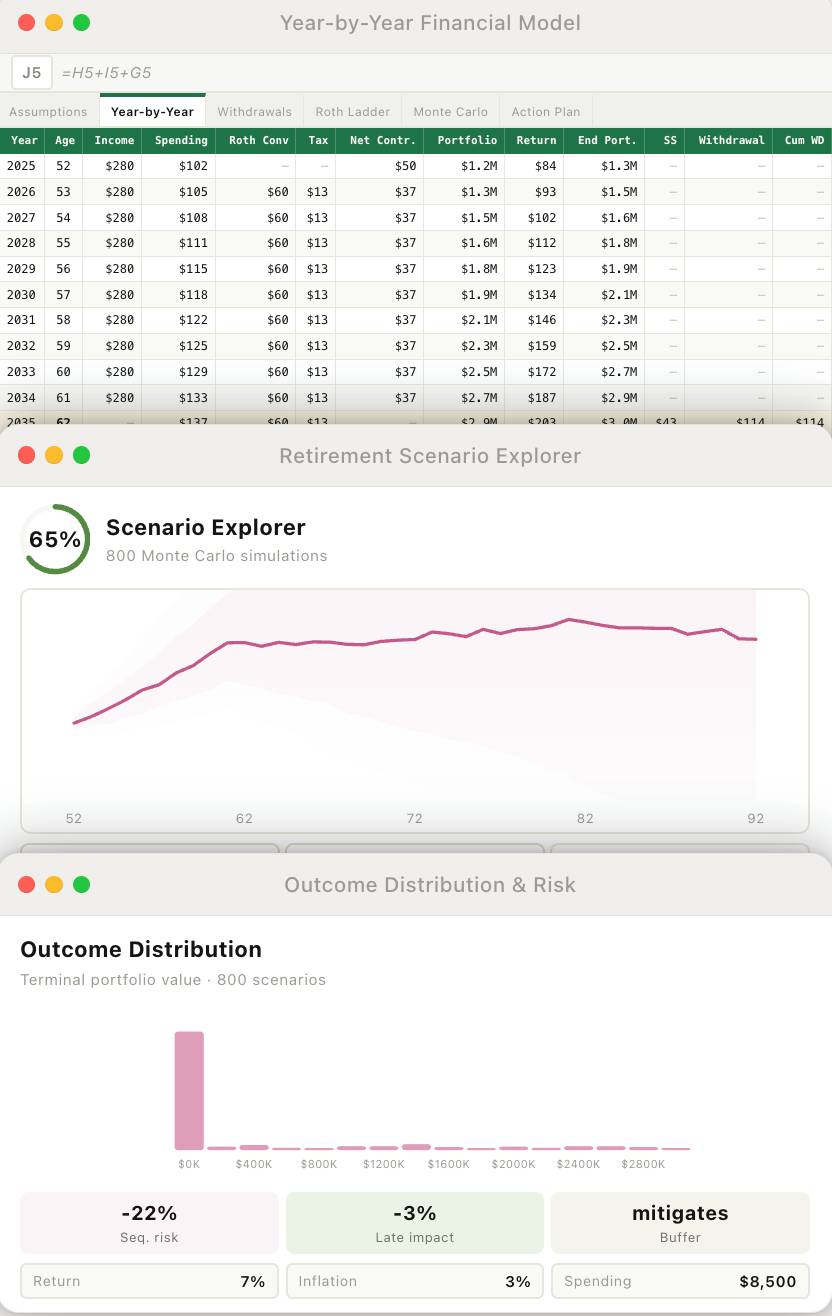
Claude can help you organize a financial plan into editable assumptions and compare “what if” cases such as job loss, higher spending or a poor market early in retirement. Treat its spreadsheet and narrative as a draft to audit, not as a forecast or a tax recommendation. A useful result shows the inputs, formulas and uncertainty behind every conclusion.
Prepare a small, clear set of inputs
Start with a summary of household income, annual spending, current savings by account type, debt payments, planned retirement dates and any benefit estimates you have obtained from the relevant provider. State the country, state and tax year if tax rules matter. Label each figure as known, estimated or assumed, and keep a copy of the source you used.
You do not need to upload every tax return and account statement just to explore a scenario. Remove account numbers and other identifiers from any material you choose to share, and check the service's data controls and your organization's rules first. If you let Cowork access local folders, review that access carefully: Anthropic's Cowork safety guidance says the tool can read, edit and delete files in connected folders.
Ask for a model you can inspect
Give Claude a narrowly framed task with explicit assumptions and required outputs. For example:
I want to compare possible retirement scenarios, not receive a recommendation. Here are my annual income, spending, balances, debt payments and intended retirement dates: [insert non-sensitive summary]. Use only the values and ranges I supply. Build a baseline and three separate cases: reduced income for two years, higher inflation, and poor investment returns early in retirement. Show an editable assumptions table, year-by-year cash flows, formulas, and a list of missing information. Flag tax or benefit rules that need an authoritative source. Do not invent a probability of success or suggest a Roth conversion without stating the tax assumptions.Ask Claude to show the baseline before changing variables. A spreadsheet should separate inputs from calculations and keep units consistent: monthly expenses should not be mixed with annual income without conversion. If your account supports file creation, Claude can produce a workbook; Anthropic documents the file feature and its availability. TipsMake's AI tools for Excel comparison provides context on the different ways assistants work with spreadsheets.
Compare one change at a time
| Scenario | Change to the baseline | What to inspect |
|---|---|---|
| Income interruption | Reduce earned income for a defined period. | Cash needed, savings drawdown and whether debt payments still fit. |
| Higher inflation | Raise the assumed growth rate of spending. | Real spending power and the year-by-year gap between income and expenses. |
| Early market decline | Apply a specified loss near retirement, followed by the returns you define. | Withdrawal pressure and sensitivity to the order of returns. |
| Changed retirement date | Move the date while keeping other assumptions fixed. | Contributions, coverage needs and years of planned withdrawals. |
After individual cases, you can combine plausible shocks to see which conclusions are fragile. If Claude presents a “success rate” or Monte Carlo result, request the return distributions, correlations, fees, tax treatment, number of simulations and reproducible method. A percentage without these inputs is not a dependable measure of your plan.
Audit the output before using it
- Reconcile starting balances and annual cash flows with your own records. Spot-check several spreadsheet formulas by hand or with a second tool.
- Verify current tax brackets, withdrawal rules and benefit estimates from official sources for the relevant year and location. Do not treat a suggested Roth conversion or benefit-claiming date as established advice.
- Check how the model handles inflation, investment fees, taxes, medical costs and debt payoff. Missing categories can change the result substantially.
- Ask which assumptions drive the conclusion most strongly and which information is missing. TipsMake's guide to comparing options with AI explains how alternate assumptions can expose a fragile choice.
For decisions that could materially change your taxes, retirement income or investments, have an appropriately qualified professional review the verified inputs and the model. Claude is most useful here as a way to make assumptions visible and questions sharper.
Related Articles
 How to Plan Your Study Program with Claude6 minutes read
 minutes read
 Comparing Excel Agent Mode and Claude Excel Add-in: Which10 minutes read
 Claude Fable 5 Review: Real-World Strengths and Limits13 minutes read
 How to Write a Test Plan: Step-by-Step Guide8 minutes read
 Building a Private Data Security Strategy: Challenges with4 minutes read
Reader Comments 0
Sign in with email or Google to join the discussion.