Table of Contents
Claude can help an instructor map which course topics depend on earlier concepts and which can be moved without breaking the learning sequence. The useful output is not an automatically “correct” syllabus; it is a draft dependency map that the instructor can challenge, revise, and compare with learning outcomes, assessments, and institutional constraints.
What this workflow produces
Given a syllabus, topic list, or course outline, ask Claude to return four connected artifacts:
- A table of topics and their claimed prerequisites.
- A dependency map showing the order implied by those relationships.
- A list of topics that may be moved, with consequences.
- One or more revised weekly schedules for instructor review.
If Claude supports inline visualizations or Artifacts in your account, it may render a diagram or interactive view. Otherwise, ask for a Mermaid diagram, adjacency list, or table that you can inspect and redraw in another tool.
1. Prepare the course context
Upload or paste the materials that actually govern the course:
- Current syllabus and weekly topic list.
- Learning outcomes.
- Assessment dates and assignment briefs.
- Required readings or textbook table of contents.
- Institutional holidays, lab availability, and fixed guest sessions.
- Known learner background and formal prerequisites.
- Topics that must remain together for pedagogical or accreditation reasons.
Remove student names, grades, accommodations, and other personal data unless your institution has approved the service for that information. A topic list alone is enough for an initial map, but it is not enough for Claude to know hidden assessment or teaching constraints.
2. Ask for an evidence-based dependency map
Use a prompt that separates claims supported by your documents from general suggestions:
I am revising a 15-week introductory macroeconomics course.

Using only the attached syllabus, learning outcomes, assessment briefs, and required textbook contents, create a prerequisite map for every topic.

Return:
1. A table with topic, required prior knowledge, supporting document and page/section, what the topic unlocks, and confidence.
2. A dependency diagram.
3. Three labels:
   - Fixed: moving it would break a documented prerequisite or assessment.
   - Constrained: it can move only within a stated range.
   - Flexible: no dependency is documented in the supplied materials.
4. A list of uncertain or missing dependencies for instructor review.

Do not treat textbook chapter order as proof of a prerequisite. Do not invent institutional requirements. Ask me about any constraint that the files do not answer.
This wording prevents “common teaching order” from being presented as a mandatory sequence. It also produces a reviewable table even if the visual diagram is incomplete.
3. Inspect the dependency claims
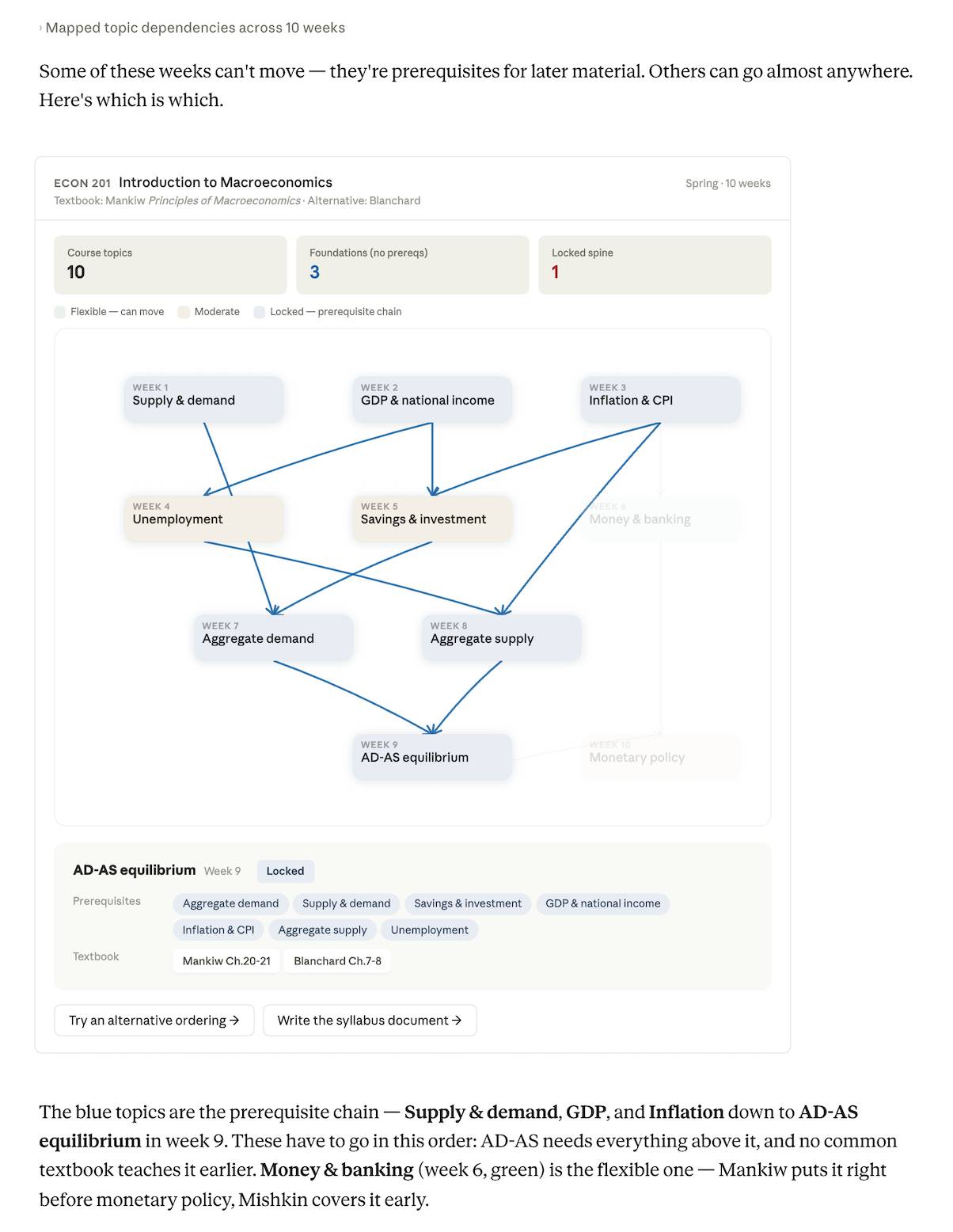
For each arrow in the map, ask why the later topic requires the earlier one. A valid explanation should name the specific concept or skill being reused. “This chapter usually comes first” is not a prerequisite.
Check for four common mistakes:
- Hidden dependencies: an assignment may rely on a method not named in the topic title.
- Overstated dependencies: two topics may be commonly adjacent but independently teachable.
- Missing co-requisites: topics may need to be taught together rather than strictly before and after.
- Assessment conflicts: a topic may appear before its prerequisite in the proposed order because a test or project date was ignored.
4. Test a proposed move
Do not ask Claude simply to “make the course better.” Name one change and require an impact analysis:
Move Money and Banking from week 8 to week 4.

Before redrawing the schedule:
- List every prerequisite this move assumes.
- Identify any downstream topic, assignment, or learning outcome affected.
- Mark each issue as blocking, manageable with a short bridge lesson, or uncertain.
- Cite the attached material for each documented constraint.
- Do not change any other week unless necessary.

Then show the revised dependency table and schedule, with all changes highlighted.
If the move creates a gap, decide whether to reject it, teach a short prerequisite earlier, or change the affected assessment. Claude can list options, but the instructor remains responsible for the educational decision.
5. Compare alternative sequences
Ask for two or three coherent schedules rather than dozens of arbitrary permutations:
Create three valid 15-week sequences from the approved dependency map:

A. Concept-first sequence
B. Policy-application-first sequence
C. Sequence that minimizes topic switching

Keep fixed weeks unchanged. For each version, explain:
- Its teaching rationale
- Where a bridge or recap is needed
- Which assessment dates it supports
- Its main learner risk

Use the same topic names and do not add content not present in the approved map.
Only ask Claude to compare the course with named textbooks if you have uploaded the relevant tables of contents or other authorized excerpts. Otherwise, it may invent chapter mappings or rely on outdated recollection.
6. Convert the approved map into a syllabus
Once you have selected and corrected a sequence, generate a weekly plan from the approved data—not from the earlier draft:
Using the approved topic order below, draft a weekly schedule.

For each week include:
- Topic and linked learning outcome
- Required preparation
- In-class activity
- Assessment milestone
- One sentence explaining the connection to the next week

Do not create page numbers, due dates, policies, or readings that are not in the supplied documents. Mark missing items as [INSTRUCTOR TO ADD].
Review every date, reading, policy statement, and assessment rule before distributing the result. Exported or copied schedules can also lose table structure, links, or formatting.
Use the map as a student learning aid
A simplified dependency map can show students why earlier concepts matter and where to review after they fall behind. Remove internal planning notes, confidence labels, and unresolved alternatives before sharing it. Add plain-language descriptions and links to the actual course materials.
Troubleshooting weak results
The diagram looks good but the logic is vague
Require a table behind every edge: prerequisite concept, dependent topic, reason, and source citation. Delete any edge Claude cannot justify.
Everything is labeled flexible
Upload the learning outcomes and assessment briefs, then describe constraints that were previously implicit. Ask Claude to distinguish “no evidence in the files” from “independent by design.”
Everything is labeled fixed
Ask whether each relationship is strictly required, helpful but teachable through a recap, or merely conventional. The middle category often reveals realistic options.
Claude invents textbook comparisons
Remove the comparison or provide the exact authorized source. Tell Claude to write “not provided” instead of using general knowledge.
A revised schedule drops a topic
Provide a canonical numbered topic list and require a coverage check showing every topic exactly once, plus a separate change log.
Final review checklist
- Every topic in the approved list appears exactly once.
- Every prerequisite edge has a clear instructional reason.
- Fixed dates, holidays, labs, and guest sessions remain intact.
- Assessments occur after required instruction and practice.
- Citations point to the supplied material.
- Uncertainty is visible rather than hidden behind confident wording.
- No student or confidential information appears in the shared output.
- The instructor—not Claude—approves the final sequence.
The strongest use of Claude here is as a structure checker and alternative generator. It can make assumptions visible, but subject expertise and knowledge of the learners determine whether a proposed course order will work.
Related Articles
 How to Test Your Financial Plan in Various Situations with Claude10 minutes read
 What Is the Claude Code: Clear Explanation7 minutes read
 Claude API: How to Get the Key and Use the API: Explained19 minutes read
 What Is Claude AI: Clear Explanation9 minutes read
 Why Do Developers Always Choose Claude Over Other AIs?11 minutes read
 What Is Claude Pro? How Does Claude Pro Compare to Chatgpt Plus?6 minutes read
Reader Comments 0
Sign in with email or Google to join the discussion.