 Home
Home
 Wifi Tips
 Fix Computer
 Windows 10
 Windows 11
 Artificial Intelligence
 Space Science
 Strange story
How to Change Your E‐Mail Address on Apple Messages
iMessage gives you the ability to add and be contacted by multiple emails on your iOS devices and your Mac. You can easily change where you send messages from and how others can reach you with just a few adjustments to your settings. Tap...
Method 1 of 2:
iOS
-
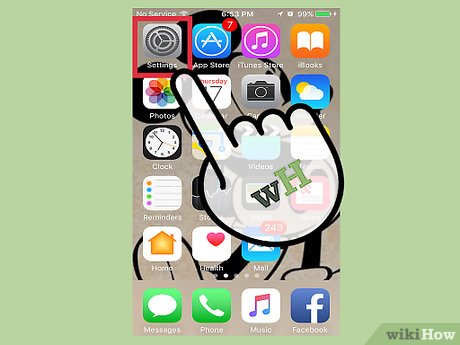 Tap the Settings icon.
 -
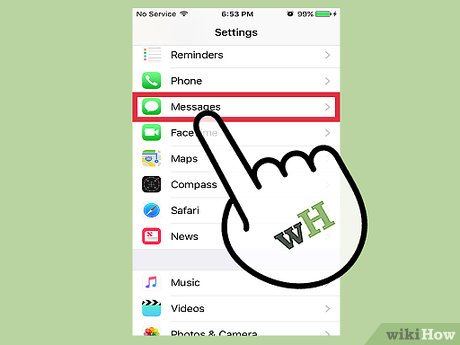 Tap Messages.
 -
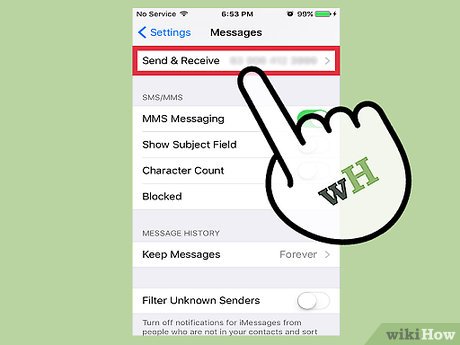 Tap Send & Receive.
 -
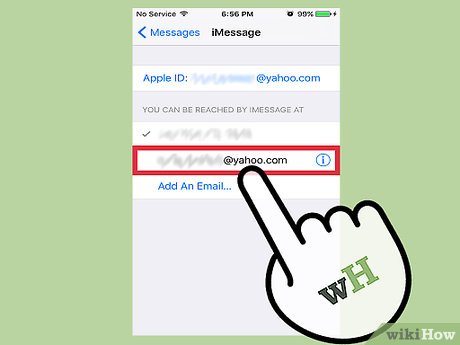 Tap the email address(es) you wish to be reached by.
- If the email address you want to use isn't there, tap Add Another Email….
- Type in your email.
- Tap Return. Apple will send you a validation email to that address.
- Verify your email following the instructions in the email.
- Once verified, tap the new email from the list to select it. A check mark will appear next to it.
-
 Tap the email you want to start conversations from.
 -
 Send an iMessage. Your contact info should appear as designated in step 5.
Method 2 of 2:
Mac
-
 Open the Messages app.
 -
 Click Messages. It's located in the top left of the screen on the menu bar.
 -
 Click Preferences.
 -
 Click on "Accounts." It looks like a blue @ symbol.
 -
 Click on your iMessage account. Make sure it's highlighted in the screen on the left side of the window.
 -
 Select the drop down menu.
 -
 Click on your email address. Doing so will send new conversations from the email you chose.
- If the email address you want to use isn't there, click Add Email.
- Type in your email.
- Hit ↵ Enter. Apple will send you a validation email to that address.
- Verify your email following the instructions in the email.
- Once verified, click on the check box next to the new email to select it as a contact method.
-
 Send an iMessage. Your contact info should appear as designated in step 7.
4.5 ★ | 2 Vote
 Isabella Humphrey
Read More
- How to Remove Your Email from Apple Messages
- How to change Apple ID from 3rd party email to Apple email
- Fix common problems when email is not sent
- How to change the primary email address for a Microsoft account
- How to change the IP address for the phone
- How to Add Email Addresses to an Address Book
- How to customize a Gmail address
- How to create temporary email addresses quickly with YOPmail
MORE LIKE THIS
- How to Take a Video on iPhone or iPad
- How to Open an IGS File on iPhone or iPad
- How to Watch Neverthink
- How to Upload Twitter Videos on Android
- How to Video Conference
- How to Rotate a Video
- How to Reduce Video Size
- How to Tell if Your Phone Is Tapped
- How to Block Caller ID
- How to Block Devices on Spotify on Android
FOLLOW US ON


-
 ChatGPT on the web can now send emails directly: How to use the new feature
-
How to check if your password has been compromised.
-
How to write professional emails in English.
-
How to view emails without opening them in Gmail using the Preview Pane feature.
-
Instructions on sending encrypted emails on Gmail
-
Learn about CC: An AI agent that transforms a chaotic inbox into a daily summary.
 ChatGPT on the web can now send emails directly: How to use the new feature
 How to check if your password has been compromised.
 How to write professional emails in English.
 How to view emails without opening them in Gmail using the Preview Pane feature.
 Instructions on sending encrypted emails on Gmail
 Learn about CC: An AI agent that transforms a chaotic inbox into a daily summary.
 Mac OS X
 Mac OS System software
 Mac OS Security
 Mac OS Office application
 Mac OS Email Management
 Mac OS Data - File
 Mac hardware
 System
 Hardware
 Game
Game Tech info
 Technology
 Science
 Life
Life Application
 Electric
 Program
 Mobile