Table of Contents
Claude creates a blank scatter plot right in the conversation – you place the points, drag them, and observe the fit. This app is useful when you can do the math but haven't...
Claude creates a blank scatter plot right in the conversation – you place the points, drag them, and observe the fit. This app is useful when you can do the math but haven't yet developed a feel for it.
1. Job Description
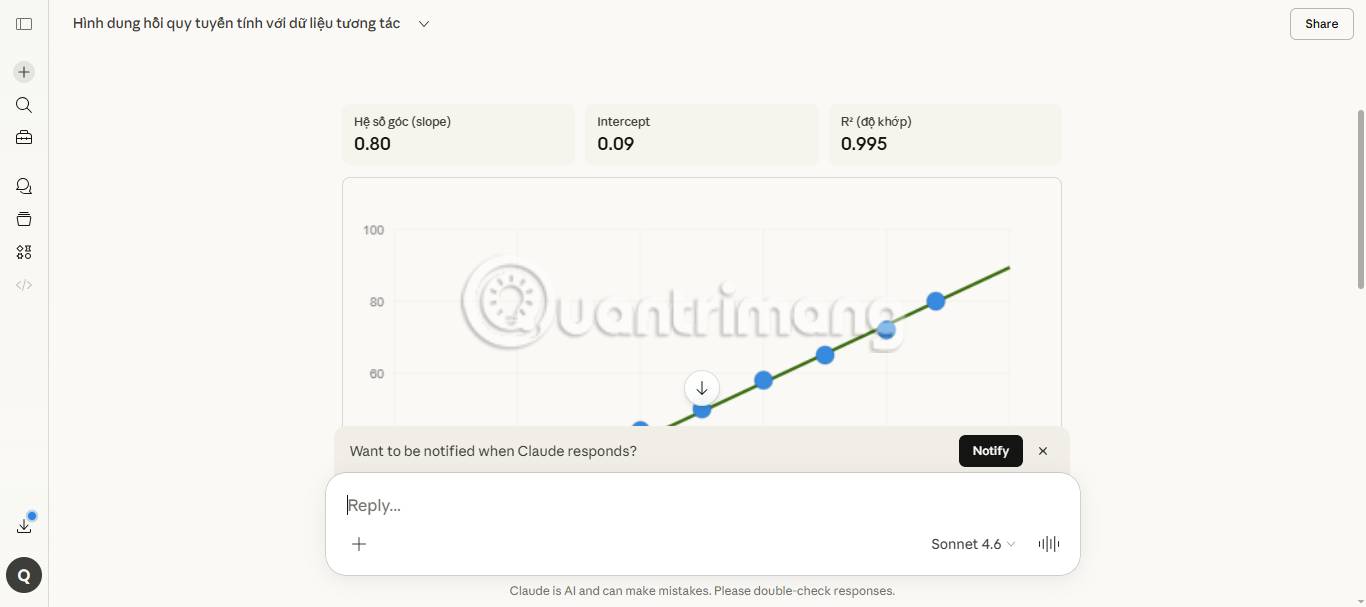
There's a gap between applying a formula and feeling it. You might calculate correctly, but still not know how an anomaly will affect the result—that feeling comes from practice: Move a point, observe the changes. Claude can build a blank canvas right in the middle of a conversation. You place points, drag any point, observe the fit change. It's quick enough to do halfway through learning, and once you understand it, you can continue.
Here, a statistics student might be able to perform the calculation but wouldn't grasp why one anomaly would alter the entire fit curve. Claude provides them with a scatter plot to build from scratch, with toggle switches for residuals and effects so that the difference is represented by dragging.
Tôi đang học về hồi quy tuyến tính và có thể viết công thức nhưng không thực sự hiểu. Bạn có thể cho tôi một cái gì đó mà tôi có thể tự mình thao tác với các điểm dữ liệu và quan sát điều gì xảy ra với đường thẳng không? Tôi muốn thực sự cảm nhận được tại sao một điểm bất thường có thể làm sai lệch toàn bộ. Bạn có thể giúp tôi hình dung điều đó không?
2. Provide context for Claude.
There are no files. The verbs in question will do the job – "experiment," "observe what happens," "feel why." That language will give you a blank canvas to fill in instead of a pre-loaded demo to view.
Context required: No uploads needed.
3. What Claude created
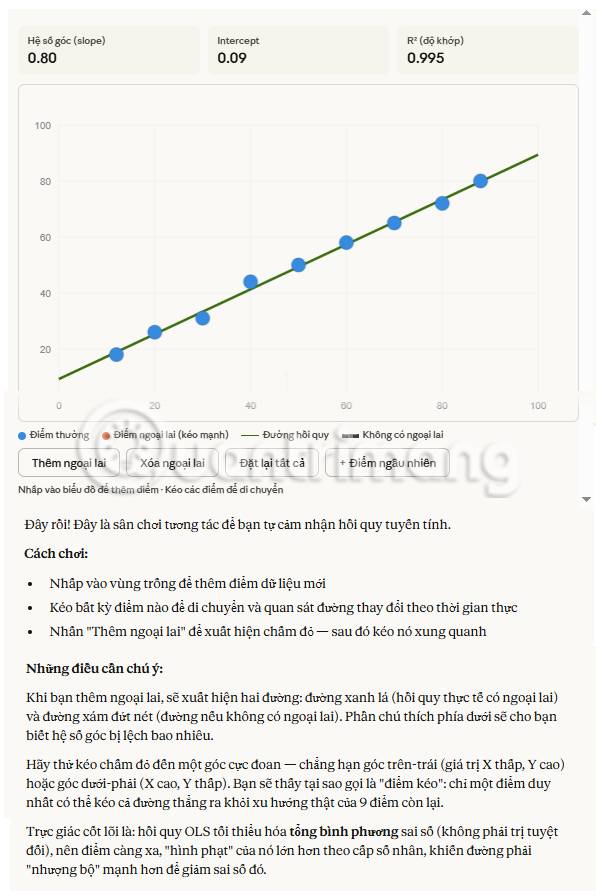
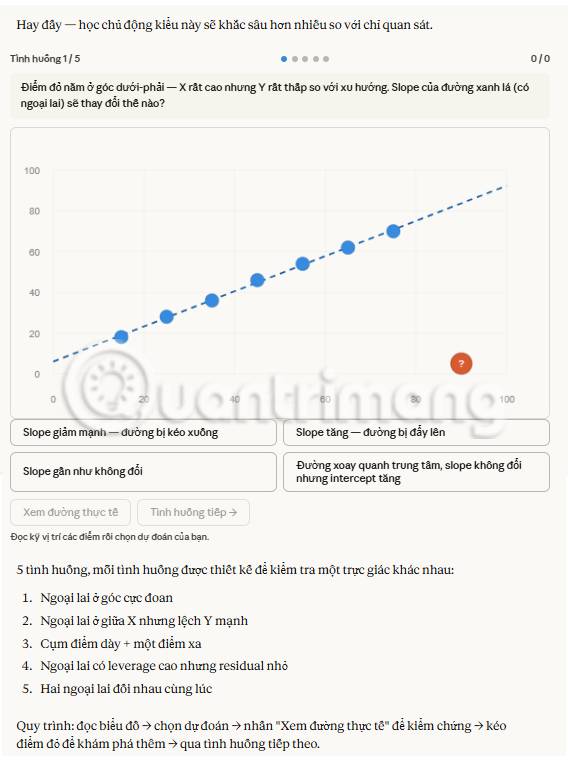
Claude gives you a blank canvas. You click to place points, drag to break points, and observe the feedback line. Setting out the outlier point yourself and observing the line you drag toward it is what makes the squared distance weighting clear – larger deviations will be counted more, and now you can see the calculation happening. The influence toggle will draw a halo around the point where the fit depends most, which is another question of how far away that point is. Drag a point to the edge and the halo will grow larger even if the point is right on the line.
4. Subsequent prompts
Continue the conversation with Claude to refine, expand, or explore further.
Ask Claude to explain the mathematical formula behind what he observed.
If there's something you notice while scrolling that puzzles you, ask for the mathematical formula behind it, and Claude will create a second visual representation below to illustrate the formula.
Quầng sáng ảnh hưởng lớn lên khi tôi di chuyển điểm sang ngang nhưng hầu như không thay đổi khi tôi di chuyển nó lên trên. Hãy cho tôi xem công thức đòn bẩy và khoảng cách ngang xuất hiện ở đâu trong đó.
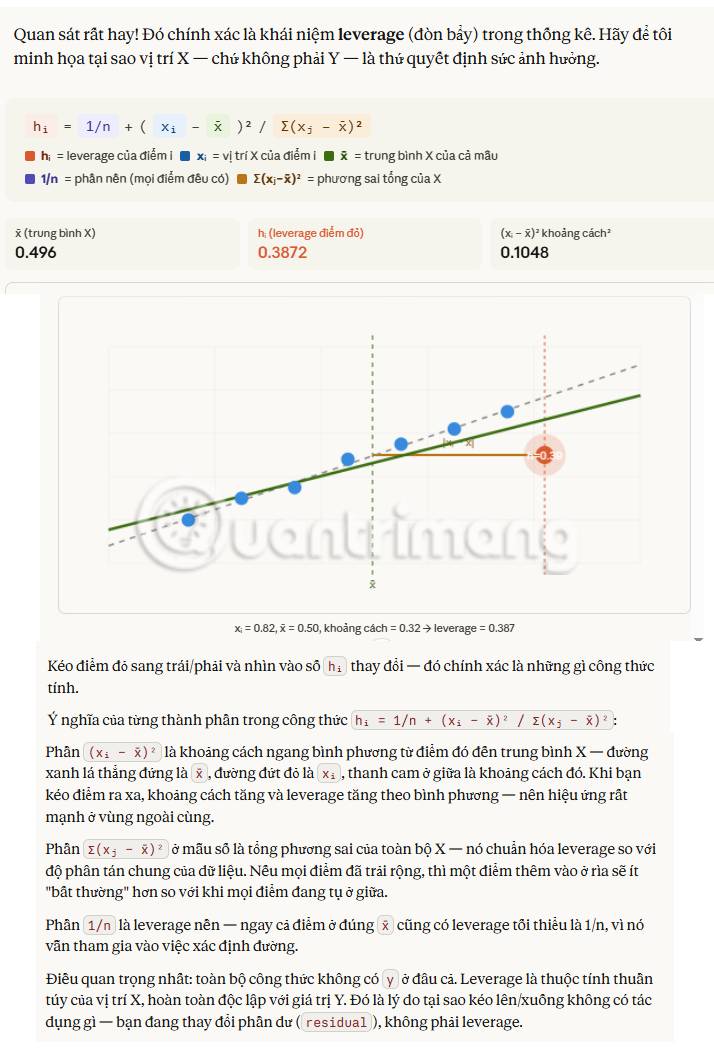
Claude was asked to add a second element onto the same canvas.
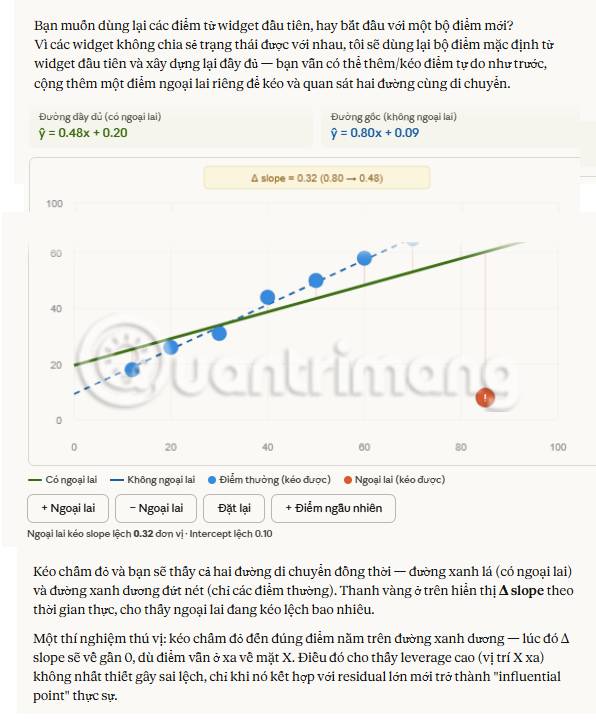
Ask Claude to overlay a second element onto the canvas you created – both will be visible, and dragging the mouse will show you how they react differently.
Chồng thêm một đường hồi quy chồng lên các điểm tôi đã tạo. Tôi muốn kéo điểm ngoại lệ và quan sát cả hai đường di chuyển.
Claude was asked to turn the canvas into a prediction test.
Claude creates experimental scatter plots; you predict what will happen before dragging the mouse, and it will tell you whether your intuition is correct or not.
Hãy cho tôi một vài mẫu thử nghiệm - cho tôi xem biểu đồ phân tán và yêu cầu tôi dự đoán điều gì sẽ xảy ra với một điểm ngoại lệ trước khi tôi kéo nó.
5. Tips, tricks, and troubleshooting
The way you phrase the prompt will shape what you get.
"Experiment with," "observe what happens," "feel why"—those words would create a blank canvas. Claude reads interactive verbs as a signal to build something you manipulate; a simple "explain" often creates a pre-loaded demo that you can view.
Tell Claude what needs adjusting and he will redraw it.
If what's included is close but still missing something—a second variable, a simpler version, a toggle switch for a concept that was initially overlooked—tell Claude. Claude will redraw it. This back-and-forth exchange is how you get the version that fits what you're trying to feel.
What should we do next?
Hover over the options: Copy as image will put it into your notes, Save as Artifact will keep the canvas interactive for later use. Or ask Claude to rewrite what you just understood – the image pointed out a knowledge gap, and verbal explanation often reveals the next one.
Related Articles
 What Is Claude AI: Clear Explanation9 minutes read
 What Are Claude Artifacts?: What You Need to Know10 minutes read
 How to Use Claude Code Safely: a Guide to Risk Management12 minutes read
 How to Transfer ChatGPT and Claude Conversations to Gemini7 minutes read
 Making Whiteboard Lessons More Engaging Through Conversation with Claude7 minutes read
 What Is the Claude Code: Clear Explanation7 minutes read
Reader Comments 0
Sign in with email or Google to join the discussion.