Table of Contents
Give Claude your budget totals, allocation rules, and specific changes, then ask for a side-by-side comparison. Request the calculation table before the chart so you can check the arithmetic. Treat the result as a scenario model based on your assumptions, not a forecast of what will happen.
1. Define the baseline and three scenarios
The example below uses an illustrative annual budget of $2.1 million: 60% for programs, 25% for operations, and 15% for fundraising. It compares losing a $400,000 grant, no change, and 5% growth. The growth rate is an explicit example assumption, not a prediction.
Under an initial proportional-allocation rule, every category retains its share of the total:
| Scenario | Total | Programs: 60% | Operations: 25% | Fundraising: 15% |
|---|---|---|---|---|
| Lose $400,000 | $1,700,000 | $1,020,000 | $425,000 | $255,000 |
| No change | $2,100,000 | $1,260,000 | $525,000 | $315,000 |
| Grow 5% | $2,205,000 | $1,323,000 | $551,250 | $330,750 |
This starting rule is deliberately simple. Replace it if a grant is restricted to a program or if some costs cannot change.
2. Ask for the calculations and interactive view
Use an illustrative annual budget of $2,100,000, allocated 60% to programs, 25% to operations, and 15% to fundraising.
Compare three scenarios: lose a $400,000 grant; keep the total unchanged; grow the total by 5%.
For this first comparison, keep the allocation percentages constant.
First show the calculation table and verify that each row sums to its total.
Then create three stacked bars side by side, with a toggle between dollars and percentages.
Use the same category colors throughout and label every scenario and total.
Clicking a scenario should show a one-sentence explanation based only on these assumptions.
Label the output as illustrative scenario planning, not an approved budget.
Claude supports generated charts and interactive visuals, as described in its custom visuals documentation. The exact output can vary. If you receive only text, explicitly request an interactive visualization or artifact; the table remains useful even without interactivity.
You do not need to upload a file for this example. For real data, use figures approved for the service you are using and explain the currency, period, and any restrictions. TipsMake's guide to visualizing data with Claude Artifacts covers the related workflow.
3. Read dollars and percentages differently
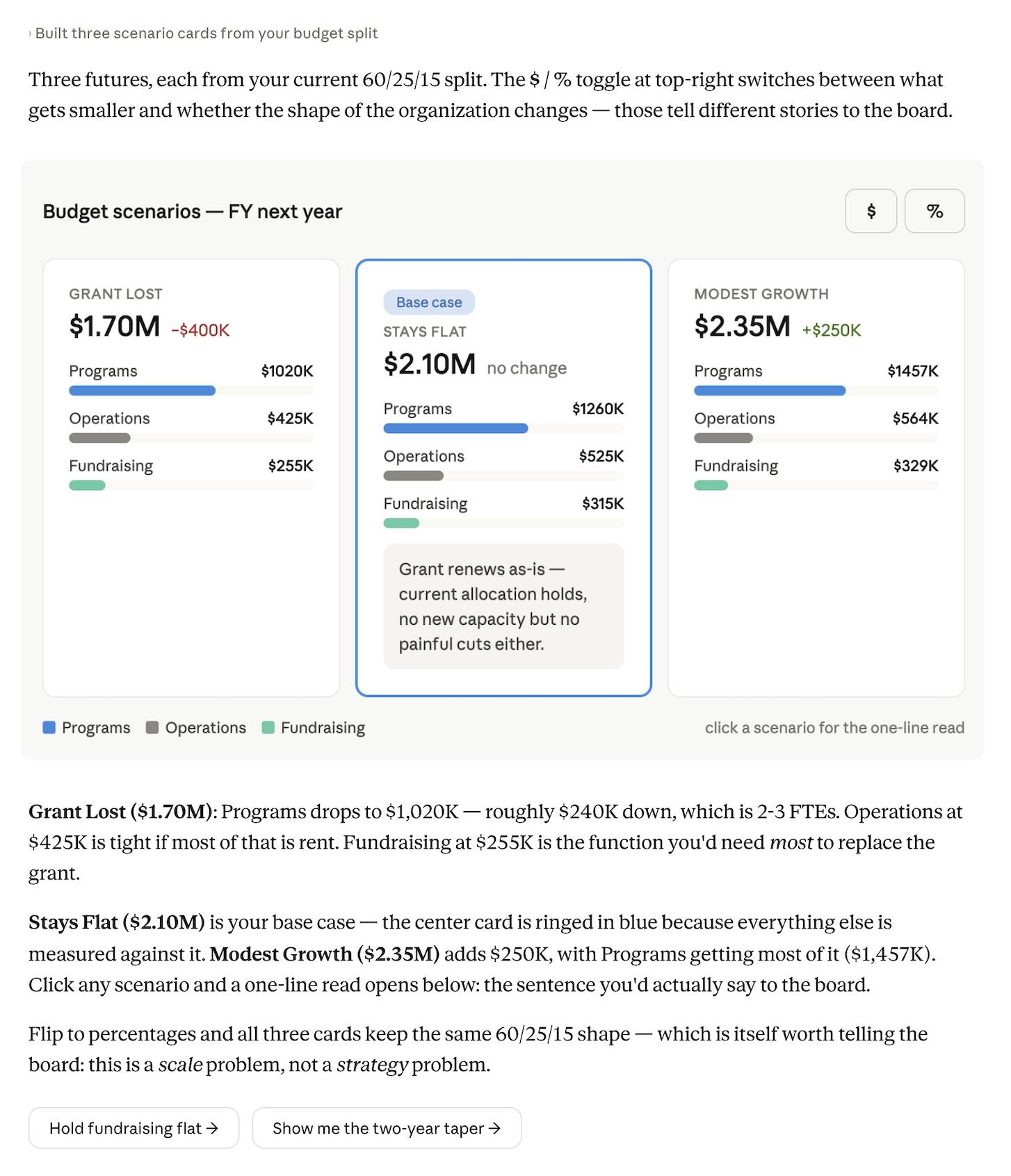
The dollar view shows the change in available resources. The percentage view shows the allocation mix. In the proportional example, the percentage bars should look identical even though the total budget changes substantially.
That is not a chart error: programs lose $240,000 in the grant-loss scenario while remaining 60% of the smaller total. Show total dollar labels alongside percentage bars so the normalized view does not hide the reduction.
4. Add realistic constraints
Keep fundraising fixed
Revise the grant-loss scenario. Keep fundraising fixed at its baseline $315,000.
Allocate the remaining $1,385,000 between programs and operations in their original 60:25 ratio.
Show the new dollar amounts and percentages, the change from baseline for each category, and the calculation.
Do not decide which real services should be cut.
This rule gives approximately $977,647 to programs and $407,353 to operations. Fundraising becomes about 18.53% of the $1.7 million total. Check rounding and confirm that these allocation rules reflect the actual choices available to your organization.
Model a phased grant reduction
Model losing $200,000 of the original grant in year 1 and the remaining $200,000 in year 2.
Assume all other funding stays at baseline, with no inflation or replacement funding.
The total should be $1,900,000 in year 1 and $1,700,000 in year 2.
Use the original proportional allocation rule and explain the difference from an immediate loss.
Specifying the year-two total prevents an ambiguous prompt from being interpreted as an additional $400,000 reduction. For a longer timeline, a line graph in Excel can complement the side-by-side comparison.
Write a concise meeting explanation
Write one sentence for each scenario stating the funding change and the allocation assumption.
Distinguish calculated changes from possible operational consequences.
Do not invent staffing losses, service reductions, or board recommendations.
5. Check the result before sharing
- Confirm the baseline percentages sum to 100% and the category amounts sum to each scenario total.
- Check fixed costs remain fixed wherever requested.
- Use a common scale for dollar bars and consistent colors for categories.
- Verify that a toggle changes the display units without changing the underlying assumptions.
- Read each summary against the calculation table; remove consequences not supported by the inputs.
Keep the assumptions with any exported chart. Use the export options actually available in your interface, or request a static chart and table if you need a portable meeting handout. A screenshot of interactive controls will not preserve their behavior.
Related Articles
 What Is Claude Pro? How Does Claude Pro Compare to Chatgpt Plus?6 minutes read
 What Is Claude AI: Clear Explanation9 minutes read
 How to Apply the Formula You Learned in Your Conversation with Claude7 minutes read
 5 Technology Forecasts in 20186 minutes read
 What Are Claude Artifacts?: What You Need to Know10 minutes read
 How to Transfer ChatGPT and Claude Conversations to Gemini7 minutes read
Reader Comments 0
Sign in with email or Google to join the discussion.