Table of Contents
LM Studio 0.4.1 introduces the /v1/messages endpoint, which is compatible with Anthropic. This means you can use your local models with Claude Code!
LM Studio and Claude Code
First, install LM Studio from lmstudio.ai/download and set up a model.
Additionally, if you are running on a virtual machine or a remote server, install llmster:
curl -fsSL https://lmstudio.ai/install.sh | bashStart the local LM Studio server.
Make sure LM Studio is running as the server. You can start it from the application or from the terminal:
lms server start --port 1234Point Claude Code to LM Studio
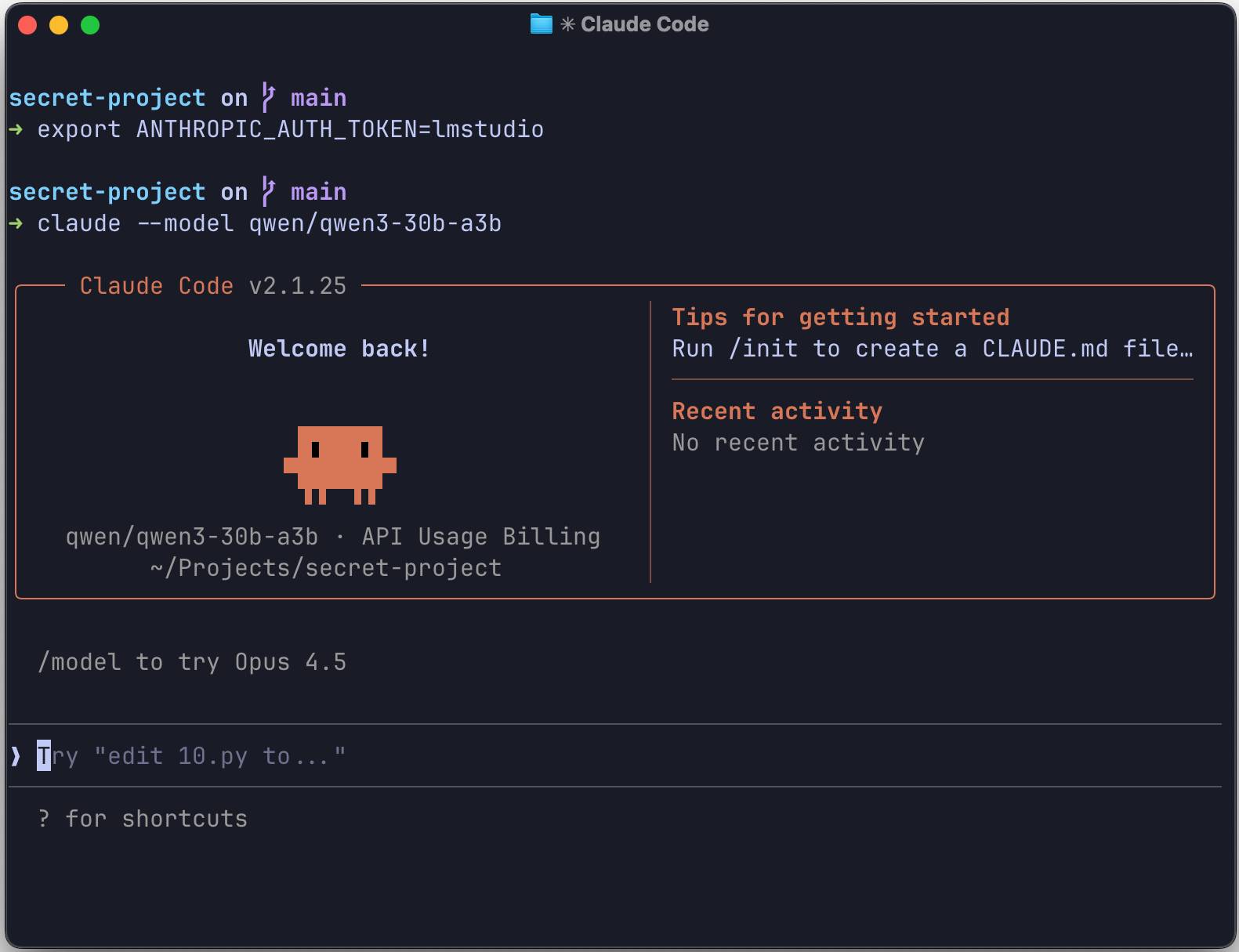
Set these environment variables so that Claude's CLI can communicate with your local LM Studio server:
export ANTHROPIC_BASE_URL=http://localhost:1234 export ANTHROPIC_AUTH_TOKEN=lmstudioRun Claude Code in the terminal.
From the terminal, use:
claude --model openai/gpt-oss-20bThat's it! Claude Code is now using your local model.
You should start with a context size of at least 25K tokens and gradually increase it for better results, as Claude Code can be quite context-heavy.
Alternatively: Configure Claude Code in VS Code
Open your VS Code settings:
"claudeCode.environmentVariables": [ { "name": "ANTHROPIC_BASE_URL", "value": "http://localhost:1234" }, { "name": "ANTHROPIC_AUTH_TOKEN", "value": "lmstudio" } ]
LM Studio 0.4.1 provides the /v1/messages endpoint, which is compatible with Anthropic. This means that any tool built for the Anthropic API can communicate with LM Studio simply by changing the base URL.
What is supported
- Messaging API: Full support for the /v1/messages endpoint.
- Stream: SSE events include message_start, content_block_delta, and message_stop.
- Use the tool: Call the function to activate immediately.
Python example
If you're building your own tool, here's how to use the Anthropic Python SDK with LM Studio:
from anthropic import Anthropic client = Anthropic( base_url="http://localhost:1234", api_key="lmstudio", ) message = client.messages.create( max_tokens=1024, messages=[ { "role": "user", "content": "Hello from LM Studio", } ], model="ibm/granite-4-micro", ) print(message.content)Troubleshooting
If you encounter any problems:
- Check if the server is running: Run `lms status` to verify that the LM Studio server is operational.
- Check the port: Ensure ANTHROPIC_BASE_URL is using the correct port (default: 1234)
- Check model compatibility: Some models perform better than others for agentic tasks.
Related Articles
 What Is the Claude Code: Clear Explanation7 minutes read
 When Should You Not Use Claude Code?10 minutes read
 Things You Need to Know About Claude Code5 minutes read
 How to Use Claude to Code and Debug Code6 minutes read
 This Claude Code Mode Is a Worthy Competitor to Other Ides8 minutes read
 Why Do Developers Always Choose Claude Over Other AIs?11 minutes read
Reader Comments 0
Sign in with email or Google to join the discussion.