Table of Contents
You can share a custom Gem from Gemini's Gem manager with named people or, when your account permits it, through a link. Before sending access, choose Viewer or Editor carefully and review every file in the Gem's knowledge section. Viewers can use the Gem and see its instructions and uploaded files; editors can change or delete those materials and share the Gem with other people.
The available sharing options depend on whether you use a personal, work, or school Google Account and on any Google Workspace administrator restrictions.
Before you share a Gem
- Open and test the Gem with several realistic prompts.
- Remove passwords, personal records, client data, private prompts, and other material recipients should not see.
- Confirm that you own or have permission to share every knowledge file.
- Decide whether recipients should only use the Gem or should also be able to edit it.
If you have not built one yet, follow the separate guide to creating a custom Gem in Google Gemini before continuing.
Share a Gemini Gem with specific people
1. Open the Gem manager
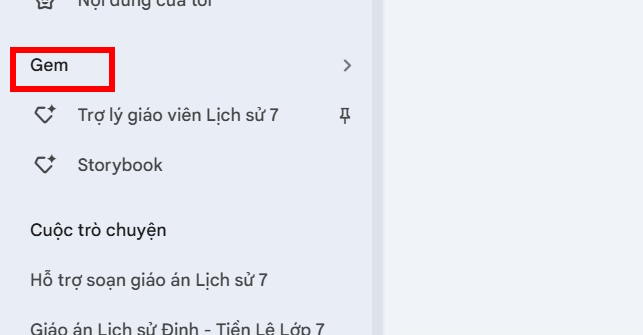
Go to Gemini while signed in to the Google Account that owns the Gem. Open the sidebar, select Gems—or Settings & help and then Gems, depending on the interface—and locate the item under My Gems.
2. Open the sharing dialog
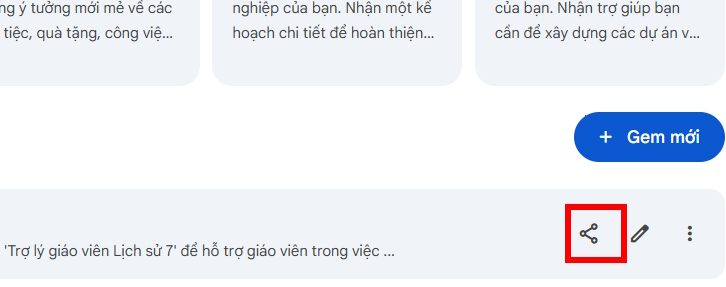
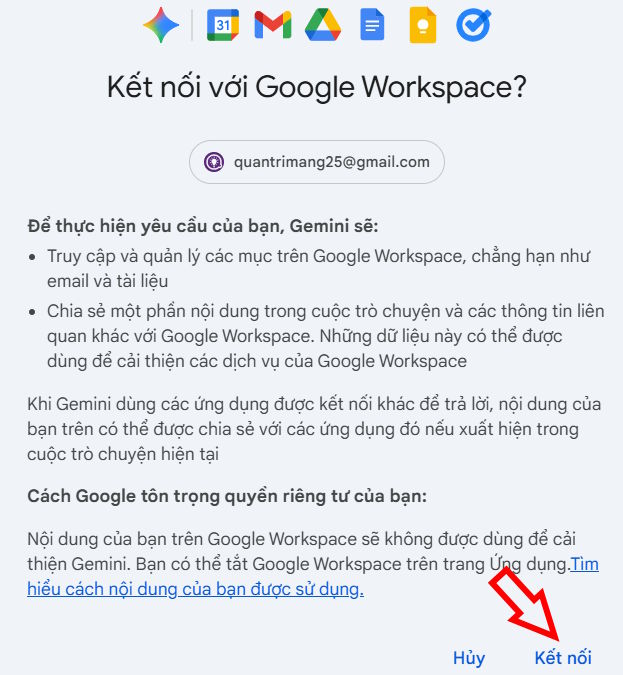
Use the share icon beside the Gem. If Gemini asks to connect to Google Workspace or Drive, review the request and continue only when you are signed in to the intended account.
3. Add recipients and assign a role
Enter each recipient's email address and choose an access level:
- Viewer: can use the Gem and view its instructions and uploaded files, but cannot edit the Gem.
- Editor: can change or delete the instructions and uploaded files, and can share the Gem with others.
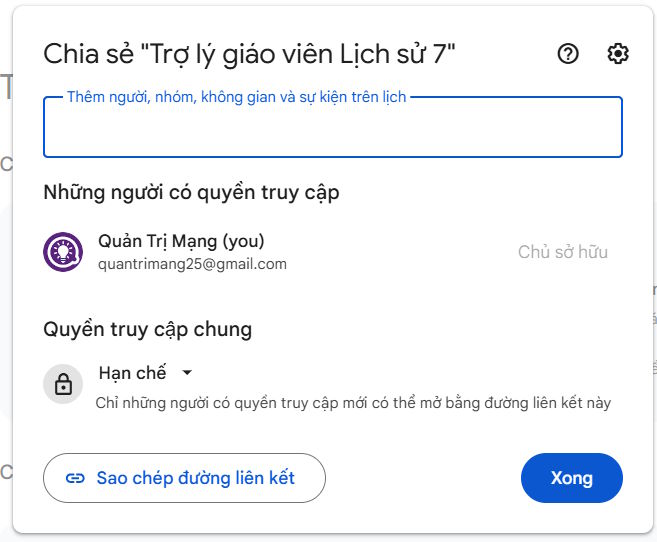
Use Viewer unless the person genuinely needs to maintain the Gem. If your account offers it, you can add an expiration date, include a message, and choose whether Google sends a notification email.
4. Review access to knowledge files
If the Gem includes uploaded files, Gemini may ask you to share those files separately. Check the proposed access for each file; file permissions are not a formality. Anyone who can use the Gem may be able to see the associated knowledge material.
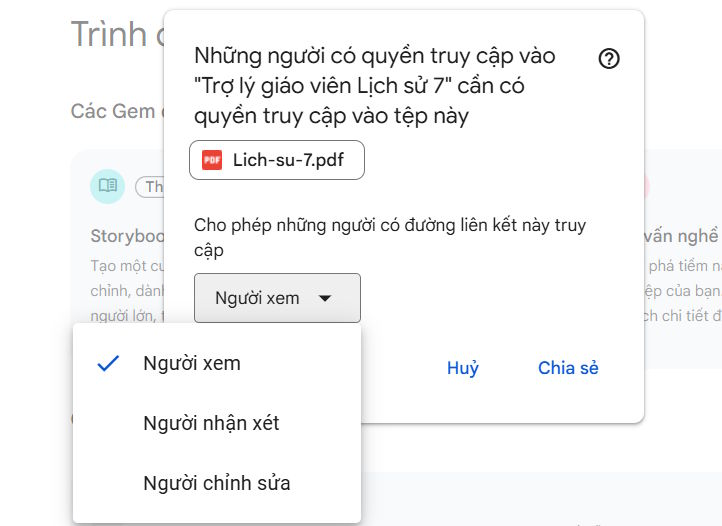
Do not grant Editor or Commenter access to a source file when Viewer is sufficient. Google also limits which uploaded file types can be shared with a Gem, so remove or replace an unsupported attachment rather than assuming recipients will be able to read it.
5. Send the invitation and test it
Select Send or Share. Ask one intended recipient to open the link, run a harmless test prompt, and confirm that the Gem and its source files have the expected permissions.
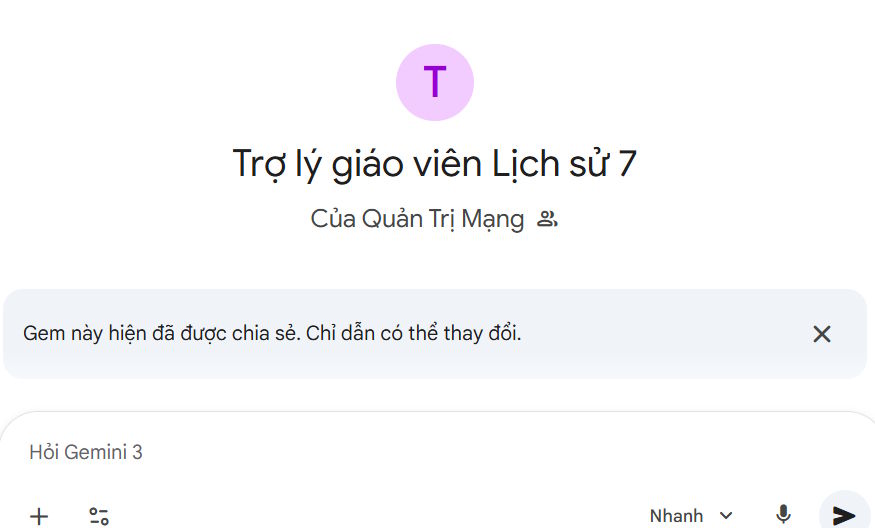
A Gem shared with someone may not appear in that person's Gem manager immediately. According to Google's current behavior, it is added under My Gems after the recipient opens and interacts with it.
Share a Gem by link
Open the same sharing dialog and choose Create link or Copy link. Copying the address does not necessarily grant access by itself. Set the Gem's general access or add named recipients first, then test the link in an account that should have access.
Depending on the account, general-access choices may include restricted access, anyone with the link, or public access. Work and school accounts may not offer broad sharing, and an administrator can limit sharing outside the organization. For the current controls and limitations, check Google's official Gem-sharing instructions.
Where shared Gems are stored
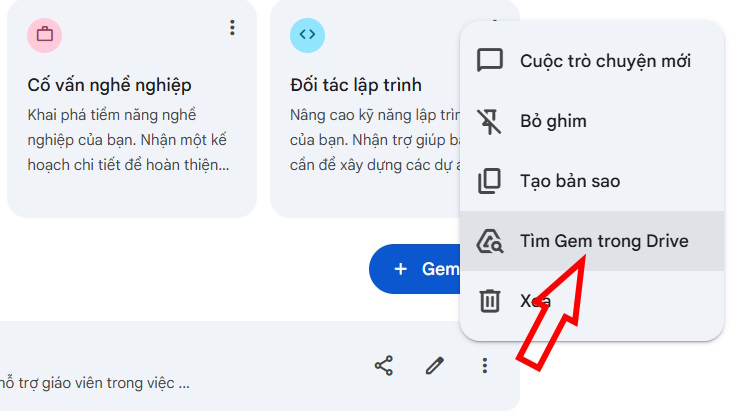
Shared Gems are stored in Google Drive, along with files uploaded as part of the Gem. To locate one, open the Gem manager, use the Gem's options menu, and choose Locate Gem in Drive when that command is available.
Because Drive permissions govern much of this sharing, the same principles used for other files apply. You can learn how to check who has access to a Google Drive file and remove people who no longer need it.
Change or remove Gem access
- Open the Gem's sharing dialog from Gemini or find the shared item in Google Drive.
- Select a person's current role to change Viewer and Editor access or to remove access.
- Review the general-access setting so an old link does not continue to work more broadly than intended.
- Check permissions on uploaded knowledge files as well as the Gem itself.
- Save the changes and test with an affected account if the Gem contains sensitive or business information.
If you need a broader introduction to files, folders, and permission controls, see how to use Google Drive.
Common sharing problems
The Share option is missing
Confirm that this is a Gem you own rather than a built-in Gem or a shared item you cannot redistribute. On a managed account, the Workspace administrator may have disabled Gem sharing or external Drive sharing.
The recipient can open the Gem but not its files
Reopen the sharing dialog and inspect the permissions for every uploaded file. The recipient needs access to the Gem and to its knowledge files. Also verify that the attachment is a supported, shareable device or Google Drive file.
The recipient can change the Gem
They probably have Editor access. Switch the person to Viewer unless collaboration on the instructions and files is intentional. Remember that edits can change the answers produced for everyone using the shared Gem.
A link works for more people than expected
Change general access to restricted, remove unnecessary recipients, and inspect the underlying Drive item and knowledge files. Do not rely on the obscurity of a link to protect confidential information.
Safe sharing checklist
- Use the least-permissive role that supports the task.
- Assume viewers can inspect the Gem's instructions and knowledge files.
- Share only material you are authorized to distribute.
- Test the experience with a recipient before a large rollout.
- Review access periodically and remove former team members or expired collaborators.
- For managed accounts, follow your organization's retention, data-classification, and external-sharing rules.
Related Articles
 How to Create Your Own AI Assistant with Google Gemini?5 minutes read
 Gemini Chat Sharing Guide5 minutes read
 Guide to Creating a Personal AI Assistant on ChatGPT5 minutes read
 Create Your Own AI Assistant for Writing Experience Reports Using Gemini4 minutes read
 Gemini Is No Longer as Useless as It Was Two Years Ago7 minutes read
 Google Confirms Gemini Will Completely Replace Assistant on Phones by 20265 minutes read
Reader Comments 0
Sign in with email or Google to join the discussion.