Table of Contents
This guide explains how to resolve Blue Screen of Death BSOD Error Codes List, starting with the most likely causes and moving through practical troubleshooting steps.
BSOD error occurs in any Windows Supported operating systems, including Windows 10, Windows 8, Windows 7, Windows Vista, Windows XP and even Windows 98/95.
Since the blue screen error leaves you with no choice but to reboot, fixing the problem can be difficult. Fortunately, almost every error of this type includes a stop code based on hexadecimal, which can be used to study how to fix it.
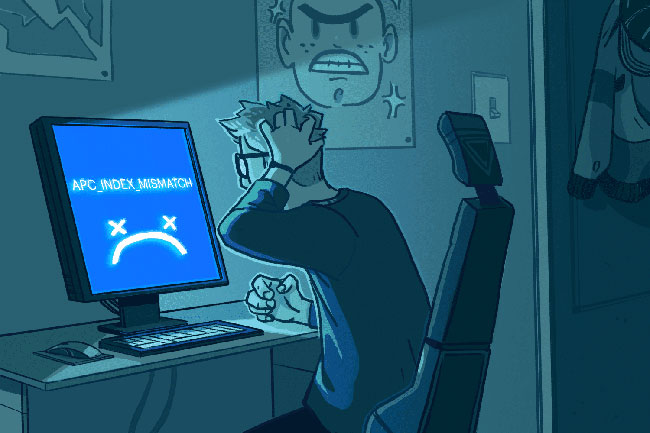
Below are BSOD errors, including the meaning of each error code, and any possible troubleshooting information about that blue screen error.
Read the links to specific error codes in the list below. But if the article does not have a detailed solution, especially in the case of an uncommon BSOD error, see instructions: How to fix the BSOD blue screen of death.
BSOD error codes list
- This BSOD 0x00000001 means there is a mismatch in the APC status index. BSOD error code 0x00000001 may also display "APC_INDEX_MISMATCH" on the same blue screen.
- This BSOD 0x00000002 is uncommon. BSOD error code 0x00000002 may also display "DEVICE_QUEUE_NOT_BUSY" on the same blue screen.
- This BSOD 0x00000003 is uncommon. BSOD error code 0x00000003 may also show "INVALID_AFFINITY_SET" on the same blue screen.
- This BSOD 0x00000004 is uncommon. BSOD error code 0x00000004 may also show "INVALID_DATA_ACCESS_TRAP" on the same blue screen.
- This BSOD 0x00000005 is uncommon. BSOD error code 0x00000005 may also show "INVALID_PROCESS_ATTACH_ATTEMPT" on the same blue screen.
- This BSOD 0x00000006 is uncommon. BSOD error code 0x00000006 may also show "INVALID_PROCESS_DETACH_ATTEMPT" on the same blue screen.
- This BSOD 0x00000007 is uncommon. BSOD error code 0x00000007 may also show "INVALID_SOFTWARE_INTERRUPT" on the same blue screen.
- This BSOD 0x00000008 is uncommon. BSOD error code 0x00000008 may also display "IRQL_NOT_DISPATCH_LEVEL" on the same blue screen.
- This BSOD 0x00000009 is uncommon. BSOD error code 0x00000009 may also show "IRQL_NOT_GREATER_OR_EQUAL" on the same blue screen.
- This BSOD 0x0000000A means that Microsoft Windows or kernel-mode driver has accessed paged memory at DISPATCH_LEVEL or higher. BSOD error code 0x0000000A may also show "IRQL_NOT_LESS_OR_EQUAL" on the same blue screen.
- This BSOD 0x0000000B is uncommon. BSOD error code 0x0000000B may also show "NO_EXCEPTION_HANDLING_SUPPORT" on the same blue screen.
- This BSOD 0x0000000C means that the current thread has exceeded the number of pending objects. BSOD error code 0x0000000C may also display "MAXIMUM_WAIT_OBJECTS_EXCEEDED" on the same blue screen.
- This BSOD 0x0000000D is uncommon. BSOD error code 0x0000000D may also display "MUTEX_LEVEL_NUMBER_VIOLATION" on the same blue screen.
- This BSOD 0x0000000E is uncommon. BSOD error code 0x0000000E may also show "NO_USER_MODE_CONTEXT" on the same blue screen.
- This BSOD 0x0000000F means that the spin lock request is generated when the spin lock has been owned. BSOD error code 0x0000000F may also show "SPIN_LOCK_ALREADY_OWNED" on the same blue screen.
- This BSOD 0x00000010 is uncommon. BSOD error code 0x00000010 may also show "SPIN_LOCK_NOT_OWNED" on the same blue screen.
- This BSOD 0x00000011 is uncommon. BSOD error code 0x00000011 may also display "THREAD_NOT_MUTEX_OWNER" on the same blue screen.
- This BSOD 0x00000012 means an unknown exception has occurred. BSOD error code 0x00000012 may also show "TRAP_CAUSE_UNKNOWN" on the same blue screen.
- This BSOD 0x00000013 is uncommon. BSOD error code 0x00000013 may also display "EMPTY_THREAD_REAPER_LIST" on the same blue screen.
- This BSOD 0x00000014 is uncommon. BSOD error code 0x00000014 may also display "CREATE_DELETE_LOCK_NOT_LOCKED" on the same blue screen.
- This BSOD 0x00000015 is uncommon. BSOD error code 0x00000015 may also show "LAST_CHANCE_CALLED_FROM_KMODE" on the same blue screen.
- This BSOD 0x00000016 is uncommon. BSOD error code 0x00000016 may also show "CID_HANDLE_CREATION" on the same blue screen.
- This BSOD 0x00000017 is uncommon. BSOD error code 0x00000017 may also show "CID_HANDLE_DELETION" on the same blue screen.
- This BSOD 0x00000018 means that an object's reference count is invalid against the object's current state. BSOD error code 0x00000018 may also show "REFERENCE_BY_POINTER" on the same blue screen.
- This BSOD 0x00000019 means the pool header is corrupted. BSOD error code 0x00000019 may also show "BAD_POOL_HEADER" on the same blue screen.
- This BSOD 0x0000001A indicates a critical memory management error has occurred. BSOD error code 0x0000001A may also display "MEMORY_MANAGEMENT" on the same blue screen.
- This BSOD 0x0000001B is uncommon. BSOD error code 0x0000001B may also show "PFN_SHARE_COUNT" on the same blue screen.
- This BSOD 0x0000001C is uncommon. BSOD error code 0x0000001C may also show "PFN_REFERENCE_COUNT" on the same blue screen.
- This BSOD 0x0000001D is uncommon. BSOD error code 0x0000001D may also show "NO_SPIN_LOCK_AVAILABLE" on the same blue screen.
- This BSOD 0x0000001E means that a kernel-mode program created an exception that was not caught by the error handler. BSOD error code 0x0000001E may also display "KMODE_EXCEPTION_NOT_HANDLED" on the same blue screen.
- This BSOD 0x0000001F is uncommon. BSOD error code 0x0000001F may also show "SHARED_RESOURCE_CONV_ERROR" on the same blue screen.
FAQ
What usually causes Blue Screen of Death BSOD Error Codes List?
The cause may involve incorrect settings, outdated software, damaged files, permission problems, device compatibility, or a temporary system issue.
What should I try first to resolve Blue Screen of Death BSOD Error Codes List?
Restart the affected app or device, install pending updates, verify settings and connections, and follow the troubleshooting steps in order.
How can I prevent the issue from returning?
Keep software updated, maintain backups, avoid interrupted installations, and review system or device settings after major changes.
Related Articles
 How to Find the Cause of Blue Screen Death and Minidump Errors?8 minutes read
 Ways to Fix BSOD Blue Screen Error19 minutes read
 How to Create a Blue Screen of Death (BSOD) to 'Prank' Friends1 minutes read
 Do You Know That Microsoft Also Has Blue Screensaver Screensavers?5 minutes read
 Instructions to Fix Blue Screen Error on Computer15 minutes read
 How to Fix Blue Screen Error on Windows: Practical Guide13 minutes read
Reader Comments 0
Sign in with email or Google to join the discussion.