Clear, practical technology insights BSOD Code Lookup · Windows Error Code Lookup · Wi-Fi Troubleshooting · PC Troubleshooting Checklist

Windows 11 Is About to Offer Better Control Over HDR Features: What You Need to Know

Explore Windows 11 Is About to Offer Better with clear explanations, practical examples, common limitations, and useful tips for better-informed decisions.

Table of Contents

Windows 11 Is About to Offer Better Control Over HDR Features is easier to understand when the main concepts, benefits, limitations, and real-world uses are considered together.

This guide organizes the essential information into clear sections and adds practical context so you can make a more informed decision.

As the name suggests, this feature essentially allows Windows 11 users to stream HDR content without needing to enable HDR for the entire system.
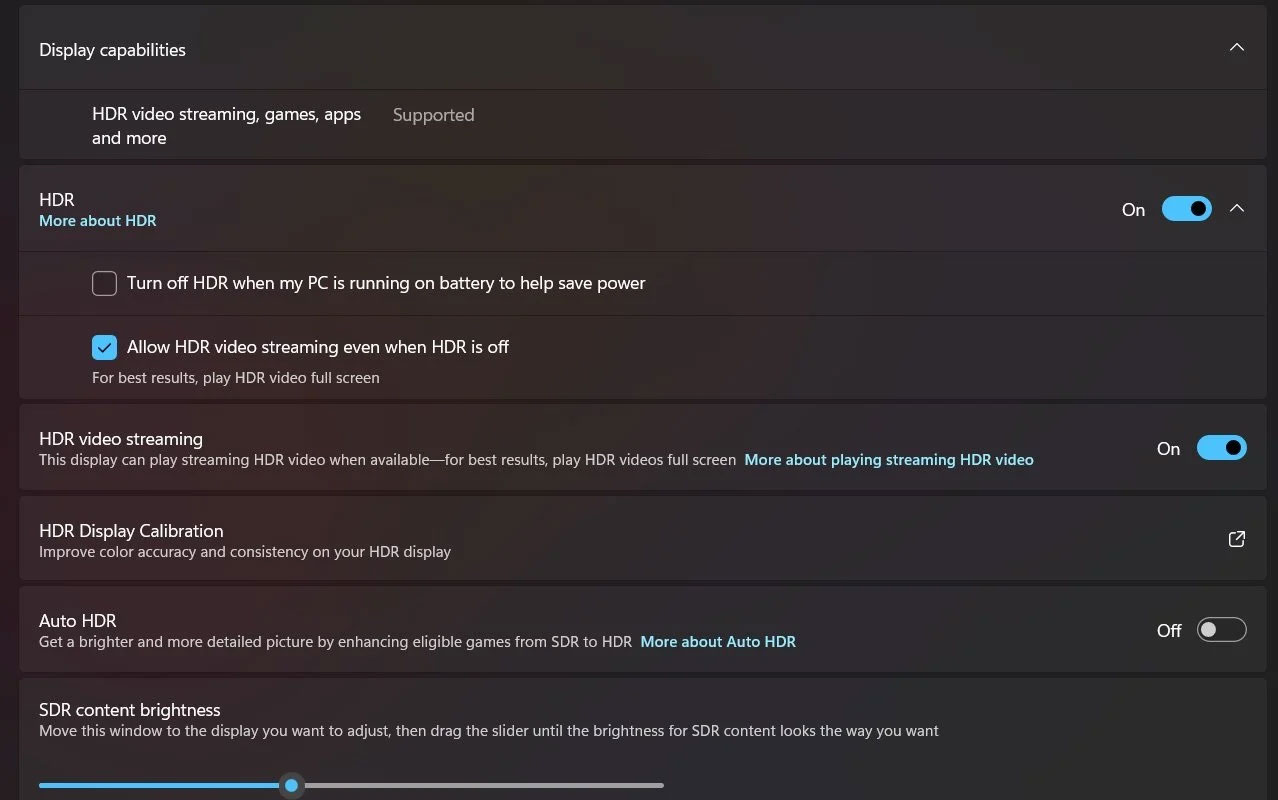
Windows 11 Is About to Offer Better Control Over HDR Features: What You Need to Know screenshot

In addition, the "HDR video streaming" logo in the Display capabilities section has been updated to "HDR video streaming, games, apps and more", which shows that Microsoft is planning to launch more HDR-related features. in the future.

Other Notable Improvements in Windows 11 Build 27686

A small but notable visual change has been made in the Disks & Volumes settings. The "Create volume" button for unallocated hard drive space now has rounded corners and a V-shaped icon that animates when clicked.

Build 27686 also adds support for ReFS (Resilient File System) version 3.15. However, it's important to note that Windows still formats partitions using version 3.14, introduced in the previous build (26047).

In addition to these minor improvements, build 27686 officially confirms Microsoft's statement that future Windows 11 releases will remove the 32GB size limit for FAT32 partitions, allowing a maximum size of 2TB.
FAQ

What should beginners know about Windows 11 Is About to Offer Better Control Over HDR Features?

Start with the basic requirements, learn the most common terms, and test changes gradually before using advanced features.

How can I get better results with Windows 11 Is About to Offer Better Control Over HDR Features?

Use trusted tools, follow current instructions, compare results, and review settings or limitations that may affect performance.

What mistakes should I avoid with Windows 11 Is About to Offer Better Control Over HDR Features?

Avoid skipping requirements, relying on outdated instructions, changing multiple settings at once, or using untrusted downloads and unsupported tools.

Discussion

Reader Comments 0

Sign in with email or Google to join the discussion.