Table of Contents
This guide provides a clear, practical overview of Windows 10 computers with coc installed are temporarily, with useful context, important details, and straightforward takeaways for everyday readers.
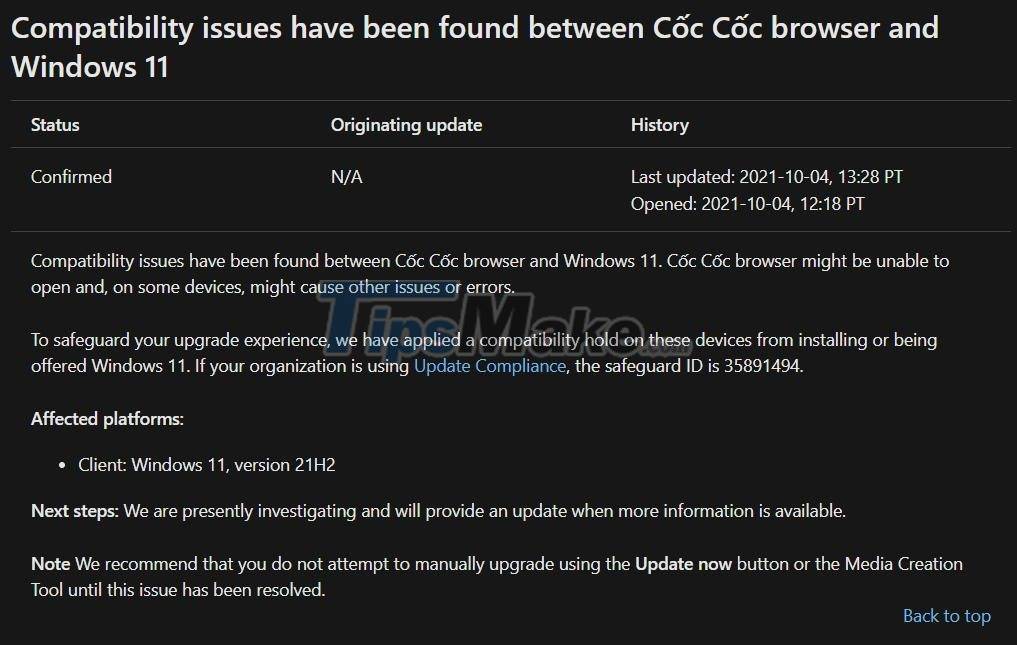
Microsoft added that to ensure the user experience, Windows 10 machines with Coc Coc installed will be temporarily blocked from updating to Windows 11. Microsoft is actively investigating to find a solution soon.
The software giant also recommends that users do not update Windows 11. If you are using Coc Coc for essential work, you should not intentionally update Windows 11 to avoid unnecessary problems.
On its support page Microsoft does not mention uninstalling Coc Coc. However, if it doesn't affect your work, you can try to uninstall Coc Coc to see if you can update Windows 11 or not. In addition, you can also skip Coc Coc to use another browser instead.
Besides the compatibility error with Coc Coc browser, Windows 11 currently has two other compatibility errors related to Oracle's VirtualBox and the Intel networking software "Killer".
Microsoft said it will soon release patches for existing problems on Windows 11. The earliest patch will be released on October 12.
Key Takeaways
Use the information above as a practical reference for Windows 10 computers with coc installed are temporarily. Review each step carefully, confirm any requirements, and choose the option that best fits your situation.
FAQ
What does this guide explain about Windows 10 Computers with Coc Installed Are Temporarily?
It explains the main concepts, practical considerations, and useful steps related to Windows 10 computers with coc installed are temporarily without requiring advanced knowledge.
Who can benefit from learning about Windows 10 Computers with Coc Installed Are Temporarily?
This information is useful for readers who want a clear overview, practical guidance, and reliable steps related to Windows 10 computers with coc installed are temporarily.
What should I check before applying this information?
Review the requirements, confirm that your device, software, or situation matches the instructions, and back up important data before making major changes.
Related Articles
 How to Unlock Blocked Facebook: Unlock Blocked Facebook Accounts6 minutes read
 Steps to Fix 'This App Has Been Blocked for Your Protection'6 minutes read
 Mac Computers Cannot Install Windows 11 Windows3 minutes read
 Microsoft Blocked Computers That Have Installed Avast Antivirus to Update Windows 10 April 20183 minutes read
 Microsoft Will Allow Windows 11 to Be Installed on Computers4 minutes read
 Is It Possible to Download New Features for Windows 113 minutes read
Reader Comments 0
Sign in with email or Google to join the discussion.