Table of Contents
Microsoft Edge Secure Network can add protection to supported browsing traffic, but it should not be treated as an always-on VPN for your entire device. Its main limitations are browser-level coverage, a monthly data allowance, and settings that determine which traffic uses the service.
Those limits do not make it inherently untrustworthy. They do mean you should check what is protected before relying on it for a particular task.
What the feature does
Microsoft describes Secure Network as a built-in service that encrypts supported traffic and masks your IP address. It uses a similar regional location rather than giving you unrestricted control over the country your traffic appears to come from.
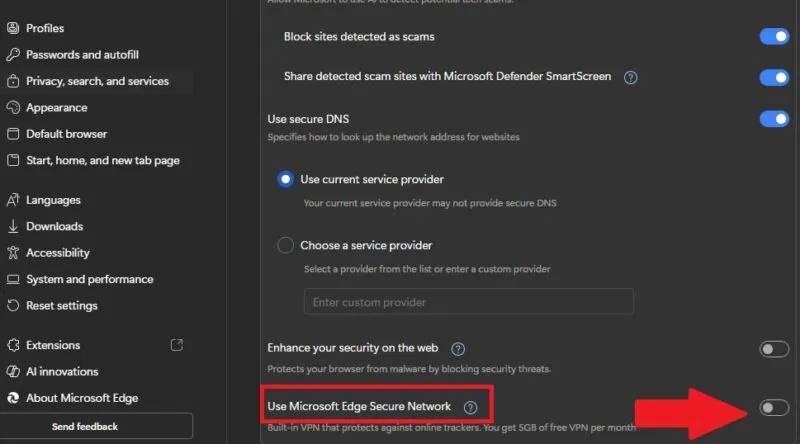
Local restaurant or cinema results are therefore consistent with its design. They do not, by themselves, demonstrate that your real IP address is exposed. TipsMake’s introduction to Edge’s built-in VPN provides background on browser-based coverage.
Three limits to understand
- Scope: protection in Edge does not establish protection for other browsers or applications.
- Data: Microsoft currently lists a 5 GB monthly allowance for users signed in with a personal Microsoft account. Some traffic may be excluded from routing.
- Availability: the feature can vary by region and browser version, and Microsoft says it is not available on managed devices.
See Microsoft’s feature details and check the status and remaining allowance shown in your own browser. Do not assume protection continues after the service disconnects or its allowance is exhausted.
Choose the protection mode deliberately
Open Edge’s settings and find Secure Network, or use Settings and more → More tools → Secure Network if that option is present.
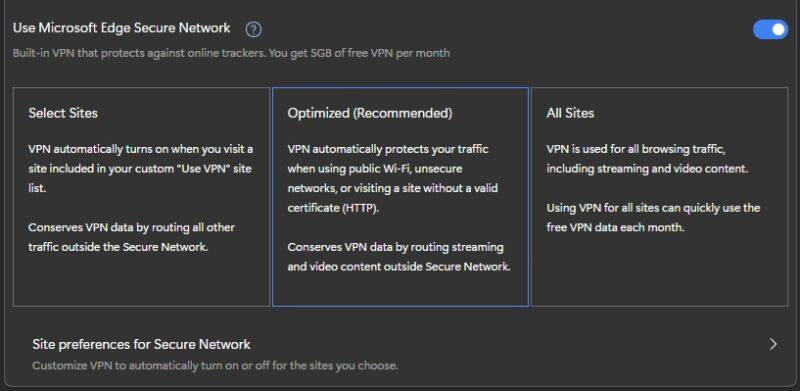
- Optimized: applies additional protection selectively, including on open Wi-Fi and unsecured connections.
- Select Sites: lets you specify sites that should use the service.
- All Sites: routes more browsing traffic while enabled, so it can consume the allowance faster.
Use the service’s status indicator to check whether it is active. A setting being enabled is different from a particular connection actually using it.
What a VPN does not guarantee
A changed IP address does not make you anonymous. Websites can still recognize a signed-in account, cookies, and other identifying information. A VPN also does not make a phishing site trustworthy.
Continue using HTTPS and heed certificate warnings. Microsoft’s HTTPS-First guide explains that separate protection. A browser VPN is not a reason to send passwords over an insecure connection.
If you test coverage, compare the browser’s public IP before and while the service is active. The VPN leak-check guide explains related checks, but a successful IP test alone does not prove complete anonymity or protection for every application.
Related Articles
 How to Fix 5 Common Problems on Microsoft Edge Browser6 minutes read
 How Can Zero-trust Security Prevent Ransomware Attacks?7 minutes read
 How to Smooth Edges in Photoshop4 minutes read
 Box: How to Set Margins in Microsoft Publisher5 minutes read
 How to Fix iPhone Error Does Not Show Trust This Computer7 minutes read
 How Secure Is Microsoft Onedrive?8 minutes read
Reader Comments 0
Sign in with email or Google to join the discussion.