Table of Contents
Choose OBS Studio when you want a free, open-source, cross-platform production tool and are comfortable adding services or plugins for specialized features. Choose Wirecast when a paid, integrated workflow for remote guests, multistreaming, ISO recording, PTZ cameras, sports graphics, and support is worth the subscription. Neither is automatically easier or faster on every computer, so test the exact production before committing.
OBS Studio vs Wirecast at a glance
| Area | OBS Studio | Wirecast |
|---|---|---|
| License and cost | Free and open source | Commercial monthly or annual plans; free trial available |
| Operating systems | Windows, macOS, Linux | Windows and macOS |
| Core workflow | Modular scenes, sources, filters, docks, profiles, and plugins | Layered live production with more integrated broadcast features |
| Multistreaming | Requires a service, plugin, or separate output workflow | Built-in or cloud multistreaming in the applicable Wirecast plan |
| Remote guests | Use browser-based guest tools or plugins | Integrated guest capacity varies by Studio or Pro plan |
| ISO recording | Use supported plugins or separate instances/workflows | Included in Wirecast Pro |
| Plugins and scripts | Large community ecosystem; native plugins plus Lua/Python scripts | More features built in; smaller extension ecosystem |
| PTZ and sports tools | Possible through plugins, devices, browser sources, or manual setup | Integrated in Wirecast Pro |
| Best fit | Independent creators, technical teams, Linux users, and custom workflows | Schools, houses of worship, sports, events, and teams wanting an integrated package |
What OBS Studio does well
OBS Studio is free software for recording and live streaming on Windows, macOS, and Linux. It can combine cameras, capture cards, displays, application windows, games, browsers, media, images, and text into scenes, then mix audio and encode a program output.
No license cost or feature tier
The core application does not lock resolution, scene count, recording, or streaming behind a paid plan. That makes OBS practical for a first channel, a classroom, a volunteer production, or a custom studio that would rather invest in microphones, lighting, cameras, and capture hardware.
Plugins and scripts
OBS supports community plugins that add sources, filters, hardware integrations, outputs, automation, audio routing, remote control, captions, replay, and recording workflows. Lua and Python scripts can automate supported parts of the application.
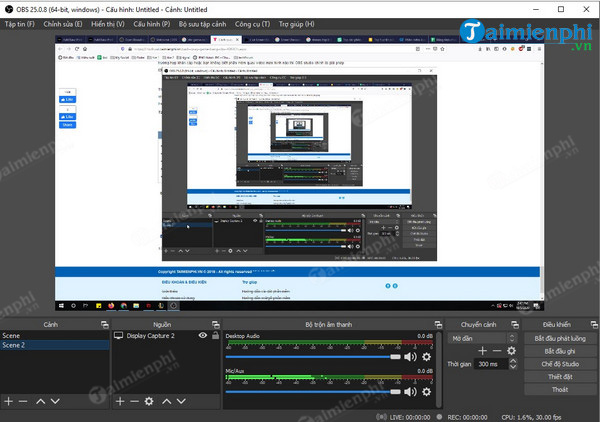
This flexibility is also a maintenance responsibility. A plugin may lag behind a major OBS update, behave differently across operating systems, or depend on another runtime. Back up profiles and scene collections and test updates before an event.
Fine-grained control
OBS separates scene collections, output profiles, audio devices, encoders, recording formats, filters, hotkeys, transitions, and docks. Experienced operators can build a lean setup containing only the tools the production needs.
Where OBS takes more assembly
- Native OBS normally sends one primary stream; simultaneous destinations need another output, a plugin, or a cloud restreaming service.
- Remote guests typically enter through a browser or conferencing integration that the operator must configure.
- Source-level or isolated recording generally relies on plugins or a planned multi-instance workflow.
- Sports scoreboards, stock media, PTZ control, and polished title packages are not one bundled product.
- Community support is extensive, but there is no conventional paid vendor support contract included with the application.
What Wirecast does well
Wirecast is Telestream's commercial live-production software for Windows and Mac. Its current Studio and Pro plans bundle different feature sets, so compare the live pricing page rather than assuming a trial or old license includes everything.
Integrated production features
Wirecast combines live switching, layered shots, titles, chroma key, screen capture, IP and capture sources, remote guests, virtual camera and microphone output, destination presets, and stock media in a vendor-supported application.
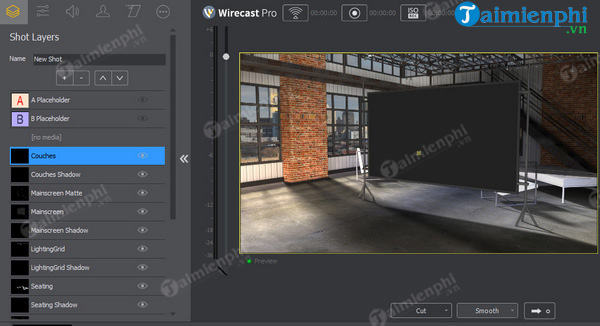
Wirecast Pro adds features aimed at larger productions, including cloud or built-in multistreaming, more remote guests, ISO recording, PTZ camera control, sports tools, multi-track audio recording, and a larger multi-viewer. Confirm the current plan table because packaging can change.
Multistreaming
Wirecast can reduce setup work when one production must reach several destinations. The important distinction is how the selected plan sends them:
- Local multistreaming can require the computer to encode more than one output and the connection to upload their combined bitrate.
- Cloud multistreaming sends one contribution stream to a service that redistributes it, but service limits and plan terms apply.
Check each destination's simultaneous-broadcast rules, chat workflow, aspect ratio, and stream-key security. A technical ability to send multiple feeds does not override a platform contract.
Remote guests and event workflows
Integrated guest, PTZ, sports, ISO, and multi-viewer features can be valuable when an operator must run a show quickly and hand the workflow to other staff. Vendor documentation and support may also matter more to a school, company, or paid event than software cost alone.
Where Wirecast may not fit
- The subscription is a continuing production expense.
- Linux is not supported.
- Some high-value features are limited to the Pro plan.
- A bundled interface can consume resources even when a production uses only a subset of the tools.
- Teams built around a particular OBS plugin or script may not find a direct equivalent.
Performance: do not rely on “lightweight” labels
The original comparison claimed OBS works on low-spec computers while Wirecast requires high-end hardware. That is too broad. CPU and GPU load depends on sources, resolutions, frame rates, filters, scaling, encoders, simultaneous recordings, browser content, remote guests, and outputs.
The legacy requirements image below should not be used for purchasing a computer.
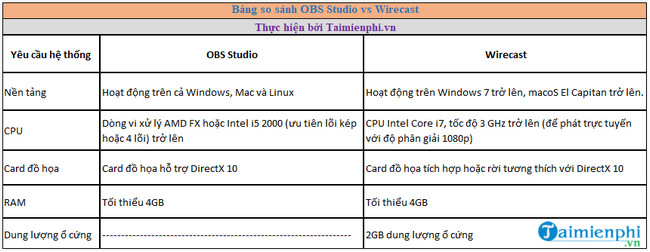
Telestream's current Wirecast technical specifications list minimum and recommended Windows or macOS versions, processors, memory, graphics, storage, and bandwidth. OBS publishes supported operating systems, but its practical requirement is the hardware needed to run the content and encode the selected output.
Run a fair test
- Use the same camera, capture card, microphone, game or presentation, browser sources, and overlays.
- Set the same canvas, output resolution, frame rate, encoder, bitrate, keyframe interval, and audio rate.
- Stream privately or record locally for at least 15 minutes.
- Switch every scene, play every video, connect remote guests, and trigger the busiest graphics.
- Monitor CPU, GPU, memory, rendering lag, encoding lag, dropped network frames, audio sync, and disk throughput.
- Repeat the test while recording or multistreaming if the real event will do so.
Which one should you choose?
Choose OBS Studio if:
- your budget is limited or you do not want a software subscription;
- you need Linux support;
- you value plugins, scripts, and custom automation;
- one main output and one program recording cover most events;
- your team can maintain the production and test updates.
Choose Wirecast if:
- remote guests, multistreaming, ISO recordings, PTZ cameras, or sports tools are routine;
- you want these features in one supported package;
- staff prefer a consistent vendor-designed workflow over assembling plugins;
- the software cost is small relative to event labor and failure risk;
- you have confirmed that the required features are in the selected plan.
Before buying Wirecast
- List the features you actually need and match each one to Studio or Pro.
- Check current monthly, annual, upgrade, cancellation, and support terms.
- Install the free trial on the exact production computer.
- Verify every camera, capture card, audio device, PTZ controller, NDI or SRT source, guest, and destination.
- Open an existing OBS workflow only as reference; assume scenes and plugins will need rebuilding.
- Document a fallback output in case authentication or a destination API changes before an event.
For a different free-versus-integrated comparison, read Streamlabs Desktop vs OBS Studio. If you choose OBS, follow the OBS Studio installation guide and test a complete scene before going live.
Related Articles
 OBS Studio - Free, Open Source Software9 minutes read
 What Is TikTok Live Studio? Instructions for Using TikTok Live Studio3 minutes read
 The Simplest and Most Effective Way to Fix the OBS Studio Recording Error on Windows 117 minutes read
 What Is LM Studio? What Are Its Applications?6 minutes read
 How to Install Obs Studio in Ubuntu3 minutes read
 How to Adjust Video Audio on Camtasia Studio10 minutes read
Reader Comments 0
Sign in with email or Google to join the discussion.