Table of Contents
Choose OBS Studio if you want a free, open-source, cross-platform tool with extensive plugin support and granular control. Choose Streamlabs Desktop if you value guided setup, integrated alerts, chat, themes, and Streamlabs services in one interface. Both can produce a high-quality stream; the better choice depends on your workflow, computer, and willingness to configure tools separately.
SLOBS was the former abbreviation for Streamlabs OBS. The product is now called Streamlabs Desktop, so this guide uses its current name.
OBS Studio vs Streamlabs Desktop at a glance
| Area | OBS Studio | Streamlabs Desktop |
|---|---|---|
| Price | Free and open source | Core app is free; some themes and services require Streamlabs Ultra |
| Operating systems | Windows, macOS, and Linux | Windows and macOS |
| Setup style | Flexible, with more manual configuration | Guided onboarding and integrated Streamlabs tools |
| Plugins | Large community ecosystem plus Lua and Python scripts | Built-in Streamlabs features; compatibility differs from native OBS plugins |
| Overlays and alerts | Add through browser sources, plugins, or third-party services | Integrated theme, alert, widget, and chat workflow |
| Performance | Lean base installation; actual load depends on scenes and settings | More integrated services can add overhead; test on your hardware |
| Best fit | Users who want control, plugins, Linux support, or a minimal base | Users who want Streamlabs tools in one app and faster initial setup |
OBS Studio: strengths and tradeoffs
OBS Studio is free, open-source software for recording and live production. It can combine display or window captures, cameras, capture cards, browser sources, media, images, and text into scenes, with an audio mixer and transitions.
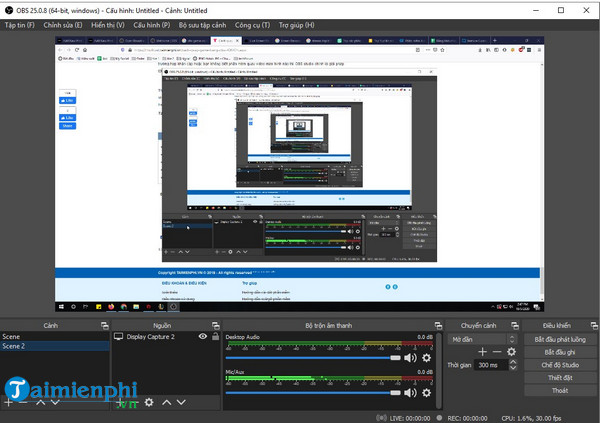
Why choose OBS Studio?
- No subscription for the application: recording, streaming, scene creation, and the core production tools are free.
- Broad platform support: current releases support Windows, macOS, and Linux. Check the official download page for current OS-version requirements.
- Plugin and script ecosystem: OBS explicitly supports community plugins, native integrations, and Lua or Python scripts. The old claim that OBS has no plugin support is incorrect.
- Fine control: output resolution, frame rate, encoder, bitrate, audio tracks, color settings, hotkeys, and scene collections can be configured independently.
- Recording as well as streaming: OBS is useful for tutorials, gameplay capture, presentations, and local production even when you never go live.
- Portable workflow: scene collections and profiles separate visual layouts from output settings.
What takes more work?
- Alerts, donations, chat widgets, and overlay libraries usually come from external services or plugins.
- The number of settings can be intimidating to a first-time streamer.
- Plugins must match your OBS version and operating system; an outdated plugin can fail after an update.
- OBS does not automatically guarantee low CPU use. Encoding method, resolution, frame rate, sources, filters, and browser widgets determine the load.
Streamlabs Desktop: strengths and tradeoffs
Streamlabs Desktop packages a streaming application with Streamlabs account services. It guides users through platform connection, microphone and camera setup, scene import, and optimization, then places alerts, themes, widgets, and chat close to the production controls.
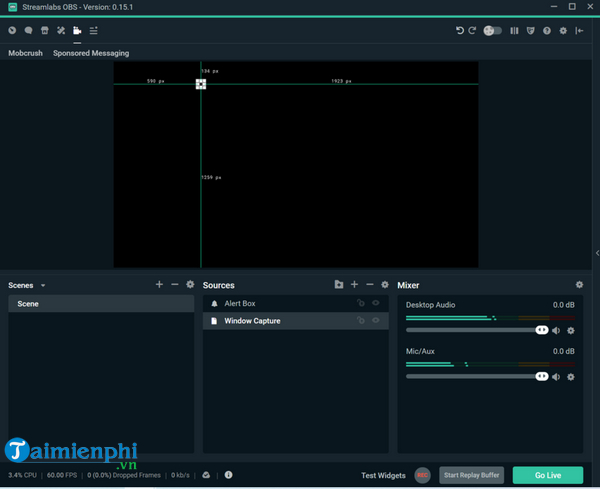
Why choose Streamlabs Desktop?
- Faster onboarding: the setup flow can connect an account and build a basic stream without assembling every component manually.
- Integrated widgets: alerts, goals, event lists, chat, and other Streamlabs services are easier to add.
- Theme workflow: users can browse compatible overlays and install scene packages more directly.
- Cloud-linked account features: convenient if your channel already relies on the Streamlabs ecosystem.
- Windows and Mac support: the current desktop app is no longer Windows-only. Feature behavior can differ between operating systems.
What should you check first?
- Some themes, multistreaming options, apps, or services may require a paid Streamlabs Ultra plan. Check the price and renewal terms before subscribing.
- The integrated interface may use more resources than a simple OBS scene, but no single benchmark applies to every setup.
- Linux is not listed as a supported Streamlabs Desktop platform.
- If you later want a specialized OBS plugin, verify compatibility instead of assuming it will work in Streamlabs Desktop.
- Account-linked features can be convenient, but they also make your workflow more dependent on one service.
System requirements are only a starting point
The original comparison treated basic hardware requirements as a guarantee. In practice, a computer that can open the application may still struggle to encode a demanding stream. Streamlabs currently lists Windows or macOS requirements and 8 GB of RAM as a minimum, while OBS lists supported operating-system versions on its download page. Neither figure describes your full workload.
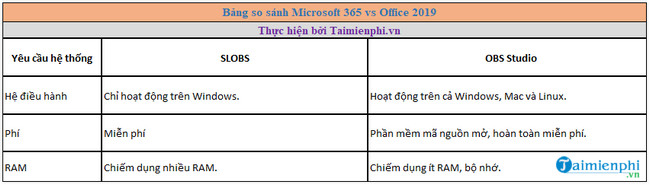
The screenshot above is a legacy reference, not a current specification. Before going live, test the exact combination of:
- canvas and output resolution;
- 30 or 60 frames per second;
- CPU or hardware video encoder;
- game, screen, camera, capture-card, and browser sources;
- noise suppression, chroma key, scaling, and other filters;
- recording at the same time as streaming;
- internet upload speed and the streaming platform's bitrate limits.
Run a private or unlisted test stream and watch the application's statistics. Dropped network frames point toward connection or server issues; encoding lag and rendering lag point toward different hardware or scene-load bottlenecks.
Which one should you use?
Pick OBS Studio if:
- you use Linux;
- you want the widest plugin and scripting options;
- you need precise output, audio-track, or recording control;
- you prefer a smaller base app and will add only the tools you need;
- open-source licensing and community development matter to you.
Pick Streamlabs Desktop if:
- you want alerts, chat, widgets, and themes assembled in one interface;
- you are new to streaming and value guided setup;
- you already use Streamlabs for donations, overlays, or channel tools;
- you accept that some optional features are subscription-based;
- you stream on a supported Windows or Mac system.
There is also a middle option: Streamlabs offers a plugin for OBS Studio. It can add selected Streamlabs services while keeping the native OBS application, though you should still verify current feature and plan requirements.
How to make a fair comparison on your PC
- Install each application only from its official website.
- Create the same canvas size, output resolution, frame rate, encoder, and bitrate.
- Add the same camera, game or display capture, alert browser source, and audio filters.
- Record the same five- to ten-minute test while monitoring CPU, GPU, memory, rendering lag, and encoding lag.
- Compare the output for motion clarity, microphone sync, dropped frames, and ease of recovery after a scene change.
- Keep the tool that is reliable on your hardware and easier for you to operate under pressure.
For a different production comparison, read OBS Studio vs Wirecast. If local recording matters as much as streaming, our guide to screen-recording software with audio provides more alternatives.
Related Articles
 The Main Difference Between Ollama and LM Studio10 minutes read
 What Is LM Studio? What Are Its Applications?6 minutes read
 How to Install Obs Studio in Ubuntu3 minutes read
 How to Adjust Video Audio on Camtasia Studio10 minutes read
 Comparing Lte and 4g: Comparison of Lte, 4g and 5g Networks12 minutes read
 Shortcuts in Camtasia Studio6 minutes read
Reader Comments 0
Sign in with email or Google to join the discussion.