Table of Contents
An ad blocker can hide many banners, pop-ups, and other page elements, but no extension removes every ad on every site. The safest approach is to use your browser's official extension store, verify the publisher, review the requested permissions, and install only one blocker at a time.

Important: “AdBlock,” “Adblock Plus,” and “ad blocker” are not interchangeable names. The first two refer to particular products; the last is a general category. Check the extension name and developer carefully before installing.
Before installing an ad blocker
- Download extensions only from the browser's official store or use a blocker built into the browser.
- Read the permissions prompt. A blocker normally needs access to page content so it can identify and hide advertising, but unrelated permissions deserve scrutiny.
- Check recent reviews, update history, and the publisher's identity. A familiar name or logo alone is not proof that an extension is genuine.
- Do not run several blockers together. Overlapping filters can slow pages, break site features, and make troubleshooting harder.
For a product-level comparison, see the differences between AdBlock and Adblock Plus. Our overview of useful browser extensions also explains why extensions should be chosen selectively.
Install an ad blocker in Google Chrome
- Open the Chrome Web Store and search for the blocker you want.
- Open the listing, verify the developer, and select Add to Chrome.
- Review the permissions, then confirm the installation.
- To manage it later, open Chrome's menu and choose Extensions > Manage extensions, or enter
chrome://extensionsin the address bar.
Google's current Chrome extension guide covers installation, permissions, and removal.
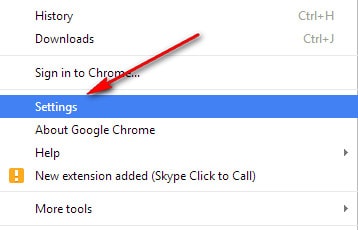
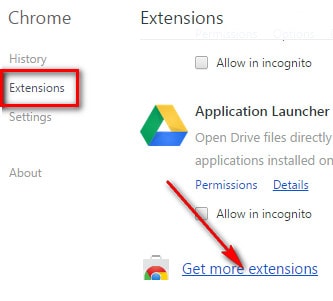
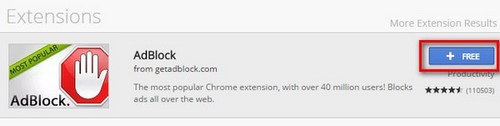
The screenshots below show an older Chrome interface. The wording and store layout have changed, but the basic sequence—open the extension store, inspect the listing, then confirm installation—remains useful.
Install an ad blocker in Firefox
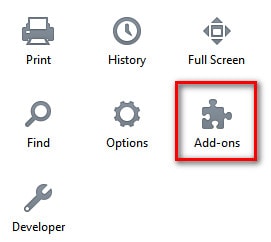
- Open the Firefox menu and select Add-ons and themes, then Extensions.
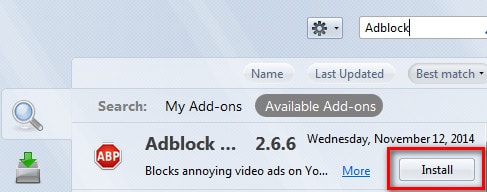
- Search Mozilla Add-ons for the extension.
- Choose Add to Firefox, inspect the permissions, and confirm.
- Return to
about:addonswhenever you need to disable, remove, or update the extension.
Mozilla's official add-on instructions provide the current menu path. Firefox normally requires extensions to be signed, so avoid download sites that ask you to bypass browser safeguards.
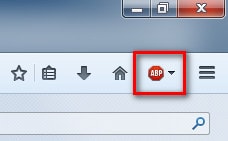
These images document the older Firefox Add-ons interface and should not be followed button-for-button in a current release:
Install and manage an ad blocker in Microsoft Edge
- Select the Extensions button beside the address bar. If it is hidden, open Settings and more > Extensions.
- Select Open Microsoft Edge Add-ons, find the blocker, and choose Get.
- Review the requested permissions before confirming.
- Use Extensions > Manage extensions or
edge://extensionsto disable or remove it.
See Microsoft's current Edge extension instructions for the latest controls.
Do not install an old Internet Explorer add-on
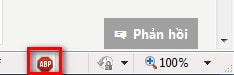
The original guide included an Internet Explorer result, shown below for historical reference. Internet Explorer is retired on supported Windows systems. Use a current browser such as Microsoft Edge rather than searching for a legacy IE plug-in.
Use Opera's built-in ad blocker
Current Opera versions include an ad blocker, so an extra extension may be unnecessary:
- Open Settings.
- Under Privacy protection, enable Block ads.
- Use Manage exceptions when a trusted site must be allowed, or Manage lists to choose filter lists.
Opera documents these controls in its security and privacy help. The next image shows an older extension-based method; prefer the built-in setting when it meets your needs.
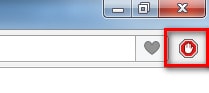
What about Cốc Cốc and other Chromium-based browsers?
Cốc Cốc and several other browsers are based on Chromium, but their menus and supported stores can differ by version. Open the browser's own extensions page, use the store it recommends, and apply the same checks for publisher identity and permissions. Do not download a loose extension file from an unfamiliar website merely because an old tutorial shows a similar Chrome interface.
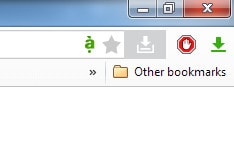
Allow ads on a trusted site
Some sites depend on advertising, while others may fail to load video, payment, login, or comment components when filtering is active. To make a narrow exception:
- Open the affected site.
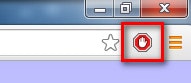
- Select the blocker icon beside the address bar.
- Choose the option to pause blocking or allow ads on that site only.
- Reload the page and test the feature again.
Do not turn the blocker off everywhere unless you are diagnosing a problem. A site-specific exception is easier to reverse and affects fewer pages.
Before and after blocking
The following original screenshots illustrate how a filter can reduce visible advertising. Results vary by blocker, filter list, region, and site design; sponsored content built directly into a page may remain.


If a page breaks after installation
- Pause the blocker on that site and reload. If the feature returns, a filter is probably responsible.
- Disable other privacy or script-blocking extensions temporarily to identify a conflict.
- Remove duplicate ad blockers and keep only the one you intend to use.
- Check for extension and browser updates.
- Restore default filter lists if the problem began after adding a custom list.
An ad blocker is a page-filtering tool, not a replacement for browser security updates, Safe Browsing protections, or antimalware software. Keep the browser current and treat unexpected downloads and permission prompts cautiously even when ads are hidden.
Related Articles
 Want to Browse the Web Quickly, Don't Be Foolish to Clear the6 minutes read
 What Is the Difference Between Adblock and Adblock Plus?5 minutes read
 Adblock and Adblock Plus: What Are the Differences?5 minutes read
 How to Block Ads on Google Chrome: Step-by-Step Guide9 minutes read
 Install Adblock, an Add-on to Block Ads on Google Chrome and Firefox Browsers4 minutes read
 How to Block Ads on Coc Coc?: Coc Coc Ads4 minutes read
Reader Comments 0
Sign in with email or Google to join the discussion.