Table of Contents
LM Studio is a desktop application for downloading and running compatible large language models on your own computer. It provides a chat interface, model-management tools, document chat, and local APIs that developers can call from other applications.
Local inference can improve privacy, provide offline access, and avoid per-request cloud API charges. It does not make every model fast, accurate, free of license restrictions, or completely isolated by default. Hardware capacity, model choice, server settings, and any connected tools still matter.
What can LM Studio do?
- search for and download supported models;
- run GGUF models through
llama.cppand supported MLX models on Apple Silicon; - chat with a local model through a graphical interface;
- attach documents for local retrieval-assisted chat;
- serve models through LM Studio REST, Python, TypeScript, OpenAI-compatible, or Anthropic-compatible interfaces;
- run as a desktop app or use a headless service for server and CI workflows;
- connect supported MCP tools when additional capabilities are required.
How the local workflow works
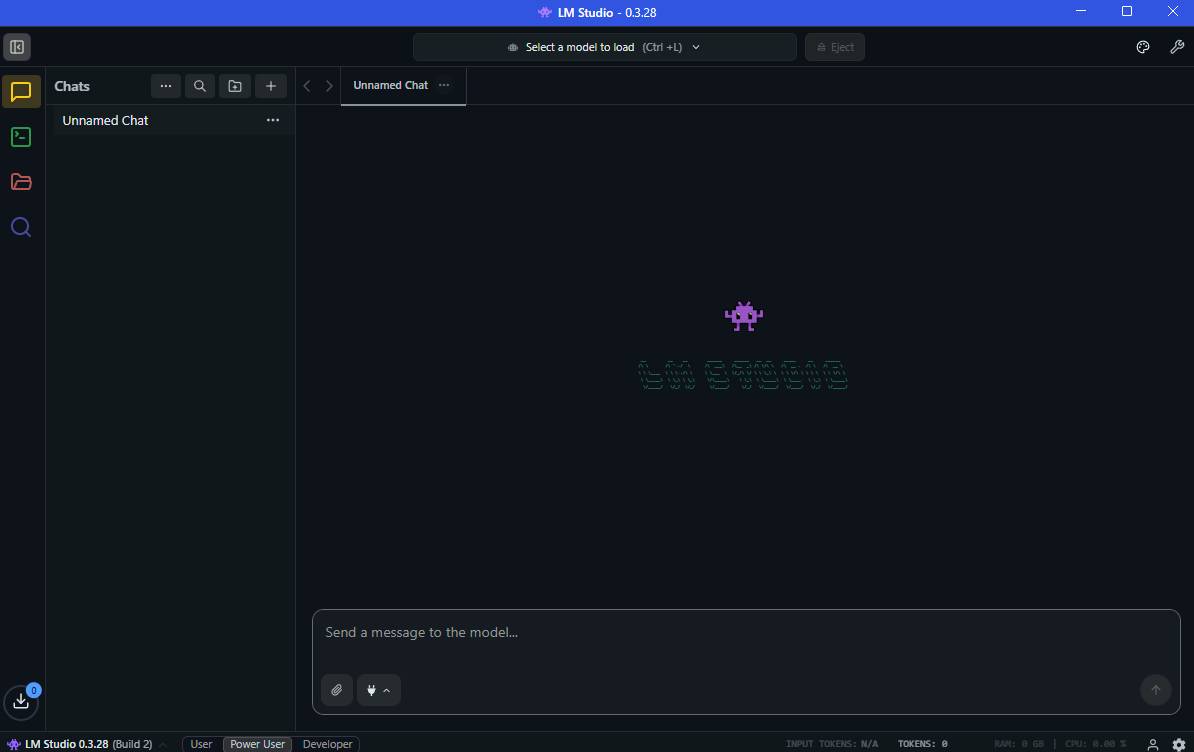
- Install LM Studio for Windows, macOS, or Linux.
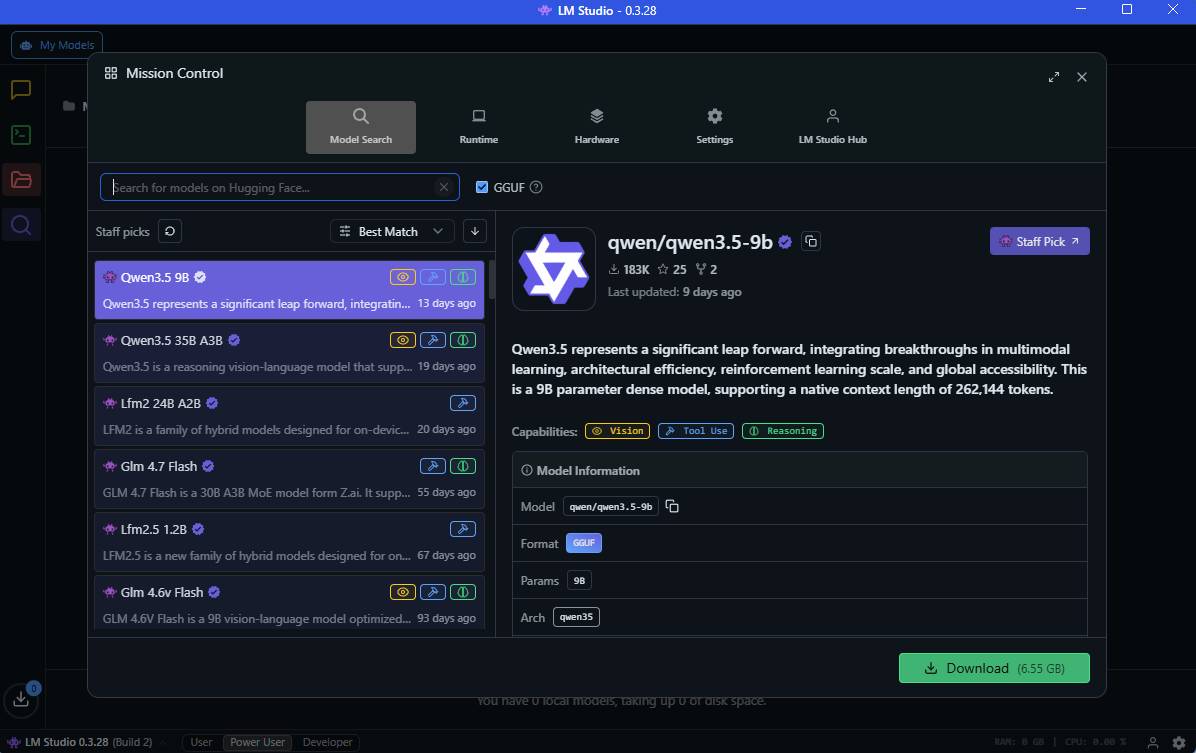
- Find a compatible model and choose a quantization that fits your available memory.
- Download the model weights to local storage.
- Load the model with suitable context, GPU offload, and memory settings.
- Chat in the application or start a server for another local program.
After a model and required runtimes are downloaded, core operations such as chatting with the model, chatting with documents, and running a local server can work without an internet connection. Searches, model downloads, software updates, and remote integrations still require connectivity.
Choosing a model that fits your computer
The model's parameter count, architecture, quantization, and context length affect memory use and speed. A smaller quantized model may respond quickly on ordinary hardware but give weaker answers. A larger model may be more capable yet load slowly, run partly on the CPU, or fail to fit in memory.
| Resource | Why it matters |
|---|---|
| System RAM | Holds model weights and runtime data when they are not fully in GPU memory |
| GPU/VRAM | Can substantially accelerate inference when enough layers are offloaded |
| CPU features | Supported instruction sets affect compatibility and CPU inference |
| Storage | Model files can consume several to many gigabytes each |
| Context length | Longer conversations and documents use more memory |
LM Studio's current Windows guidance recommends at least 16 GB of RAM and 4 GB of dedicated VRAM, while specific platform requirements differ. Treat those figures as starting guidance, not a promise that every model will run well.
Common uses
Private drafting and analysis
A local model can summarize non-sensitive working notes, draft text, classify content, or answer questions without sending each prompt to a hosted model provider. You still need to review model licenses and the operating system, extensions, backups, and other software that can access those files.
Offline document chat
LM Studio can process attached documents locally for retrieval-assisted generation. This is useful when connectivity is unreliable or a document should remain on the machine. Verify citations manually because retrieval can select the wrong passage and the model can still invent details.
Local application development
Developers can prototype against a local API and switch models without rewriting the user interface. Compatibility endpoints make it easier to adapt software built for familiar API shapes, but supported parameters and behavior may not be identical to a cloud provider.
Model evaluation
Run the same test set against several models, prompts, and quantizations. Record accuracy, latency, memory use, output consistency, and license requirements. Casual chat impressions are not enough for selecting a production model.
Start a local API server
The Developer area can start a server, and the CLI can do the same:
lms server startThe default local address documented by LM Studio is http://localhost:1234. A service bound only to localhost is intended for programs on the same computer.
Do not expose the server accidentally
Serving on a local network changes the bind address and makes the API reachable by other devices that can connect. LM Studio recommends authentication when the server is exposed beyond 127.0.0.1. Add firewall rules, restrict network access, enable API tokens, and avoid exposing an unauthenticated endpoint to the public internet.
MCP tools require extra care because they may read files, access private data, or modify external systems. Give a model only the tools required for the task and keep approval checks around consequential actions.
Privacy: what stays local and what may not
According to LM Studio's offline documentation, prompts entered while chatting with downloaded local models and documents used for local document chat stay on the device. That benefit applies to the core local workflow—not automatically to every extension, MCP server, remote model, telemetry setting, or application that calls the local API.
Before using confidential material, check the selected model's license, LM Studio settings, installed tools, network configuration, OS backups, and any client application connected to the server.
Limitations to expect
- Local models can hallucinate and require fact-checking.
- Smaller quantized models may lose capability or precision.
- Long contexts can consume substantial memory and slow inference.
- Downloaded models occupy significant storage.
- Some model licenses restrict commercial use or redistribution.
- A local setup shifts maintenance, security, and performance work to the user.
Getting started safely
Download the application from the official LM Studio page, then consult the current system requirements. Begin with a small model recommended for your available memory, keep the server on localhost, and test with non-sensitive data.
LM Studio is a practical bridge between model experimentation and local application development. Its main value is control: you choose the model, hardware, network exposure, and integration surface. That control also makes you responsible for choosing a suitable model and securing everything connected to it.
Related Articles
 Visual Studio Community - Visual Studio Community Download4 minutes read
 What Is Android Studio?: Develop Android Application?7 minutes read
 How to Install Visual Studio Using Parallels Desktop on a Mac5 minutes read
 How to Get Started Using LM Studio5 minutes read
 Windows App Studio Update Introduces Many New Additions3 minutes read
 6 Notable Differences Between Mac Studio and Mac Pro10 minutes read
Reader Comments 0
Sign in with email or Google to join the discussion.