Table of Contents
Ad blocking in Maxthon depends on the platform and browser generation. Current Maxthon mobile releases include an Adblock setting, while Maxthon's official feature page says desktop users add an ad-blocking extension. The AdHunter menu shown in this article's screenshots belongs to an older desktop interface.

Current Maxthon: mobile versus desktop
Maxthon's current Adblock feature page distinguishes between the two:
- Android and iOS: Ad blocking is built into the browser and can be toggled in Settings.
- Windows and macOS: Install a compatible ad-blocking extension and manage it from the browser's Extensions page.
Because Maxthon's menus can change between releases, update the browser first and use the controls visible in your version rather than looking for an old AdHunter button that may no longer exist.
Enable ad blocking in Maxthon on Android or iPhone
- Install or update Maxthon through the Google Play Store or Apple App Store. Verify that the publisher is Maxthon before installing.
- Open Maxthon and tap the menu button.
- Open Settings and find Adblock or Ad blocking.
- Turn the feature on, then reload the page you were viewing.
- Open the Adblock settings to allow ads on a trusted site when a page breaks or when you want to support its publisher.
If the setting is missing, check that the app is current and that you installed the official release for your platform. Some controls may be rolled out differently by version or region.
Block ads in current Maxthon on a computer
- Download Maxthon only from the official Maxthon website and install current updates.
- Open the Maxthon menu and choose Extensions or Manage extensions.
- Use the browser's supported extension store to find a reputable content blocker. Check the developer, update history, privacy policy, and requested permissions before installing it.
- After installation, pin the extension to the toolbar if you want quick access to per-site controls.
- Open a page with ads and confirm that the block counter or extension status changes.
Maxthon describes current desktop versions as compatible with Chromium extensions on its Extensions feature page. Avoid similarly named extensions from unknown download sites; a content blocker can read and change page data, so its publisher matters.
Configure a desktop blocking extension
Most reputable content blockers provide the following controls:
- Pause on this site: Allow ads or page scripts for a trusted domain without disabling protection everywhere.
- Filter lists: Enable maintained general-purpose lists and only add regional or privacy lists you need. Too many overlapping lists can slow filtering or break pages.
- Element picker: Hide a specific banner or page element that a normal rule misses. This is cosmetic and may stop working if the site changes.
- Custom rules: Intended for advanced users. A broad rule can hide legitimate content or prevent sign-in, checkout, and video playback.
Do not run several full ad blockers at the same time. Their rules can overlap, make troubleshooting difficult, and consume more resources. TipsMake's comparison of AdBlock and Adblock Plus explains how two familiar extensions differ.
Legacy Maxthon AdHunter instructions
The following steps apply to older Maxthon desktop releases that display an AdHunter item in the browser menu. These versions should not be installed for ordinary web browsing today merely to regain the old interface; an outdated browser may contain unpatched security flaws.
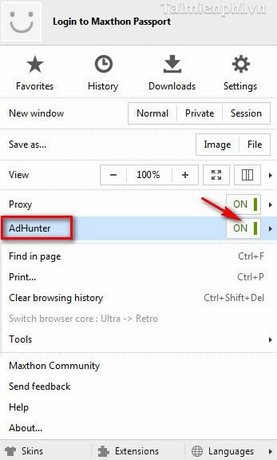
1. Turn AdHunter on
Open the Maxthon options menu, select AdHunter, and use the On/Off control. The old menu let you enable or disable filtering without leaving the page.
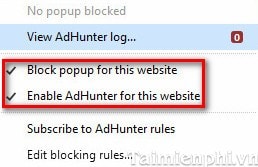
2. Choose site-specific controls
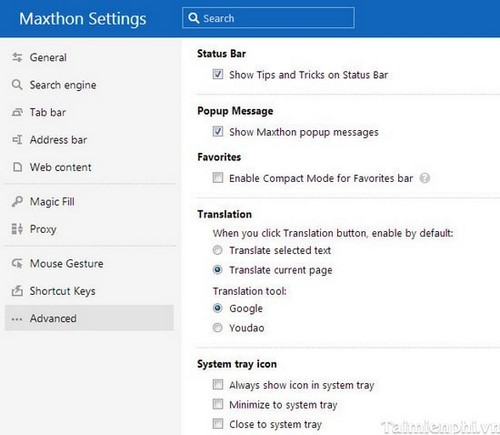
The legacy menu included separate controls for blocking pop-ups and enabling AdHunter on the current website. Use a site exception when filtering removes navigation, a sign-in form, a payment control, or media the reader intentionally opened.
3. Review blocking rules
Select Edit blocking rules to inspect or modify the filters applied by AdHunter.
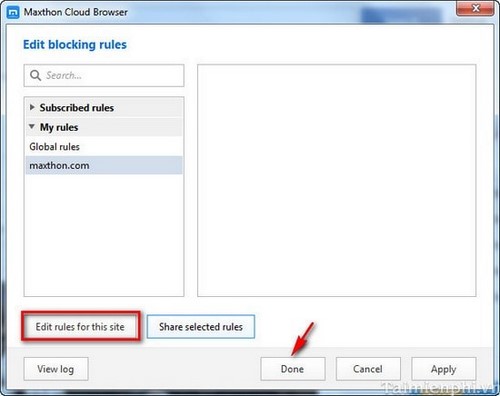
Add a rule only when you can identify the exact resource or element to block. Test the page after every change and remove a custom rule if content disappears unexpectedly.
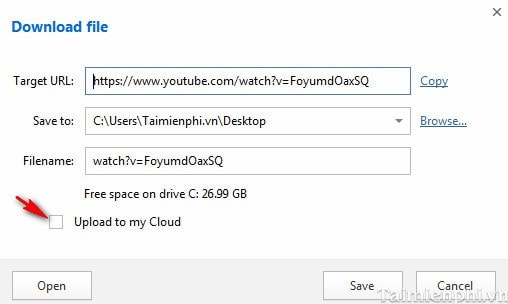
4. Keep other browser tools separate
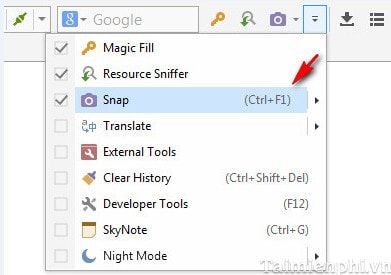
Older Maxthon releases placed downloads, cloud upload, screenshots, translation, and related utilities near AdHunter. Those tools do not improve the ad filter and may have their own privacy or storage settings.
When a website stops working
- Pause blocking for that site and reload it.
- If the page works, re-enable filtering and disable extra filter lists one at a time.
- Remove recent custom rules.
- Check whether script blockers, privacy extensions, or DNS filters are also active.
- Keep the exception limited to the exact trusted domain rather than disabling the blocker globally.
Some sites depend on advertising revenue or request that visitors allow non-intrusive ads. Decide per site, but do not allow a suspicious domain merely because it displays an anti-blocking message.
What ad blocking cannot protect
An ad blocker can reduce banners, pop-ups, and some trackers, but it is not antivirus software and cannot guarantee protection from phishing, malicious downloads, account theft, or unsafe extensions. Keep Maxthon and the operating system updated, use HTTPS, review download sources, and enable the platform's security tools. For alternatives and complementary tools, see TipsMake's overview of browser extensions that reduce ads, pop-ups, and trackers.
Related Articles
 Is Maxthon Web Browser Safe to Use?5 minutes read
 Managing Search Engines on the Maxthon Browser on Windows4 minutes read
 6 Simple Ways to Enable the Right-Click Feature to Block That Site5 minutes read
 How to Block Websites on Mac: Clear Instructions8 minutes read
 How to Block Mailers in Mail on Iphone, Ipad4 minutes read
 How to Block Pop-ups: Practical Guide9 minutes read
Reader Comments 0
Sign in with email or Google to join the discussion.