Table of Contents
If you use GapoWork, select Forgot password on its login screen, identify the account by email, phone number, or organization ID, enter the one-time code, and create a new password. The older consumer Gapo social network stopped operating in Vietnam in 2023, so its original recovery screens and accounts should not be confused with the current workplace service.
First identify which account you have
| Account | Current status | What to do |
|---|---|---|
| Consumer Gapo social-network account | The consumer service was discontinued in Vietnam in August 2023 | Old password-reset instructions no longer provide a dependable recovery path |
| GapoWork account using email or phone | Current workplace product | Use the GapoWork Forgot password flow |
| GapoWork organization-ID account | Managed by a workplace or organization | Choose the organization-ID login method, then reset or contact the administrator |
| Google, Microsoft, or company SSO login | Authentication may be handled outside GapoWork | Reset the password with that identity provider or contact workplace IT |
If your old bookmark uses gapo.vn and shows a consumer social feed, do not install an archived APK or give your credentials to an unofficial recovery site. GapoWork's current official domain is gapowork.com.
Reset a GapoWork password with email or phone
- Open the official GapoWork login screen in the app or from the verified GapoWork website.
- Select Forgot password.
- Enter the email address or mobile number associated with the account and choose Continue.
- Check that the masked destination belongs to you, then wait for the one-time password (OTP).
- Enter the newest OTP on the GapoWork screen.
- Create and confirm a new password, then return to the main screen.
GapoWork's own forgotten-password documentation confirms this email/phone and OTP flow. Menu labels may appear in Vietnamese depending on the organization and app language.
Reset with an organization ID
Some workplaces use an organization name and member ID rather than a personal email address as the main login:
- On the GapoWork login screen, choose the option to continue with an organization ID.
- Select Forgot password.
- Enter the organization name and your member identifier exactly as supplied by the employer.
- Receive the OTP at the phone number registered for that member account.
- Enter the code and create a new password.
If you do not know the organization name, member ID, or registered phone number, contact the company's GapoWork administrator or IT help desk. Do not create a second account, because it may not have access to the existing workspace or files.
If you sign in with Google, Microsoft, or SSO
A GapoWork workspace can use an external identity provider. If the login screen redirects you to Google, Microsoft, or a company sign-in page, that provider controls the password. Use its own password-reset process or contact the organization's IT team. A GapoWork SMS code cannot replace a password controlled by the employer's identity system.
If the OTP does not arrive
- Confirm that the masked email address or phone number is yours.
- Check spam, junk, and filtered email folders.
- Check mobile signal and whether the phone blocks short-code or unknown SMS messages.
- Wait before requesting another code; the newest request may invalidate an earlier OTP.
- Enter the latest code manually and before it expires.
- Try the other registered method if GapoWork offers both email and phone.
- Ask the organization administrator to verify that the member account is active and has the correct contact information.
Never send an OTP to a colleague, administrator, or support account. A legitimate helper can guide you but should not need the code that proves control of your account.
If the account is locked or no longer active
A workplace account may be disabled when a member leaves a company, changes teams, or has not accepted an invitation. Only the organization can restore that membership. Contact the administrator through a known company channel and provide your name, department, organization ID, and the email or phone normally used—without sending your password or OTP.
If the organization cannot resolve a platform issue, use the support contact published in the official GapoWork app or website. Avoid phone numbers and chat accounts copied from third-party comments.
Create a safer replacement password
- Use a long password or passphrase unique to GapoWork.
- Do not reuse the password for email, banking, or other workplace tools.
- Store it in a reputable password manager rather than a shared document or chat.
- Do not use a sample password from an article.
- If the organization provides multi-factor authentication, enable it and store recovery details securely.
For broader credential hygiene, compare TipsMake's password manager options and authenticator app alternatives.
Why the old Gapo instructions no longer apply
The original article showed the consumer Gapo site's phone-number reset screens. That service was distinct from GapoWork and was discontinued for consumers. The screenshot below is retained only to help identify the legacy interface; do not use it as a current GapoWork menu guide.
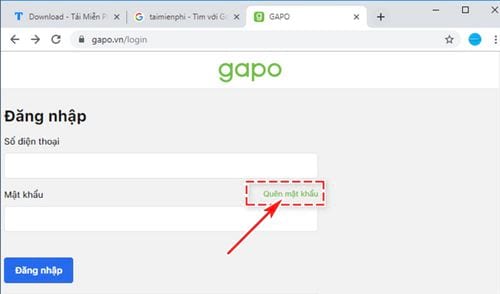
The remaining legacy sequence asked for a registered phone number, a six-digit code, and a replacement password on both desktop and mobile. Although that pattern resembles many current reset flows, the old domain and app are not a safe basis for present instructions. Use the official GapoWork documentation and your organization's login page instead.
After access is restored
- Confirm that you joined the correct workspace.
- Review the email address and phone number attached to the member profile.
- Sign out of any unfamiliar device if the product provides a session list.
- Tell the administrator immediately if account content, permissions, or messages look unfamiliar.
- Remove any old app or browser bookmark that still points to the discontinued consumer service.
General account-recovery advice is available in TipsMake's guide to resetting a forgotten social-account password, but always use the provider-specific recovery screen for the account you actually own.
Related Articles
 Instructions to Change Your Gapo Account Password2 minutes read
 Forgot Your Saved Wi-Fi Password?6 minutes read
 Steps to Reset Forgotten Password on Windows 105 minutes read
 How to Recover a Forgotten Excel Password Using Passper6 minutes read
 How to Recover Your Facebook Password When It Is Forgotten4 minutes read
 How to Recover Gmail Account When Password Is Forgotten5 minutes read
Reader Comments 0
Sign in with email or Google to join the discussion.