Table of Contents
Instagram gives you several ways to control replies to your posts. You can turn commenting off for one post, automatically hide potentially offensive comments, filter specific words, delete an individual comment, or restrict the account that posted it. Choose the narrowest option that solves the problem so you do not remove useful discussion unnecessarily.

Turn off comments on an existing Instagram post
This stops new comments and hides the existing comment thread from view while commenting remains disabled.
- Open Instagram and go to your profile.
- Select the post or Reel you want to manage.
- Tap the three-dot menu in the upper-right corner.
- Choose Turn off commenting. On older app versions, the option may be labeled Disable comments.
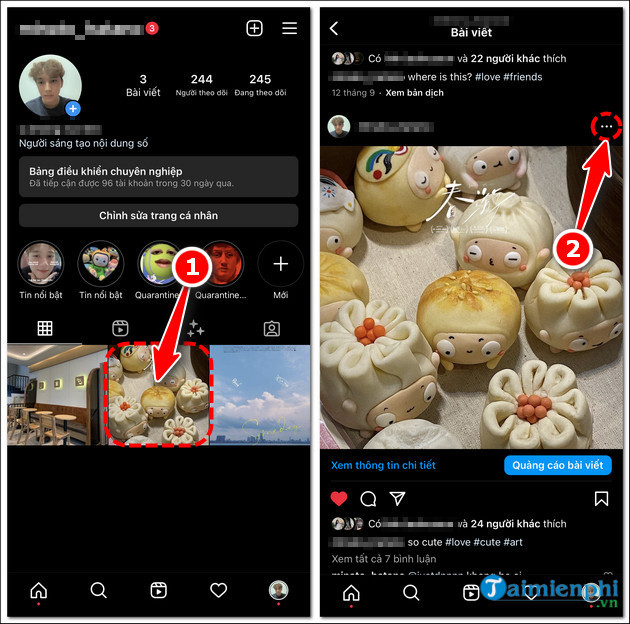
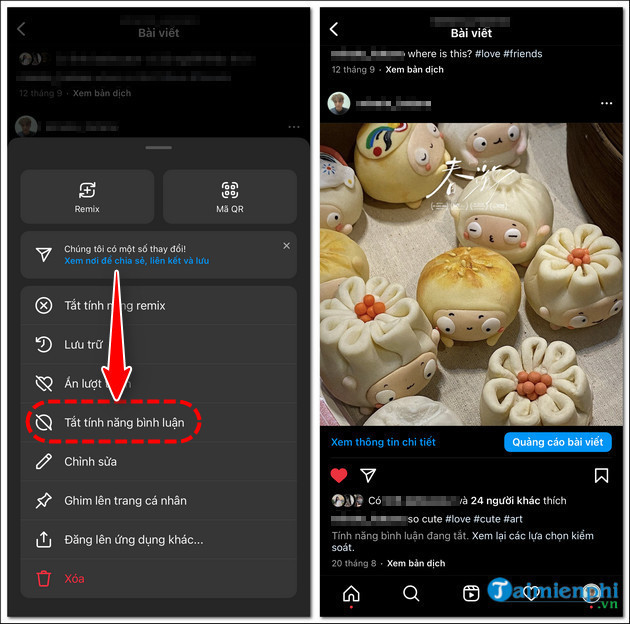
To restore the discussion, open the same menu and choose Turn on commenting. Previously posted comments should become visible again unless they were deleted separately.
Turn off comments before publishing a new post
You can disable replies during the publishing process, which is useful when a post is informational or likely to attract unwanted discussion.
- Tap the create button and choose Post or Reel.
- Select and edit the photo or video, then continue to the final sharing screen.
- Open Advanced settings or the similarly named additional-options section.
- Enable Turn off commenting.
- Return to the sharing screen and publish the post.
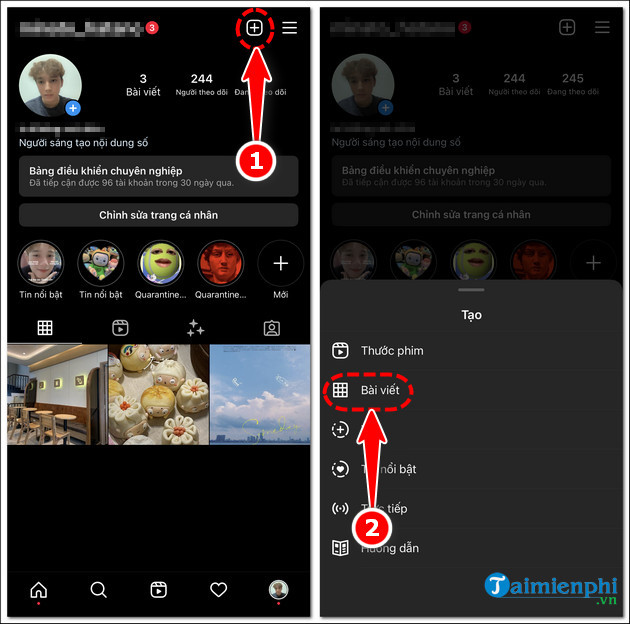
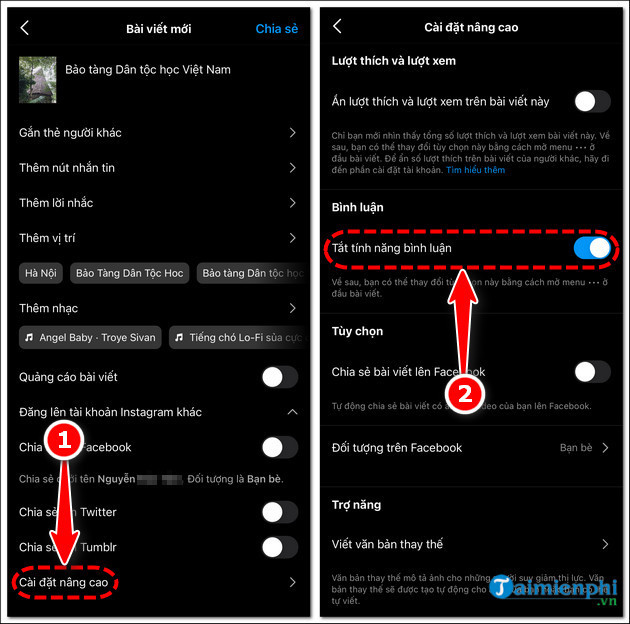
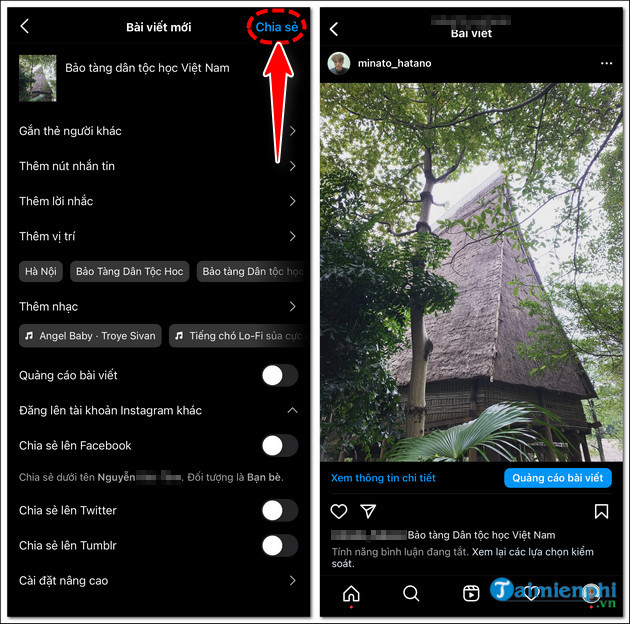
Instagram changes menu labels and positions over time. If you do not see the control on the final sharing screen, publish the post and use the existing-post method above.
Automatically hide offensive comments
If you want to keep comments open but reduce abusive or unwanted replies, use Instagram's Hidden Words controls. From your profile, open the main menu and look under Settings and activity for Hidden Words. Depending on the app version, you may see options to:
- hide comments Instagram identifies as offensive;
- apply stronger filtering to additional comments;
- hide message requests that may contain offensive language; and
- create a custom list of words, phrases, numbers, or emoji you do not want displayed.
A custom filter works best when it contains specific terms that repeatedly appear in unwanted comments. Review the list occasionally so a broad word does not hide legitimate replies.
Remove one comment without closing the entire thread
When only one reply is a problem, delete that comment instead of turning off the whole discussion. Open the comments under your post, select or swipe on the unwanted comment, and use the delete control shown by the app. Deleting is different from filtering: it removes that comment rather than merely hiding it through a word rule.
If the comment includes a credible threat, targeted harassment, impersonation, or another rules violation, use Instagram's report option before deleting it. Keep any evidence you may need before removing the comment from view.
Restrict a commenter
Restricting is useful when one account repeatedly posts unwanted replies but you do not want to block it immediately. Open the account's profile or the menu attached to its comment and choose Restrict when available. Instagram may limit the visibility of new comments from that account and reduce how directly its messages reach you. Review each restricted comment before deciding whether other people should see it.
Blocking is the stronger option when you do not want the account to interact with or view your profile, subject to Instagram's current privacy behavior. For ordinary disagreements, filtering, deleting, or restricting is often more targeted.
Which comment control should you use?
- Turn off commenting: Use it when you want no public replies on one post.
- Hidden Words: Use it to keep discussion open while filtering recurring abusive terms.
- Delete: Use it for a specific unwanted comment on your own post.
- Restrict: Use it when one account repeatedly causes problems and you want quieter moderation.
- Report: Use it when content may violate Instagram's rules.
- Block: Use it when you want to prevent further interaction from an account.
For related account, privacy, and posting instructions, browse TipsMake's social-network guides.
Related Articles
 How to Turn Off Instagram Post Comments: Step-by-Step Guide4 minutes read
 How to Turn Off Post Comments on Instagram2 minutes read
 Instagram Adds a New Comment Management Feature3 minutes read
 How to Delete Comments on Instagram: Step-by-Step Guide3 minutes read
 How to Hide Comments on Threads, Filter Inappropriate Comments Threads3 minutes read
 How to Hide Other People's Posts on Instagram3 minutes read
Reader Comments 0
Sign in with email or Google to join the discussion.