Table of Contents
Spotlight: 2 Good Tips for Ios 7 Users is easier to understand when the core ideas are paired with practical examples. The sections below explain the topic clearly, highlight useful steps, and point out details that can prevent common errors.
Spotlight is a good feature of iOS 7 that many users still miss. Here we have two methods that can be done faster on iOS 7.
Make calls faster
Each call users will not need to perform many operations because iOS has allowed to set up contacts like favorite contacts for quick access, but can make calls much faster if the location is attached. just touch the main screen. Previously, to make a call, users had to access Phone, Contacts, Search, Contact Name, Number.
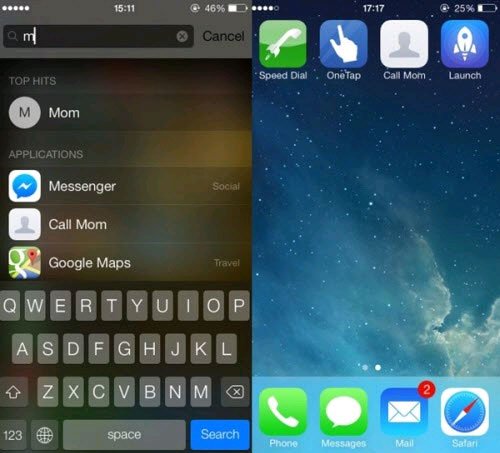
Spotlight Search is one of the most advanced features on iOS 7, but most iPhone users rarely use this feature. All you have to do is swipe the Home screen from the top down and enter the name of the person to contact. If the person is in the favorites list, it will display immediately after typing the first letter.
Say goodbye to the buttons and use gesture manipulation
Launch Center Pro is a good application for integration with third-party applications, but users will not need this tool based solely on default applications. Buttons and icons are a good way to open applications quickly, but can it work faster after opening an application? The answer is yes, if using correct gestures.
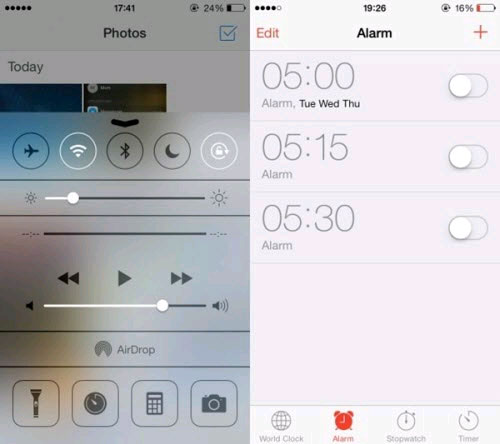
The Spotlight Search feature can also be used to search and open mail, messages and applications. If you swipe your hand up from the bottom edge of the screen, you will access the Control Center . Most users can switch different connection options, but it also allows setting alarms without unlocking the phone.
Just click the Time icon and click the Aalarms item. Many Android and iOS users who access the app find the Back button to come back whenever they want to go back to the previous window. But few users know iOS supports gesture manipulation across the system, just by swiping the hand to the right from the left edge, you immediately execute the Back command.
FAQ
What should you know about make calls faster?
Each call users will not need to perform many operations because iOS has allowed to set up contacts like favorite contacts for quick access, but can make calls much faster if the location is attached. just touch the main screen. Previously, to make a call.
What should you know about say goodbye to the buttons and use gesture manipulation?
Launch Center Pro is a good application for integration with third-party applications, but users will not need this tool based solely on default applications. Buttons and icons are a good way to open applications quickly, but can it work faster after opening.
What is Spotlight: 2 Good Tips for Ios 7 Users?
Spotlight is a good feature of iOS 7 that many users still miss.
Related Articles
 Summary of Good Tips for iPhone (Part 2)4 minutes read
 Summary of Good Tips for iPhone (Part 1)5 minutes read
 Good Tips on iOS 11 Cannot Be Ignored When Using iPhone, iPad7 minutes read
 Some Good Tips for Office Informatics Users21 minutes read
 Some Good Tips for Windows 10 Technical Preview (Part 2)5 minutes read
 3 Good Tips to Help You Manage Inbox on Gmail More Effectively3 minutes read
Reader Comments 0
Sign in with email or Google to join the discussion.