Table of Contents
Firefox has introduced AI features but many users do not need to use them. This guide explains you to disable all AI features on Firefox.
Mozilla recently introduced its AI features in Firefox, but many users do not need to use these features. This hinders their experience and also raises privacy concerns. This article will guide you to disable all AI features in Firefox browser or disable some AI features in Firefox that you need.
How to disable Firefox AI features
Step 1:
You type About.config Into the browser's address bar and press Enter to access.
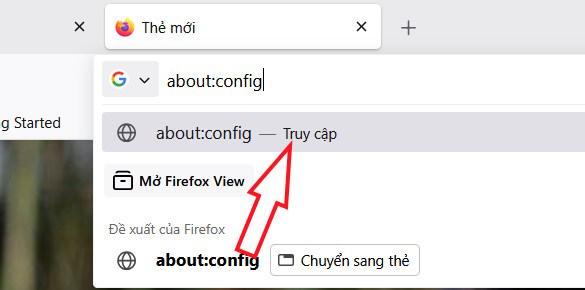
Step 2:
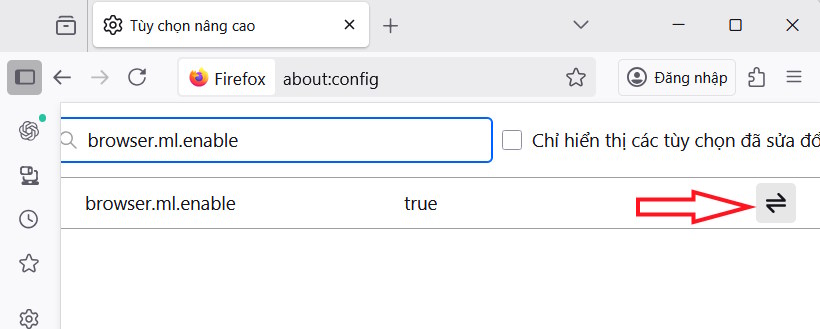
Next, in the settings interface, Enter browser.ml.enable In the search bar. Now switch To Fale mode To disable the AI feature on the Firefox browser.
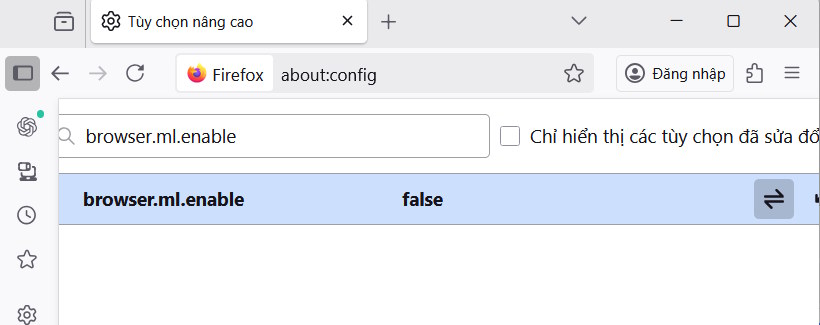
When switched to false, all AI features on Firefox browser are disabled.
In case you just want to disable some AI features on Firefox, follow the command list below. Each AI feature has its own command, you can enter the command in the search bar and switch to False to disable.
| Setting | Describe |
| Browser.ml.enable | Disable all AI features |
| Browser.ml.chat.enabled | Enables built-in AI chatbot. |
| Browser.ml.chat.sidebar | Show AI chat panel in sidebar. |
| Browser.ml.chat.shortcuts | Allows to activate chat from selected text or shortcut. |
| Browser.ml.chat.page | Activate the AI chat menu on the page when you highlight (black out) text |
| Browser.ml.chat.page.footerBadge | Display floating icon at the bottom of the web page. |
| Browser.ml.chat.page.menuBadge | Added 'Ask AI' option to page menu. |
| Browser.ml.chat.menu | Add Chat about this item to right click menu. |
| Browser.ml.linkPreview.enabled | Generate link previews and AI-based suggestions. |
| Extensions.ml.enabled | Allows browser extensions to access Firefox's ML API. |
| Browser.ml.pageAssist.enabled | Summary or AI page support assistant. |
| Browser.tabs.groups.smart.enabled . | Use AI to automatically group and label tabs. |
| Browser.tabs.groups.smart.userEnable | Lets you manually enable or disable smart tab groups. |
FAQ
How do you turn off AI feature on Firefox?
In practical terms, Firefox has introduced AI features but many users do not need to use them. This guide explains you to disable all AI features on Firefox.
What should you check before getting started?
Review the requirements, compatible device or software version, and any warnings described in the guide before making changes.
What should you do if the steps do not work?
Repeat the steps in order, confirm that your app or system is up to date, and review the troubleshooting details provided above.
Related Articles
 3 Great New Features on Firefox 59 You Can Use Today4 minutes read
 How to Turn Off Firefox Automatically Restart When Entering Windows3 minutes read
 The New Firefox AI Controls Allow Users to Disable All AI Features9 minutes read
 How to Turn Off Add-on Suggestions on Firefox3 minutes read
 How to Turn Off Auto Update on Firefox: Step-by-Step Guide2 minutes read
 How to Turn Off Suggested Ads in Firefox Address Bar3 minutes read
Reader Comments 0
Sign in with email or Google to join the discussion.