Table of Contents
An AI-integrated lesson plan should use AI only where it improves a specific learning activity. It should not attach a chatbot to every stage or replace the teacher's objectives, subject knowledge, assessment, or responsibility for student safety.
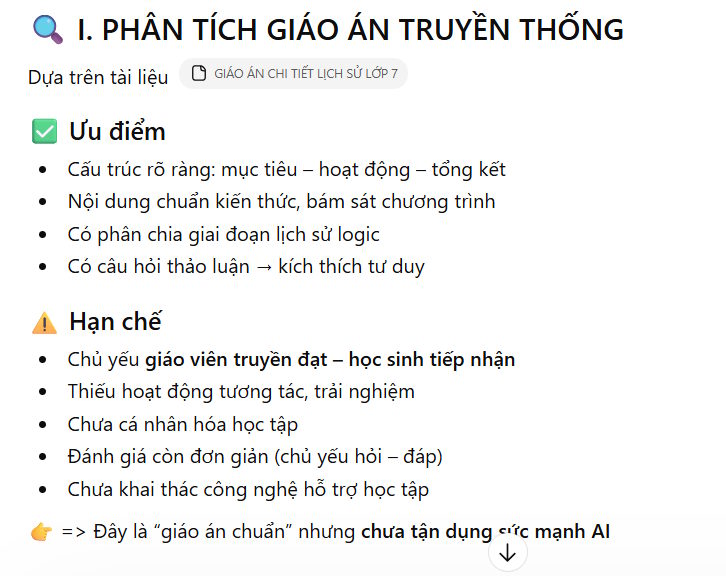
A practical workflow is to start with an approved lesson plan, ask ChatGPT to map possible AI uses to that structure, and then keep only the additions that produce better evidence of learning.
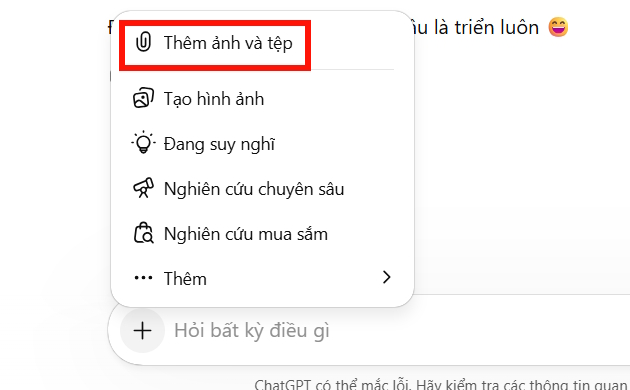
1. Prepare a safe source document
Remove student names, grades, behavior notes, disability information, contact details, and other identifying data. Keep the learning objectives, content outline, activity sequence, timing, resources, and assessment criteria.
Before uploading, check your school or district's policy and the service's current data controls. On personal ChatGPT accounts, eligible content may be used for model improvement depending on settings; business and education workspace policies can differ. OpenAI's file-upload guidance and Data Controls FAQ explain the current options.
2. Ask for analysis before redesign
Do not begin with “add AI everywhere.” First ask the model to summarize the plan's objectives, activities, student products, and assessment evidence. Correct any misunderstanding before requesting changes.
Use a prompt like this:
Analyze the lesson plan I uploaded.

1. List each learning objective exactly as written.
2. Map every existing activity to the objective it supports.
3. Identify the student product or observable evidence for each objective.
4. Flag timing conflicts, unclear instructions, unsupported factual claims, and missing accessibility options.
5. Do not rewrite the plan yet.
6. Quote the relevant section when explaining each finding.
7. Put uncertain interpretations in a separate “Teacher must verify” list.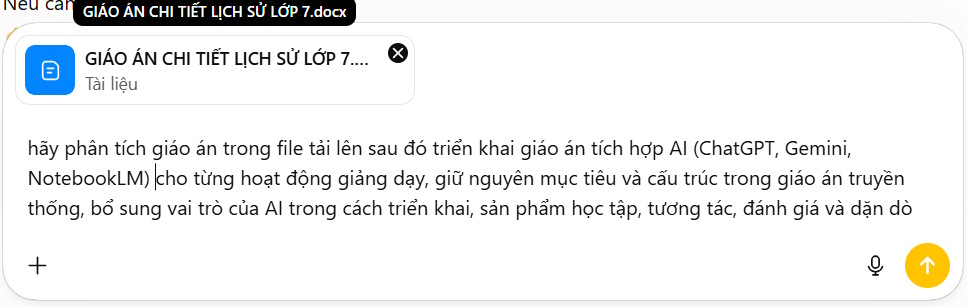
3. Add AI only to suitable activities
After checking the analysis, ask for two versions of each proposed change: one using an approved AI tool and one low-tech alternative. This prevents the lesson from failing when accounts, devices, accessibility, or internet access are limited.
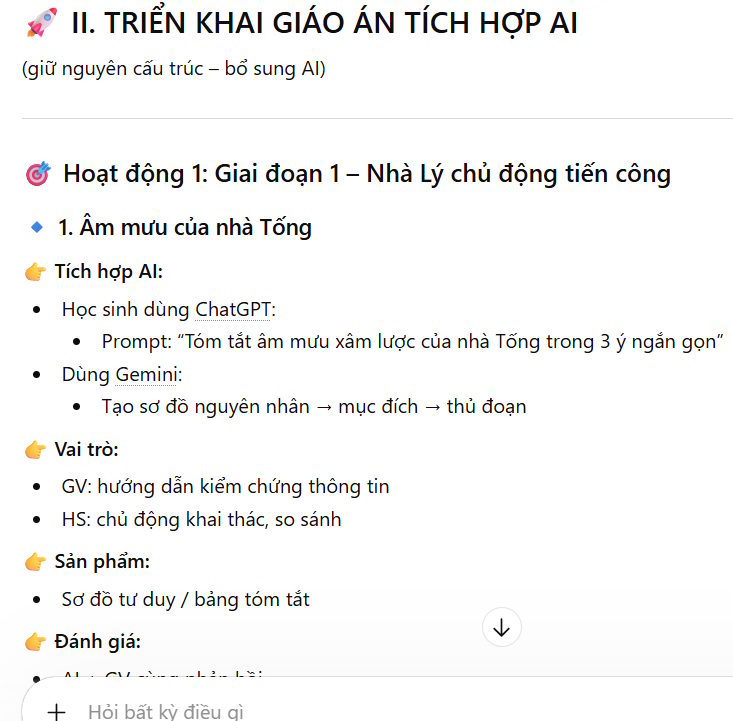
Using the verified analysis, propose AI-supported revisions without changing the approved objectives or total lesson time.

For each proposed activity, provide:
- objective supported;
- reason AI adds value;
- teacher action;
- student action;
- AI's limited role;
- approved source material;
- expected student product;
- method of assessment;
- privacy and bias risk;
- non-AI alternative.

Reject an AI activity if it only saves typing, supplies the student's answer, or makes assessment less valid. Do not invent curriculum requirements, quotations, sources, or tool features.
Useful roles may include generating contrasting examples for critique, adapting teacher-written practice items, or helping students compare explanations against an authoritative source. Weak roles include writing a final assignment for the student, grading without human review, or giving unsourced factual material.
4. Define the teacher–student–AI relationship
| Participant | Responsibility |
|---|---|
| Teacher | Selects sources and tools, teaches the concept, reviews output, provides accommodations, and makes assessment decisions. |
| Student | Uses the source material, documents prompts when required, checks AI output, explains choices, and produces evidence of learning. |
| AI tool | Provides a draft, example, transformation, or feedback within the limits set by the activity; it is not an authority or decision-maker. |
5. Review the integrated draft
Read the complete plan rather than accepting a long response at once. Verify:
- Every activity supports a measurable objective.
- The stated times add up and include setup and transitions.
- All facts, quotations, equations, and references match approved sources.
- The AI task develops the student's thinking rather than completing it.
- A non-AI path offers equivalent access and assessment.
- Students know what AI use must be disclosed.
- No personal data or copyrighted material is shared improperly.
- The final assessment still shows what the student can do independently.
6. Export and test the final materials
Copy the reviewed content into your school's required template and recheck tables, equations, symbols, and page breaks. If formulas do not paste cleanly, use Word's equation tools or transfer them as MathML/LaTeX only when the destination supports that format.
Run the activity once from a student account or device. Test sign-in requirements, links, sharing permissions, reading level, keyboard access, and the low-tech alternative. After teaching, note whether AI improved understanding, participation, feedback, or assessment quality; remove it next time if it did not.
When the lesson must stay grounded in a controlled set of teacher-selected sources, see TipsMake's NotebookLM and ChatGPT comparison before choosing a tool.
Related Articles
 Guide to Creating Integrated NLS Lesson Plans Using AI4 minutes read
 Create AI-Integrated Lesson Plans on NotebookLM3 minutes read
 How to Use AI to Create Quality Lesson Plans2 minutes read
 Guide to Creating Lesson Plans Using NotebookLM4 minutes read
 Prompt for Preparing 6th Grade Literature Lesson Plans6 minutes read
 Instructions on Converting Videos into Lesson Plans Using NotebookLM4 minutes read
Reader Comments 0
Sign in with email or Google to join the discussion.